Style Programming
MATRIX CUBE - 63 -
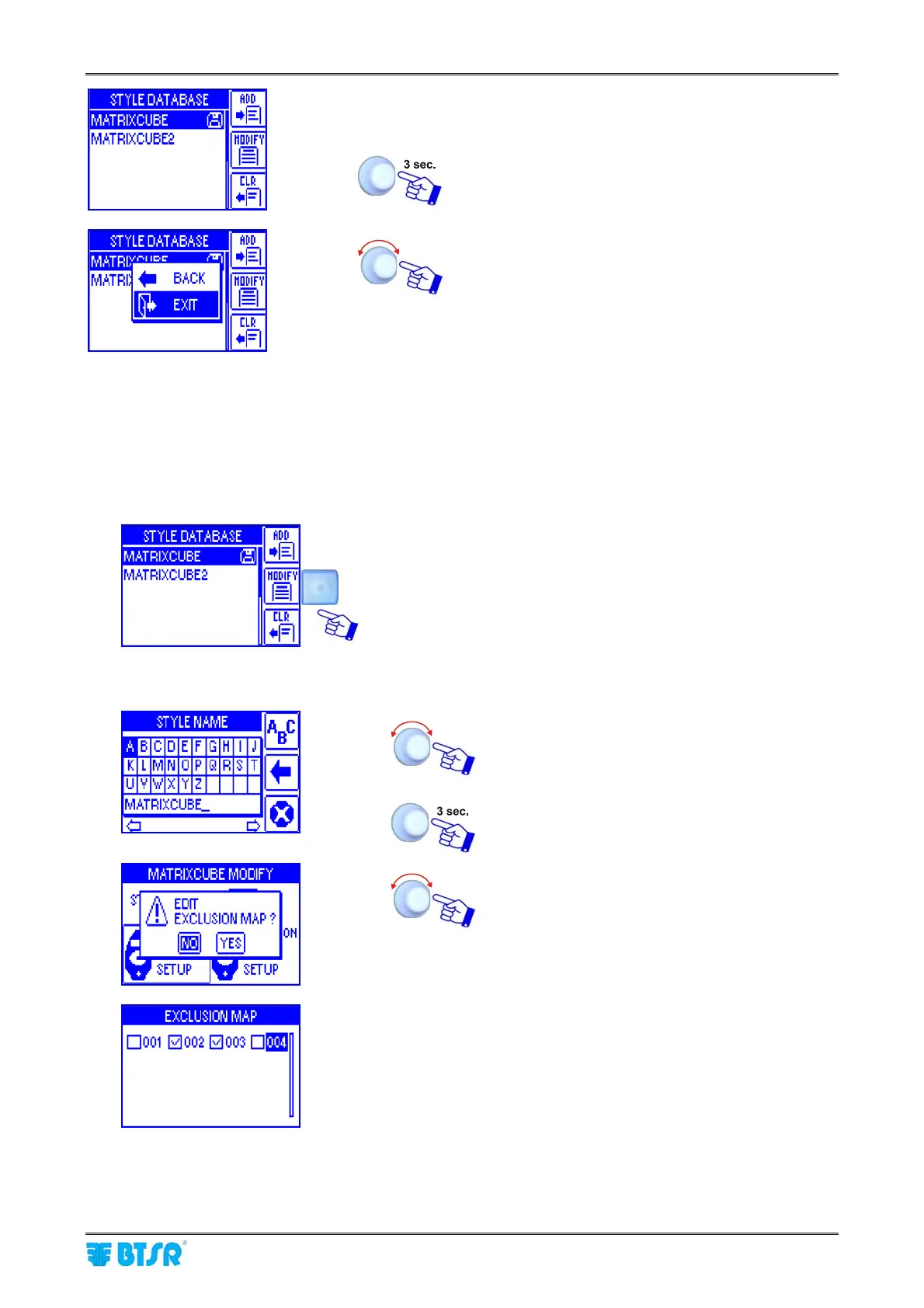
List of style contained in the database (including the
MATRIXCUBE2 style).
To leave the function: Programming a New
Style.
EXIT to return to CONTROL menu.
Style Modify
The Style Modify function is basically identical to the Programming a New Style function.
The main differences are the following:
1) once you have activated the STYLE EDIT window from Main menu, choose from the database the style
you want to modify (e.g. MATRIXCUBE) and press MODIFY
Program all the steps described on Programming a New Style
sequence, to bring all the desired changes with respect to the
reference style: MATRIXCUBE.
2) the bottom line of STYLE NAME screen that contains the style name setting keyboard shows the name
of the selected style, to be modified (MATRIXCUBE).
Type the Name you want to assign to the
modified style.
To save the new style.
If you replay YES to this question, then a map of
the configured positions will appear, with the
possibility of excluding one or more positions.
Example of positions 2 and 3 excluded.
If you change the style currently loaded on specific DIAPER FEEDER devices (indicated by the
diskette symbol) the changes will be automatically loaded on the relevant DIAPER FEEDER devices.











 To Next Page