4-14 2002 Buell X1: Fuel System
HOME
WIGGLE TEST 4.8
GENERAL
The wiggle test checks for the presence of intermittents in a
wiring harness. Depending upon the availability of diagnostic
tools, either version of this test may be used.
PROCEDURE
Using Scanalyzer (Part No. HD-41325)
1. Connect Scanalyzer to vehicle. See
4.5 SCANALYZER.
2. Start motorcycle engine and run at idle.
3. Enter wiggle test mode.
a. Press “5” from the DIAGNOSTIC MENU to enter the
SPECIAL TESTS menu.
b. Press “1” from the SPECIAL TESTS menu to enter
the WIGGLE TEST.
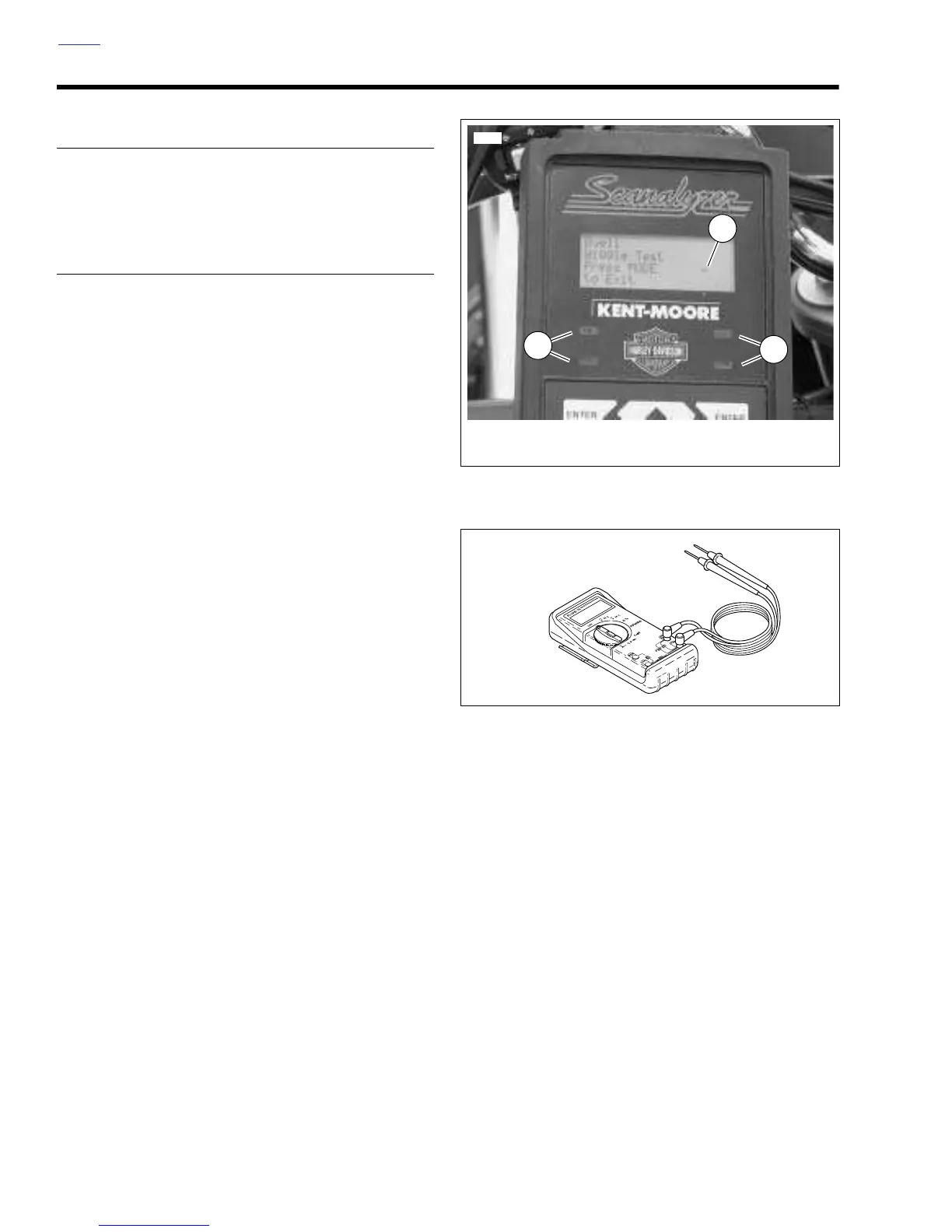
4. Shake or wiggle harness to detect intermittents. If inter-
mittents are present the Scanalyzer will beep, light the
four corner LEDs and display a minus sign when a cur-
rent trouble code is detected. See
Figure 4-15.
NOTE
If a current trouble code is present when the wiggle test is
entered, the Scanalyzer will respond as described immedi-
ately upon entering the wiggle test mode. With key ON and
engine off, clear trouble codes and then perform wiggle test
with vehicle running.
Using DVOM (Part No. HD-39978)
1. See Figure 4-16. Connect DVOM to wiring harness
between the suspect connections. When diagnosing
ECM connections, a BREAKOUT BOX (Part No. HD-
42682) may be used to simplify the procedure. See
4.7
BREAKOUT BOX
.
2. Set DVOM to read voltage changes.
3. Start motorcycle engine and run at idle.
4. Shake or wiggle harness to detect intermittents. If inter-
mittents are present, radical voltage changes will register
on the DVOM.
Figure 4-15. Wiggle Test Indicators
Figure 4-16. Fluke 78 Multimeter (DVOM)
(Part No. HD-39978)
1
6931
1. Minus Sign
2. Corner LED (4)
2
2



 To Next Page