18
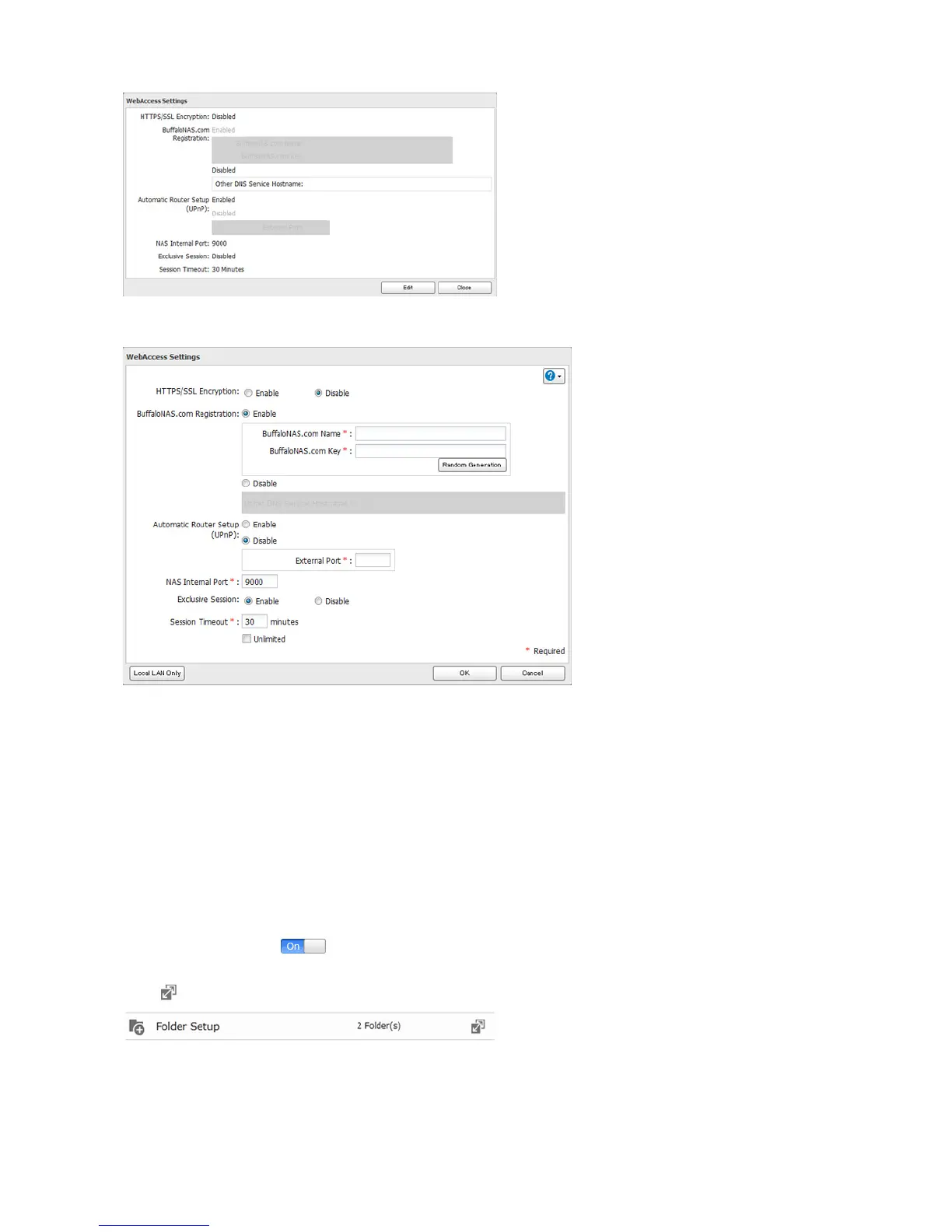
3 Configure the desired settings, then click OK.
• To use SSL encryption for more secure data transfers, enable “HTTPS/SSL Encryption”.
• Some WebAccess applications may not support HTTPS/SSL encryption. Disable it in such a case. For more
details, refer to the WebAccess Help Guide.
• You may use the default BuffaloNAS.com registration, or disable to use a different DNS server.
• Choose a “BuffaloNAS.com name” and “BuffaloNAS.com key” for your WebAccess account. Names and keys may
use 3 to 20 alphanumeric characters, underscores (_), and hyphens (-).
• If “Exclusive Session” is enabled, users cannot log multiple computers in to WebAccess. Only the last login will be
active.
• Enter a time in minutes (1 to 120 or “Unlimited”) before inactive users are logged out of WebAccess.
4 Click OK.
5 Move the switch to the position to enable WebAccess.
6 Click to the right of “Folder Setup”.
7 Select a shared folder to publish.
Notes:
• For best results, create a new dedicated share for WebAccess.















 To Next Page