25
Mechanical installation
7.4 Aligning (turning) the device and position of
connections
Deviceswithintegratedpilotairduct:
Alignmentofdeviceandpositionofconnectionsisonlypossiblewith2100,2101and2106process
valves.
The device and position of the connections can be aligned by:
- turning the actuator
Deviceswithexternalpilotairduct:
The device and position of the connections can be aligned by:
- turning the actuator (only types 2000, 2002, 2006 and 2012)
- turning the device
7.4.1 Turning the actuator, devices with hexnut
Thefollowingdescriptiononlyappliesfordeviceswithhexnutontheactuator.
For devices without a hexnut on the actuator: refer to the section "Turning the actuator, devices
without hexnut" in the operating instructions.
Thepositionoftheconnectionscanbeinnitelyadjustedbyrotatingtheactuatorthrough360°.
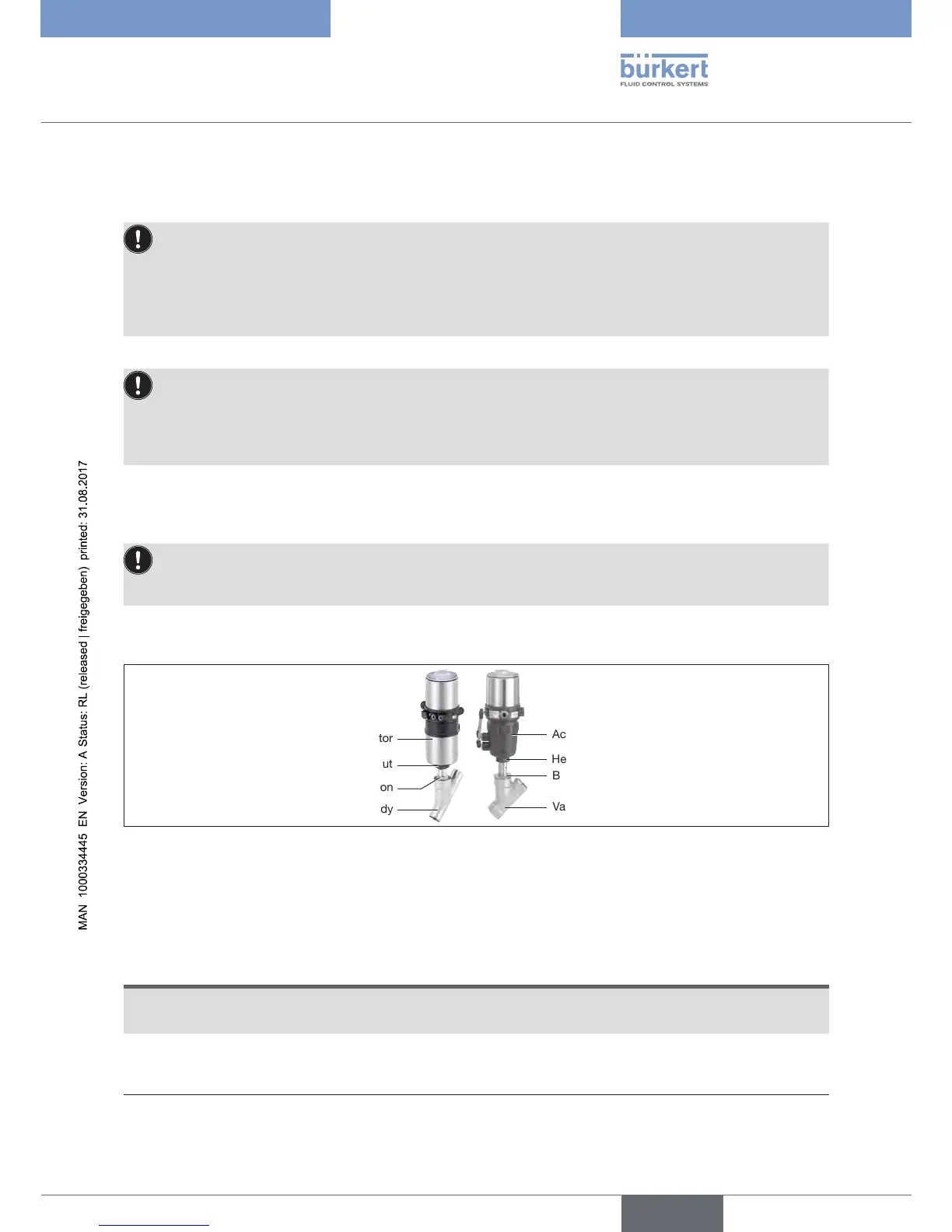
Actuator
Actuator
Hexnut
Hexnut
Body connection
Body connection
Valve body
Valve body
Figure 17: Turning the actuator (1)
→ Clamp the valve body into a holding device (only for valves not yet installed).
With 2-position actuator:
NOTE
Damagetotheseatsealortheseatcontour.
▶ When turning the actuator, the valve must be open.
→ For control function A and I*:
Apply compressed air to pilot air port 1.
* if variant exists


 To Next Page