27
Mechanical installation
7.4.2 Turning the actuator, devices without hexnut
Thepositionoftheconnectionscanbeinnitelyadjustedbyrotatingtheactuatorthrough360°.
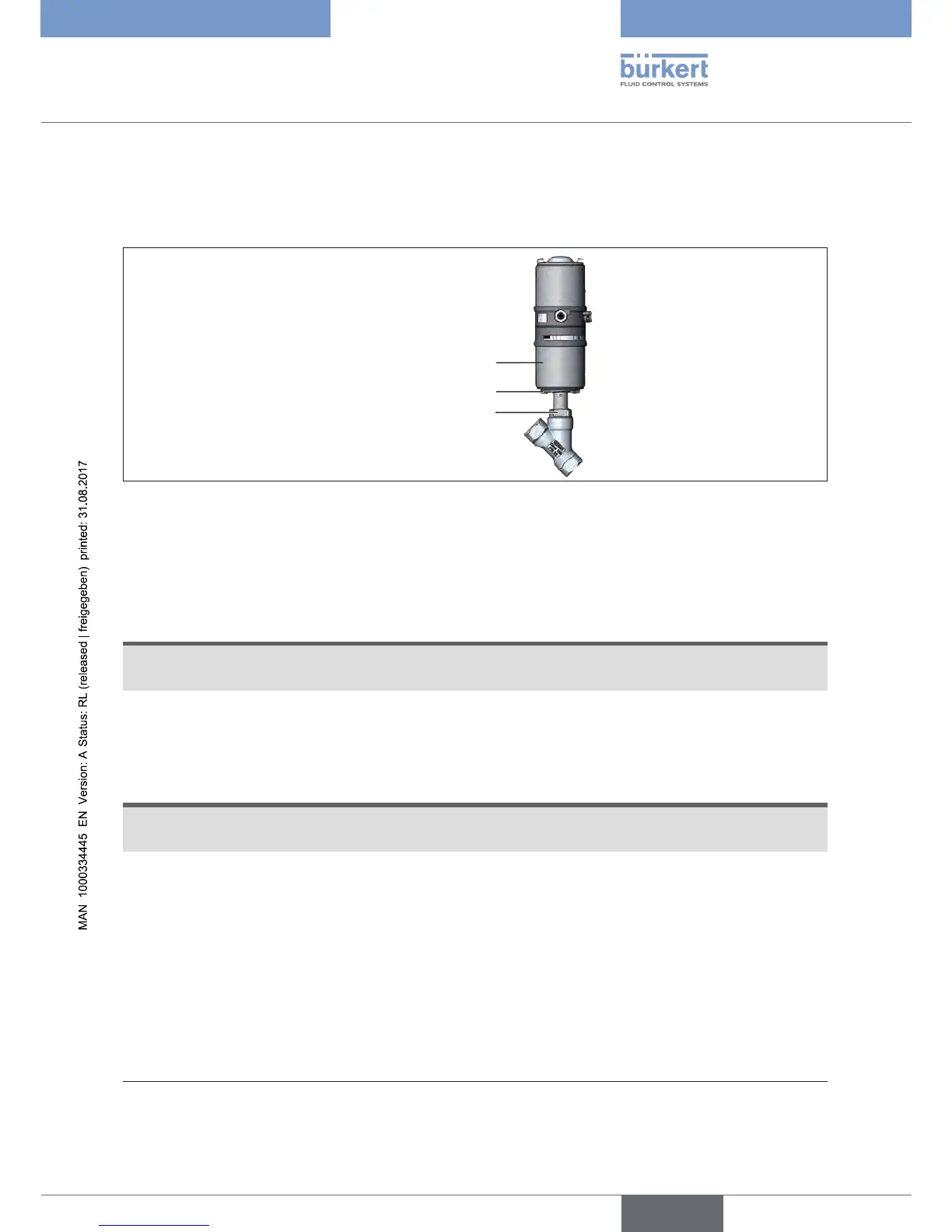
Key-tforms
Wrenchatonthebody
connection
Actuator
Figure 19: Turning the actuator (1), devices without hexnut
→ Clamp the valve body into a holding device (only for valves not yet installed).
With 2-position actuator:
NOTE
Damagetotheseatsealortheseatcontour.
▶ When turning the actuator, the valve must be open.
→ For control function A and I*:
Apply compressed air to pilot air port 1.
With 3-position actuator:
NOTE
Damagetotheseatsealortheseatcontour.
▶ When turning the actuator, the valve must be in the central position.
→ Apply compressed air to pilot air port 1:
3.5 bar for actuator size 50 (D) and 70 (M)
4.0 bar for actuator size 90 (N) and 130 (P)
For both actuator variants:
→ Switching the device manually with pilot valve (see chapter).
→ Usingasuitableopen-endwrench,counterthewrenchatonthebodyconnection.
→ Useaspecialwrench**preciselyinthekey-tformsoftheactuator.
* if variant exists
** The special wrench (665702) can be procured from your Bürkert sales department.


 To Next Page