104 ARTEMIS Digital Broadcast Production Console Routing Audio
Note: this uses the AFL system that the
user section is set to. If another Aux,
Track or Group bus is selected, AFL on
the previously selected Aux, Track or
Group bus is turned off if active, and AFL
on the newly selected Aux, Track or Group
bus is turned on.
When used in conjunction with the ‘AUX
SEND LEVELS’ option the user can listen
to the bus whilst adjusting the levels being
sent to it.
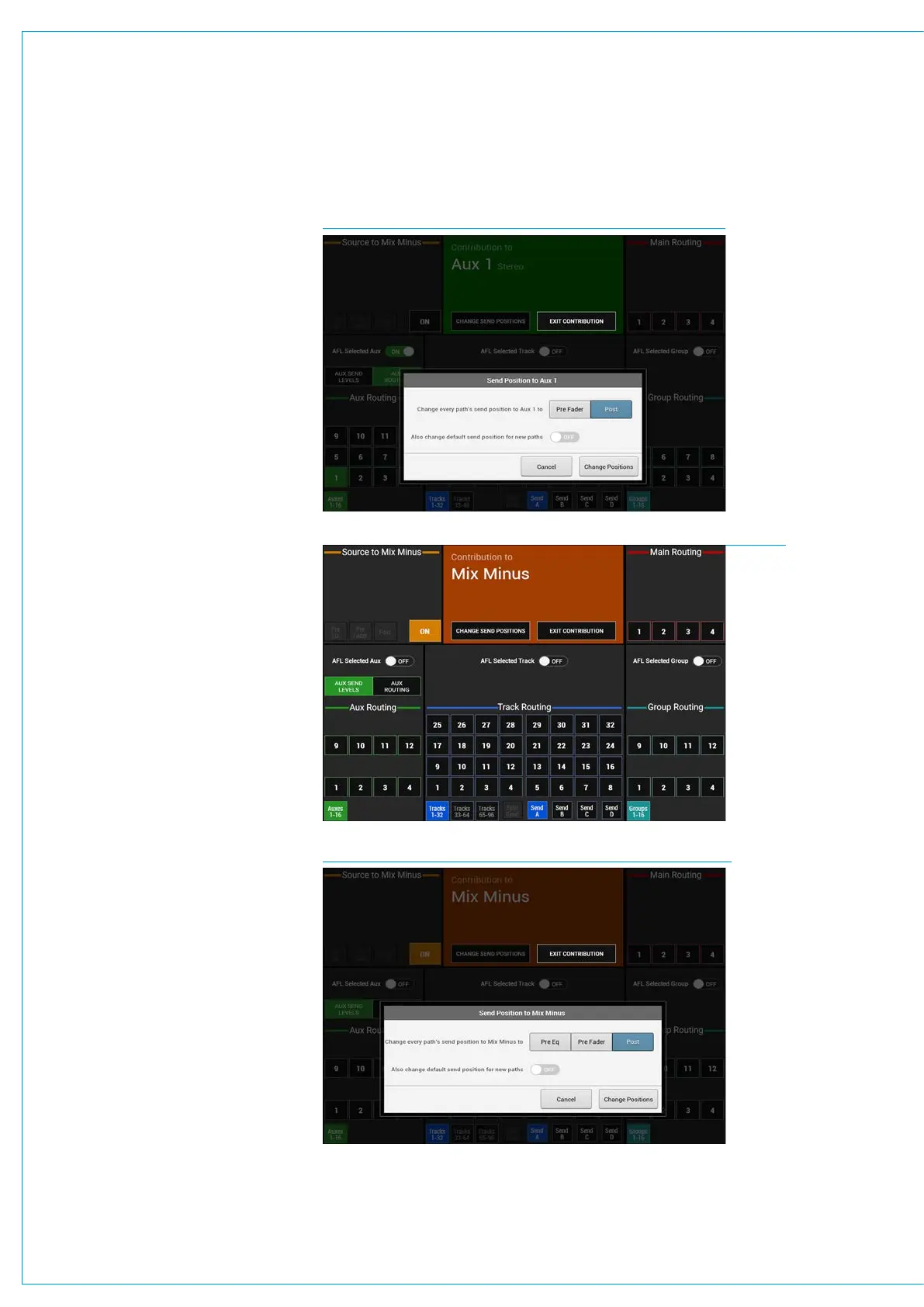
Default Send Positions
The User can change the default send
positions for all paths that can be routed
to a particular Aux bus by tapping the
‘CHANGE SEND POSITIONS’ button in
the Contribution header when viewing
contribution to that Aux bus.
There is also an options button in the
dialogue box that will also change the
default send position for all new paths
to that set by the selected send position.
See Fig 9 above right.
Mix Minus Bus Contribution
Fig 10 right shows the Contribution
screen for the Mix Minus Bus.
This is the only Mix Minus bus currently in
the system and is routed to in the same
way as the other buses.
This bus can also have its default
send positions for all paths that can
be routed to it altered by tapping the
‘CHANGE SEND POSITIONS’ button in
the Contribution header when viewing
contribution to the Mix Minus bus.
See Fig 11 below right.
Leaving Contribution Mode
When the bus routing task is complete,
touch the ‘Exit Contribution’ button to
return to the Sends-Routes page as
shown in “Making a Route” on page 96.
FIG 9 - AUX 1 DEFAULT SEND POSITION DIALOGUE
FIG 10 - MIX MINUS ON BUS CONTRIBUTION ROUTING SCREEN
FIG 11 - MIX MINUS DEFAULT SEND POSITION DIALOGUE



 To Next Page