CALREC Putting Sound in the Picture 33
MONITOR MODE
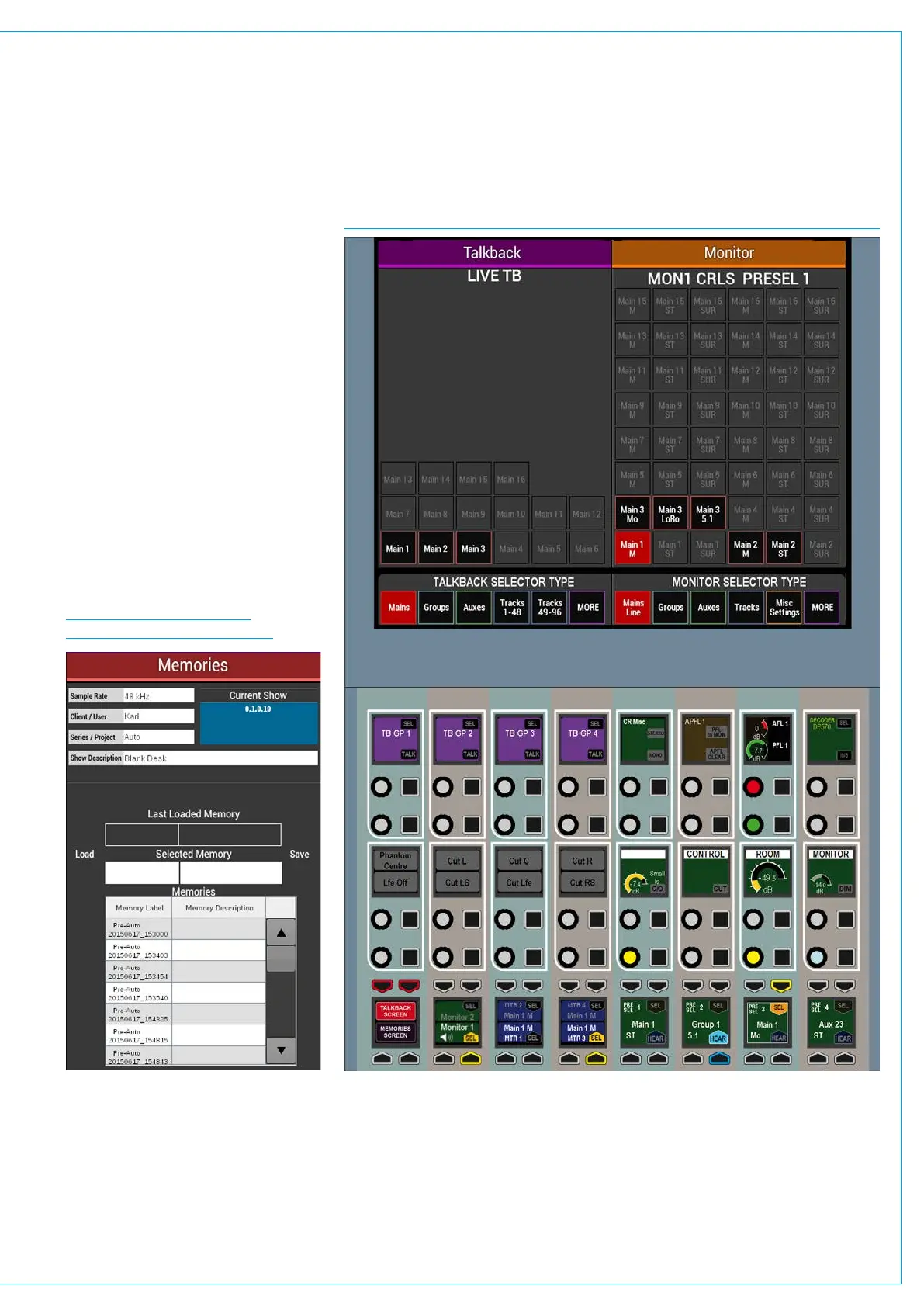
Monitor mode gives full access to the
comprehensive monitoring controls.
The four monitor pre-selectors, along
with four meter selectors are located in
the bottom row. Pressing SEL on any
of these makes it the focus of the right
hand side of the TFT screen, allowing
for the source to be changed and for
miscellaneous settings to be applied.
The button cell to the left of the meter
selectors allows for the panel to switch
between controlling monitor output 1 and
monitor output 2. See Fig 1.
The button cell at the bottom left switches
the left hand side of the TFT screen
between talkback functions and a user
memory load / save screen see Fig 2.
FIG 2 - MEMORIES SCREEN
ON CONSOLE MONITOR MODE
FIG 1 - MONITOR MODE CONTROL LAYOUT



 To Next Page