122 ARTEMIS Digital Broadcast Production Console Monitoring
MISCELLANEOUS MONITOR SOURCES
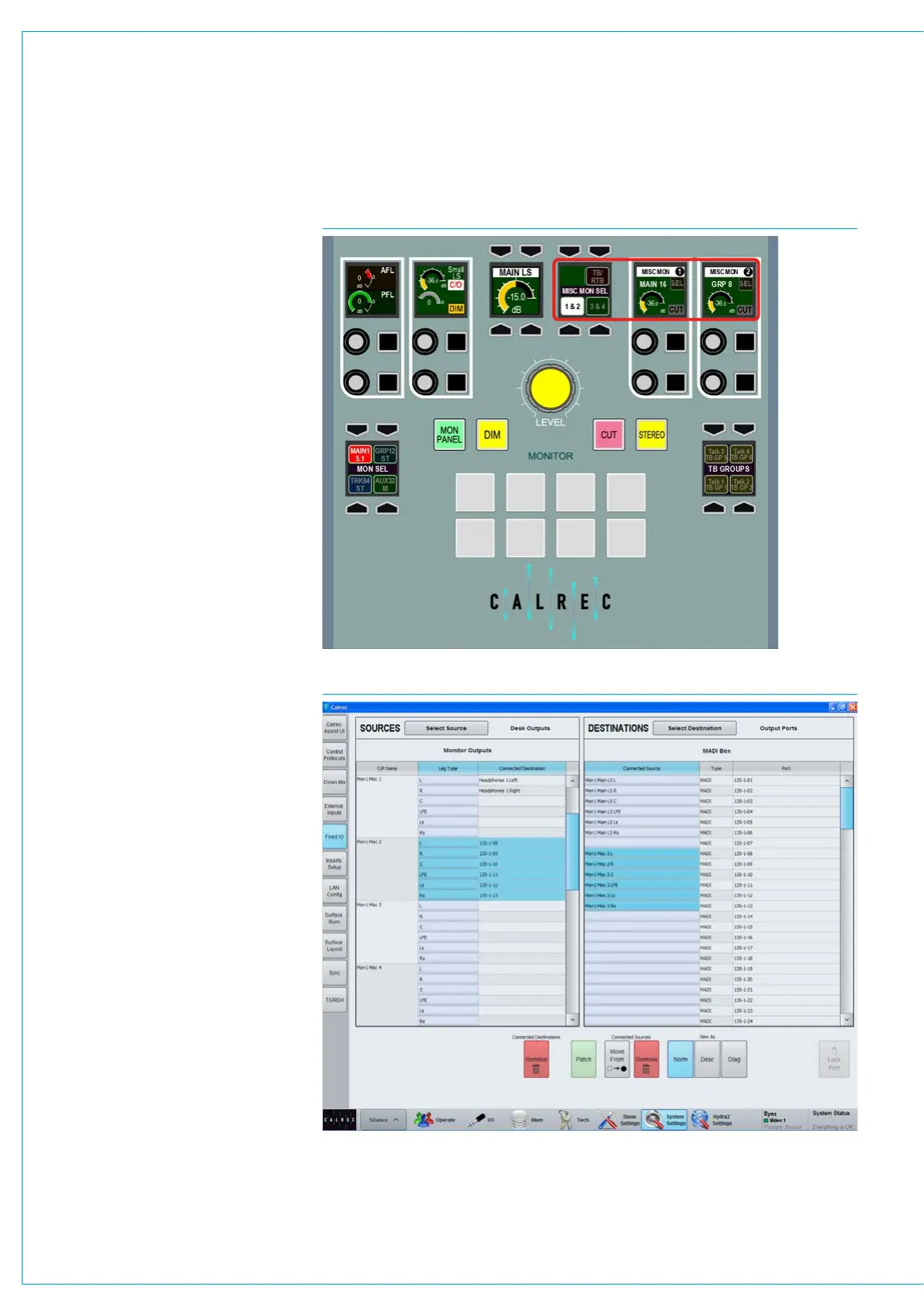
There are four miscellaneous monitor
pre selectors available on the monitor
panel. These are set up and used in
a similar way to the control room pre
selectors and are shown in Fig 1.
The MISC MON SEL selector shown in
Fig 1 selects the two adjacent control
cells highlighted in red to show either:-
Misc Mons 1 & 2 or Misc Mons 3 & 4.
Each output control has a rotary control
for altering the level of the output and a
dim button. The control cell display shows
the name, the width (M, ST, 5.1) and name
of the elected source and indications of
the output level and dim status.
Note these controls are also available on
the Fader/Monitor panel see “Monitoring
on Fader/Monitor Panel” on page 123.
Alter the output source
The output source can be altered by
pressing the SEL button which brings
attention to the required miscellaneous
output on the TFT screen in Monitor
mode. Now press on the new source in
the right hand side and the control cell
display will update to show the newly
selected output.
Patch miscellaneous monitor
outputs
The miscellaneous monitor outputs are
patched in >System Settings>Fixed I/O
shown in Fig 2.
In the sources list on the left, press the
filter button and select ‘Monitor Outputs’.
From the list select one of the Misc Mon
outputs.
In the right hand list select the output port
to which the miscellaneous output should
be connected and press ‘Patch’.
FIG 1 - MISCELLANEOUS MONITOR OUTPUT CONTROLS
FIG 2 - PATCHING MISCELLANEOUS MONITOR CONNECTIONS



 To Next Page