84 ARTEMIS Digital Broadcast Production Console Processing Audio
INSERTS
Artemis has a pool of 256 mono insert
resources available. These may be
used to create inserts for any width of
path in the system.
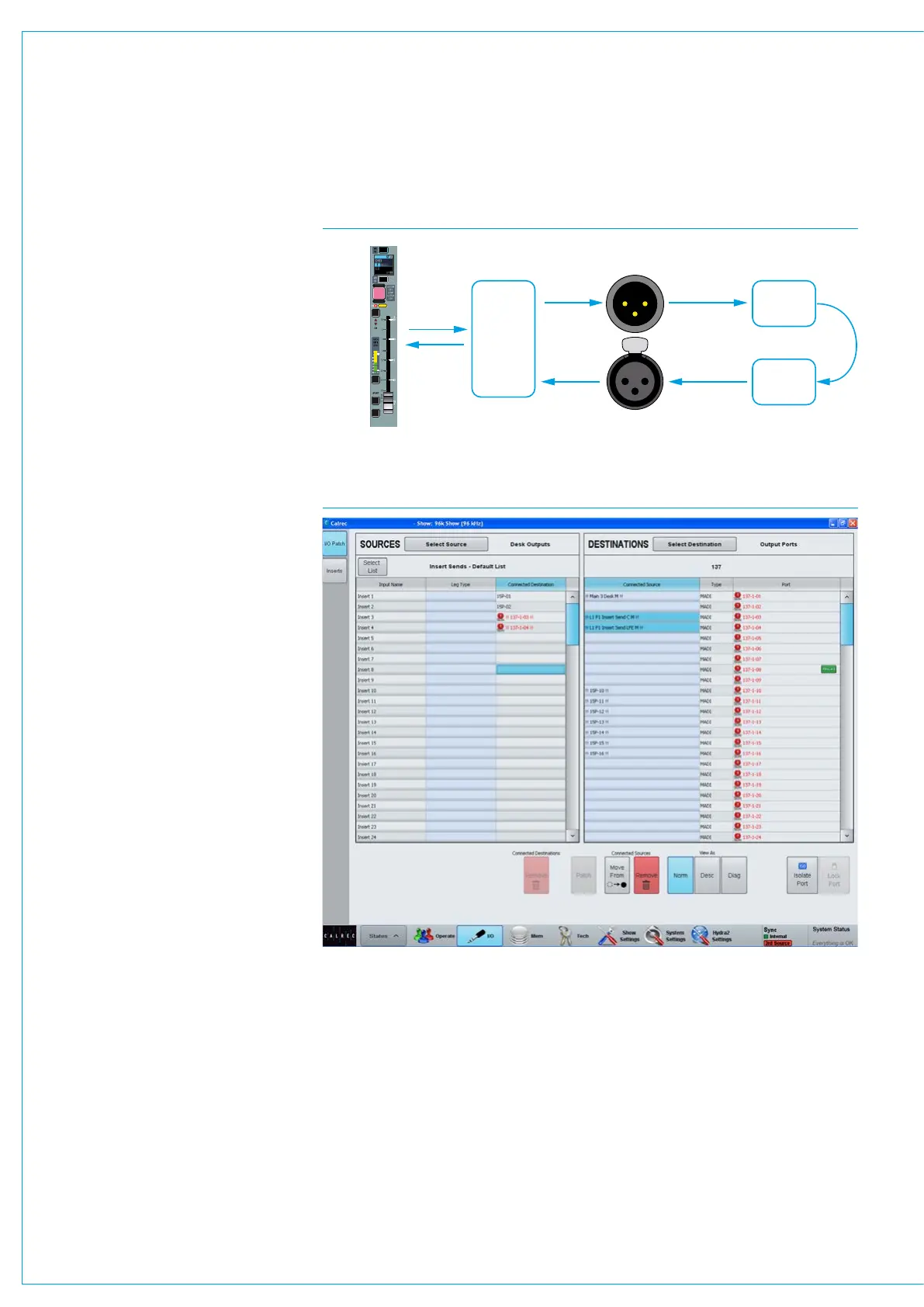
Configuring inserts is a two step process.
First any insert send and return resources
should be patched to output ports and
input ports respectively. The insert
resources should then be connected to
the required paths on the surface. This
process is shown in Fig 1.
Patching insert resources to ports
Insert sends and returns can be patched
to ports in >I/O>I/O Patch screen of the
main application. This screen is shown in
Fig 2.
In this screen select ‘Insert Sends’ from
the sources list and ‘Output Ports’ in the
destinations list. Select the required
insert sends and outputs ports then touch
the ‘Patch’ button.
Now select ‘Input Ports’ from the
sources list and ‘Insert Returns’ from the
destinations list and patch the required
ports to insert returns.
Inserts at different sample rates
From version 8.0 the desk can be
configured to operate at different sample
rates such as 48kHz & 96kHz.
At the higher sample rate the pool size for
inserts is halved, meaning that the pool
of 256 mono inserts becomes 128 mono
inserts. Note that for Artemis light these
figures are 128 mono inserts at 48kHz
and 64 mono inserts at 96kHz.
The image in Fig 2 shows the Insert
sends to Output Ports. Note that the first
2 inserts have been made at a matched
sample rate whilst Inserts 3 & 4 have
been patched to output ports at the wrong
sample rate.
FIG 1 - INSERT ABSTRACTION
Hydra2 output port
Send to
inserted
equipment
Return from
inserted
equipment
Hydra2 input port
Insert
resource
Path on
Apollo
surface
CUT
AFL
PFL
DIR
TB
ISO
FIG 2 - PATCHING INSERTS
The image in Fig 3 shows the Inserts to
faders screen note that Inserts that are
unavailable when operating at a higher
sample rate are shown in pale red and
cannot be used.
The example shown in Fig 3 is from an
Artemis Light which normally has 128
inserts but when running at the higher
sample rate this reduces to 64 which
is why inserts 65 and upwards appear
unavailable.



 To Next Page