CALREC Putting Sound in the Picture 183
Source Offline indication on a path
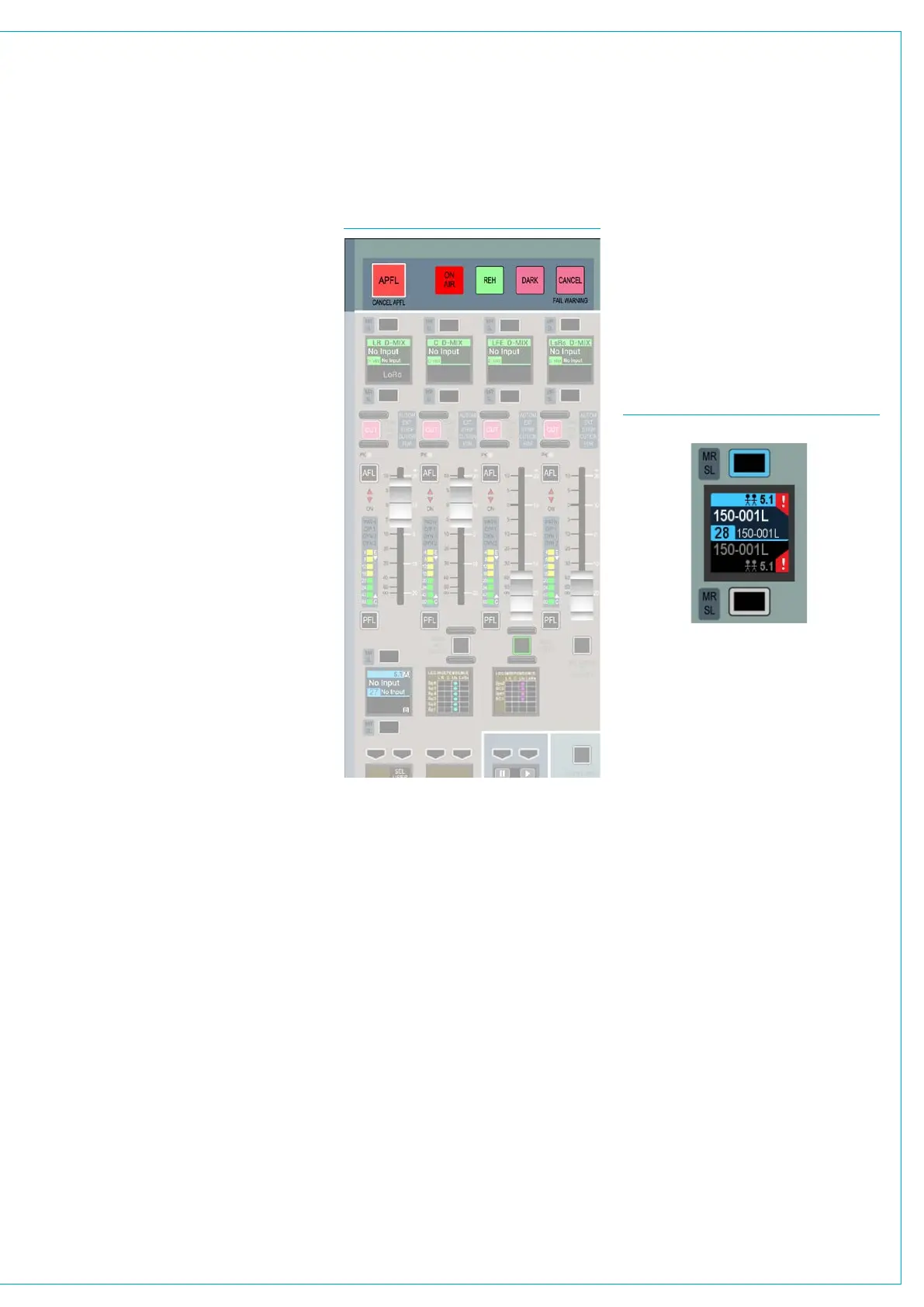
In the assign display if the source
assigned to that fader is taken offline
this is indicated by means of a Red
exclamation mark as shown in Fig 3
below.
The display shows that both sources for
the A and B paths are offline.
Intermittent Cable Failures
If intermittent cable failures exist on the
system, the System Status screen now
displays these as new messages and
when the user clicks on the message,
a 30 second timer starts which
automatically clears the intermittent
error from the message list.
FIG 2 - SURFACE FAIL WARNING
FIG 3. - SOURCE OFFLINE INDICATION
Surface indication
In addition to the main application
displaying a system status indicator
when a message is created, the FAIL
WARNING button on the dedicated
monitor panel or fader/monitor panel will
also flash. This is shown in Fig 2.
Pressing this button when it is flashing
will cause it to stop flashing and remain
illuminated. This will let the system know
that the user has acknowledged the error
but has not necessarily cleared it.
External indication
It is also possible to set an external
indicator to flash when an error message
is reported. The FAIL WARNING GPO
function should be patched to the relevant
GPO port to which the required indicator
is connected.
For a more detailed explanation of the
GPIO functions of the system, see
“GPIO” on page 170.



 To Next Page