CALREC Putting Sound in the Picture 31
SEND-ROUTE
The Send-Route mode is also an
assignable panel mode, in that it
displays information for, and can
adjust parameters of the currently
assigned audio path.
Like the Processing mode, the currently
assigned path, and therefore the focus
of the control panel is shown on the TFT
screen.
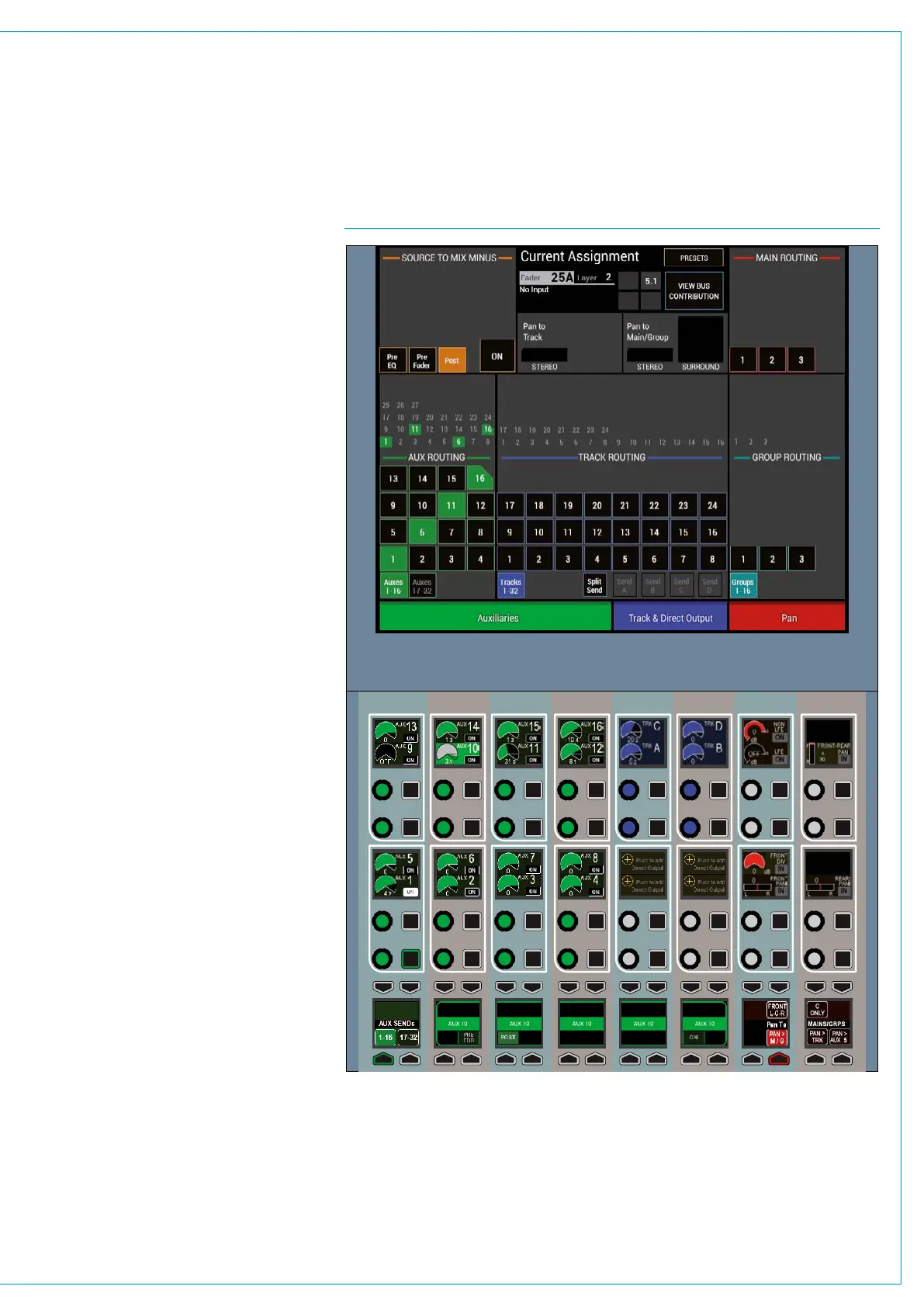
This panel mode allows for the currently
assigned path to be routed to the various
buses / outputs that are available.
The TFT screen provides routing buttons
and displays whilst the panel below
provides colour coded rotary controls for
send levels to applicable outputs, such
as Auxs, Track sends and Direct outputs.
Pressing down on a rotary encoder
highlights that send in the bottom row of
controls providing further options such as
pre-fader / post fader switching.
The last two columns of control cells
provide pan controls for positioning of the
path’s output.
Note: Artemis now displays Aux Sends
in 16s rather than 8s and any undefined
buses are removed from the display rather
than greyed out. See Fig 1.
FIG 1 - SEND-ROUTE ASSIGNABLE PANEL MODE CONTROL LAYOUT



 To Next Page