CALREC Putting Sound in the Picture 115
DIRECT OUTPUTS
A pooled resource of direct outputs
(512 legs for Artemis Shine,Ray and
Beam, 256 for Artemis Light) can be
assigned for use with channel and
group paths.
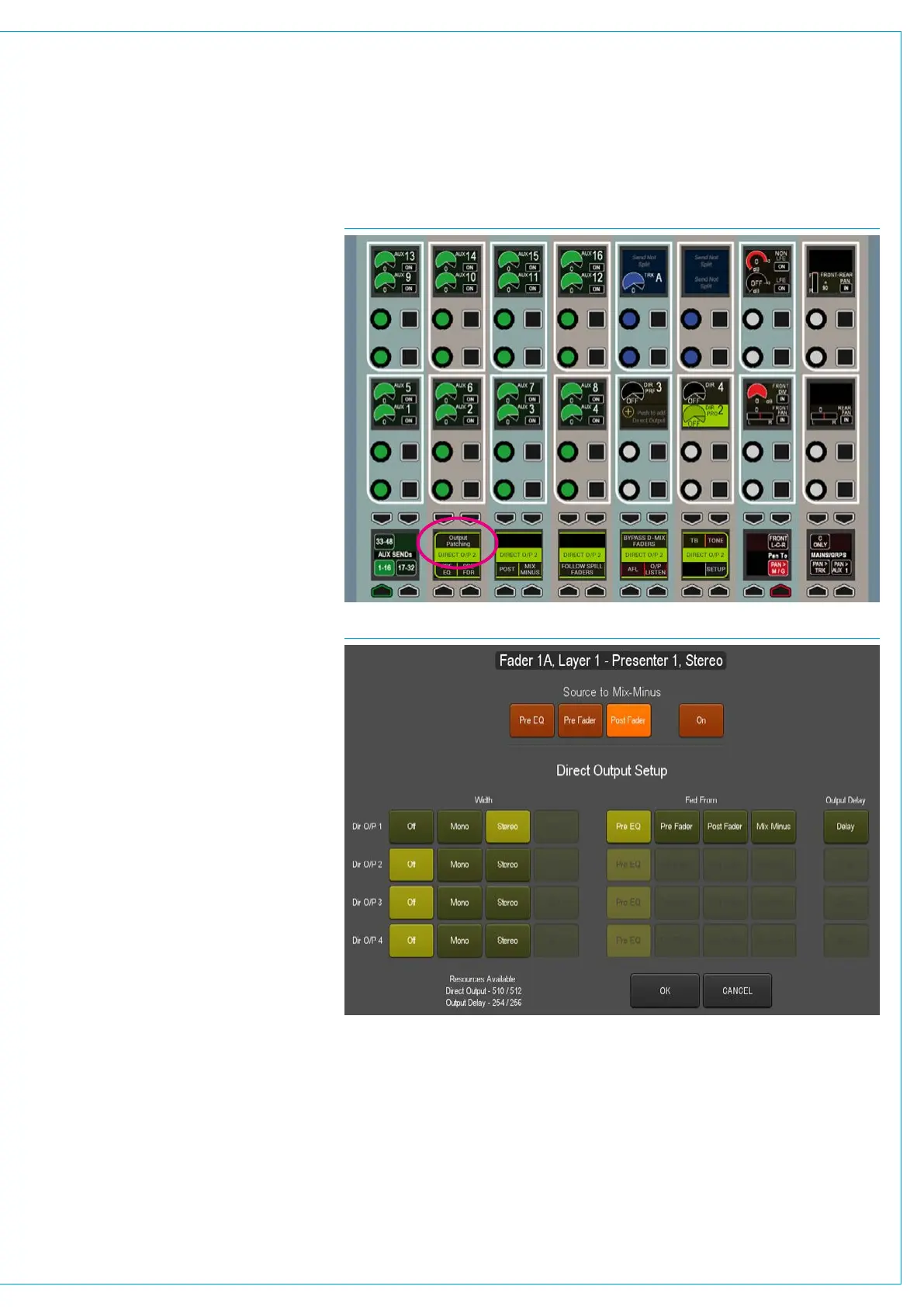
Up to four direct outputs can be created
per path, each can be set to be fed Pre-
EQ, Pre-Fader, Post-Fader or from the Mix
Minus bus. Output delay can be assigned
to any direct output which comes from
the same pool of delay resources as bus
output delay.
Direct Outputs at different sample
rates
From version 8.0 the desk can be
configured to operate at different sample
rates such as 48kHz & 96kHz.
At the higher sample rate the pool size for
Direct Outputs is halved, meaning that the
pool of 512 legs for Artemis Shine, Ray
and Beam becomes 256 legs. Note that
for Artemis Light these figures are 256
legs at 48kHz and 128 legs at 96kHz.
Assign Direct Outputs from the
Surface
To assign a direct output to a path using
the surface controls:
1. Push the assign button for which you
want to setup the direct output.
2. Place any panel into SEND-ROUTE
mode. The four centre-right control
cells will read: ‘Push to add Direct
Output’, see Fig 1. Push one of these
cell’s rotary encoders and the Direct
Output pop-up appears on the TFT
above, as shown in Fig 2.
3. Select mono or stereo to enable a
Direct Output and select either a feed
position (Pre-EQ, Pre-Fader or Post
Fader) or choose to have the Mix Minus
bus feed the Direct Output.
Assign Direct Outputs from the PC
To assign direct output resources to paths
using the console PC:
1. Select >I/O>I/O Patch from the menu
bar in the main application.
FIG 1 - DIRECT OUTPUT ASSIGN FROM POP-UP
FIG 2 - DIRECT OUTPUT SETUP POP-UP
• Note, the Direct Output pop-up also allows you to route the Direct’s Output’s source
path to the Mix Minus bus using the buttons along the top of the pop-up
2. Press ‘Select Source’ and then ‘Direct
Outputs’ from the sources menu.
3. Click on the Output (Assign) cell in
the table for the required path and the
direct output setup pop-up appears.
4. Select mono or stereo to enable a
Direct Output and select either a feed
position (Pre-EQ, Pre-Fader or Post
Fader) or choose to have the Mix Minus
bus feed the Direct Output.



 To Next Page