58 ARTEMIS Digital Broadcast Production Console Getting Signals Into Artemis
INPUT PORT PROTECTION
Input Port Protection is a simple
process designed to protect input
sources when they are being used by
multiple operators across a network.
Audio input sources can be shared by all
consoles connected on the same Hydra2
network. All operators can control a
shared input using their own console’s
input controls, but no operator has direct
control of the shared input’s Mic Gain,
phantom power (48v) or SRC. To help
avoid unwanted or accidental changes,
these critical input controls are ‘protected’
using a simple manual process.
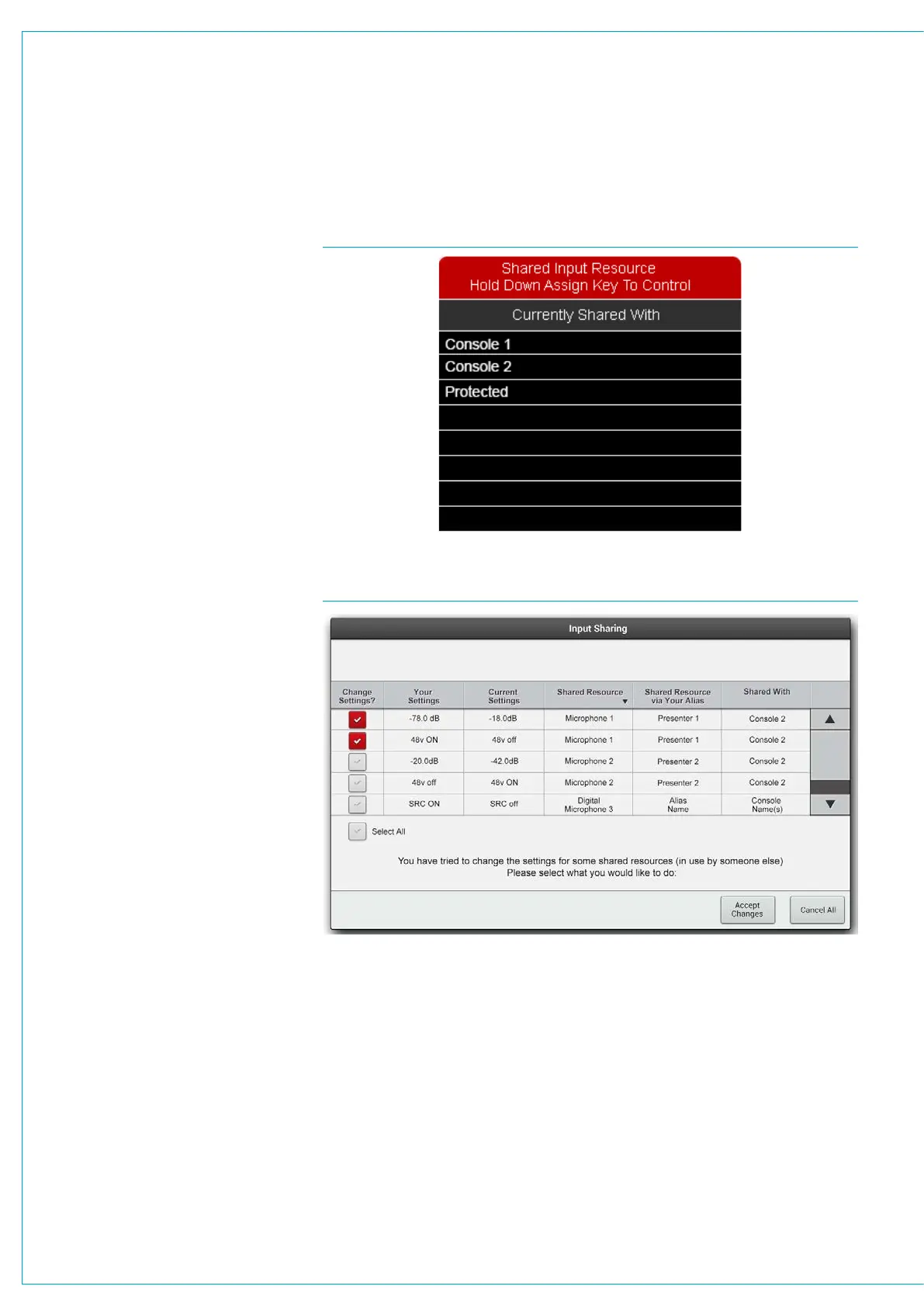
If the currently assigned path is using a
protected input, a pop-up will appear in
the upper left of all the PROCESSING
mode TFT screens showing the names
of all sharing consoles, see Fig 1. If
‘Protected’ appears in this list, as shown
above, this indicates that the input
has been protected by the network
administrator via the H2O GUI (see the
H2O manual for more information).
When the fader assign button is pressed
on a path using a protected input, its Mic
Gain, 48v and SRC controls will appear
disabled (greyed out) on the input (left
hand) column of all the PROCESSING
mode assign layouts.
Controlling a Protected Input Port
To alter a protected input Mic Gain, 48v or
SRC, simply hold down the corresponding
fader’s assign button whilst making the
desired change as usual.
Loading Shows/Memory/Alias Files
There are implications for protected
inputs’ Mic Gain, 48v and SRC settings
during the process of loading shows, user
memory and aliases (for more information
on memories, see “Using Shows and
Memories” on page 152).
If memories are loaded which affect
protected inputs, a pop-up appears on the
main application screen, see Fig 2 above
right.
FIG 1 - SHARED INPUT NOTIFICATION POP-UP - CONSOLE
FIG 2 - INPUT SHARING POP-UP - MAIN APPLICATION
This pop-up contains a table of
information to help in deciding which
protected input settings, if any, need to
be overwritten. All protected inputs are
listed, along with the consoles they are
shared with, current settings and the
potential overwrite settings. There is also
a column indicating Alias names, if in use.
The left hand check box column is used to
choose which settings to overwrite. Initially
all changes are de-selected.
Once selections have been made, the
ACCEPT CHANGES button can be
pressed to accept the selected changes
and prevent changes that are deselected.
CANCEL ALL will prevent any changes
to settings. In both cases the protected
input sources will still be patched to the
desired console paths, it is changes to
Mic Gain, 48v and SRC that are being
protected.



 To Next Page