CALREC Putting Sound in the Picture 59
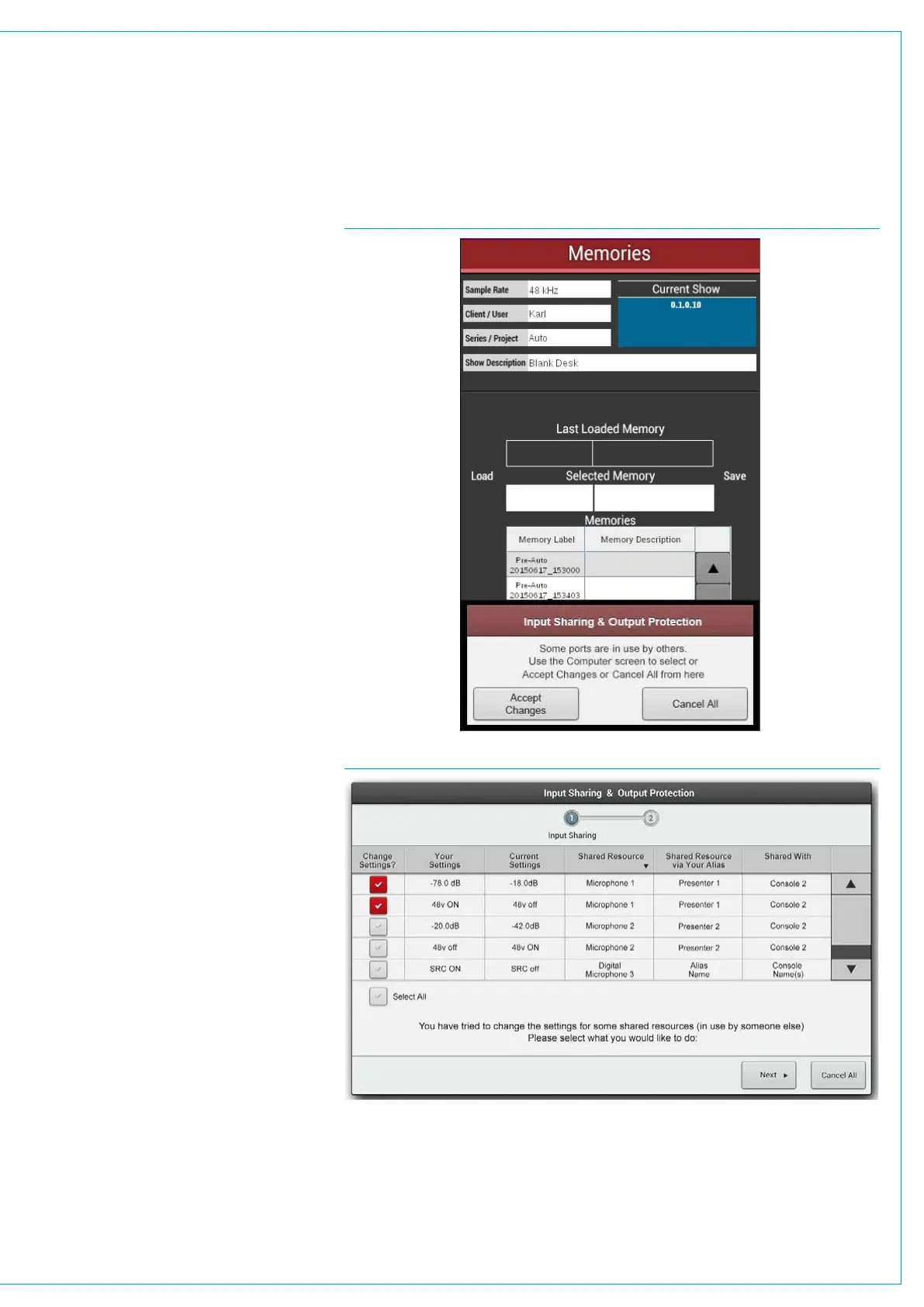
A simple ‘Ports in use by others’ pop-up
will also appear on the surface’s Memories
screen. This Pop-Up gives the option to
ACCEPT CHANGES or CANCEL ALL,
allowing full functionality through the
surface, but with reduced options and
information.
When using this pop-up, there is a second
layer of protection which will ask the
operator is they are really sure about
the changes before being prompted to
ACCEPT CHANGES again. See Fig 3.
Remember to ensure you know what
the effect of the memory load will be
before selecting ACCEPT CHANGES,
as this will alter the protected input
sources for all operators.
The pop-up in the main application
may have 2 stages - Input Sharing and
Output Protection. This indicates that
the memory to be loaded also contains
changes to outputs which are in use by
other operators.
See Fig 4, also see “Output Port
Protection” on page 111 for more
information.
FIG 3 - SHARED INPUT NOTIFICATION POP-UP - MEMORIES SCREEN
FIG 4 - INPUT SHARING AND OUTPUT PROTECTION 2 STAGE POP-UP



 To Next Page