Chapter 2
2-4
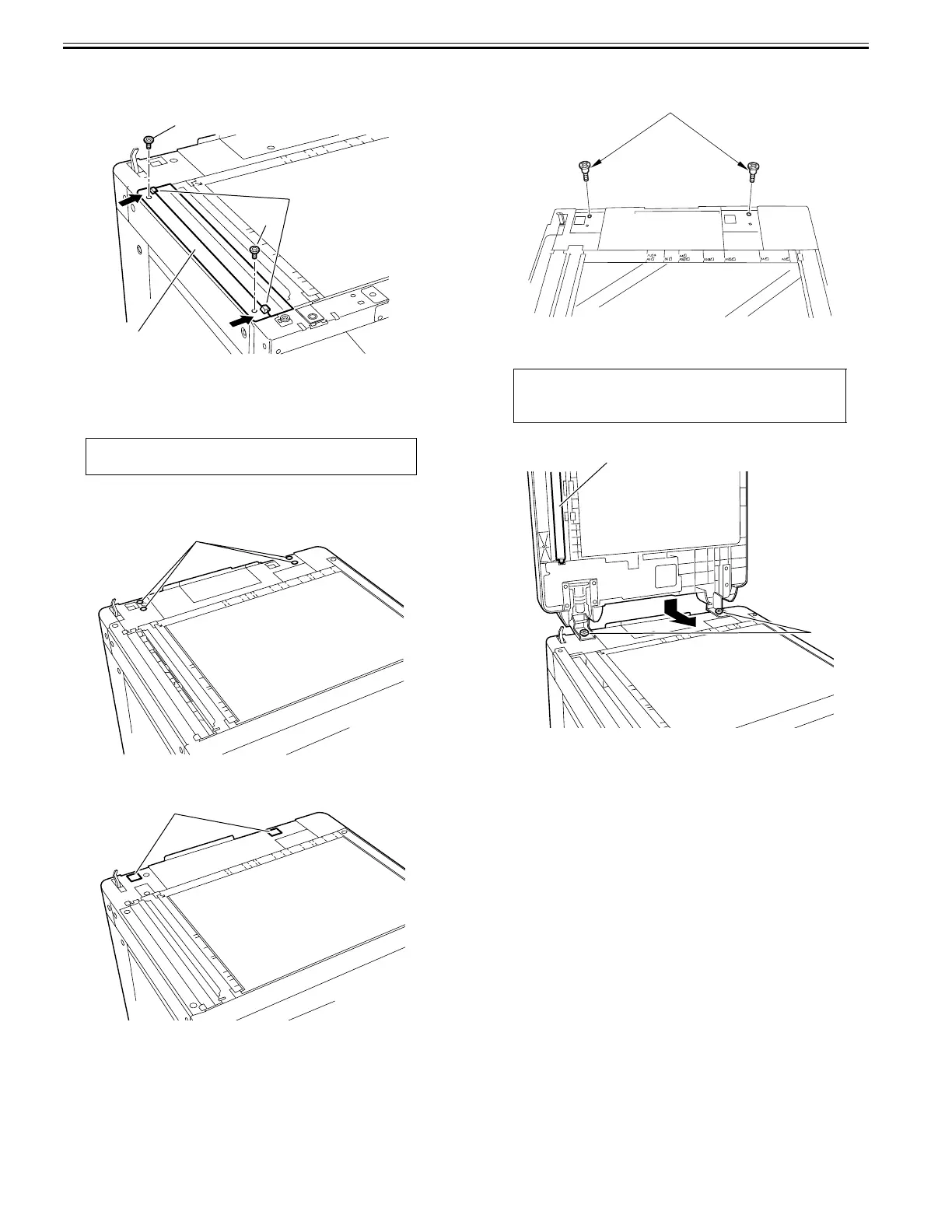
6) Pressing the projections [2] of the supplied glass holder [1] against the
glass, mount the glass holder with the 2 flat-head screws (M4X6) [3] re-
moved in Step 3).
F-2-7
7) Fix the the front side of the reader left cover with the screw.
8) Attach the reader front cover. (two screws)
2.2.3 Installing the DADF
0024-3670
1) Peel off 4 pieces of blind seal [1]. (The 4 pieces of blind seal are no longer
necessary).
F-2-8
2) Affix 2 pieces of the supplied face stickers [1] over the hinge holes.
F-2-9
3) Install the supplied 2 stepped screws (M5X6) [1] at the upper rear of the
reader.
F-2-10
4) Engage the hinges of the DADF with the stepped screws [1] from behind
and slide them toward the front of the host machine.
F-2-11
MEMO:
The DADF is weight about 10 kg.
[2]
[3]
[1]
[3]
[1]
[1]
CAUTION:
When holding the DADF, be careful not to touch the platen roller [2].
[1]
[1]
[2]










 To Next Page