Chapter 3
3-10
3.3.4 Initial Document Size Detection
0024-6991
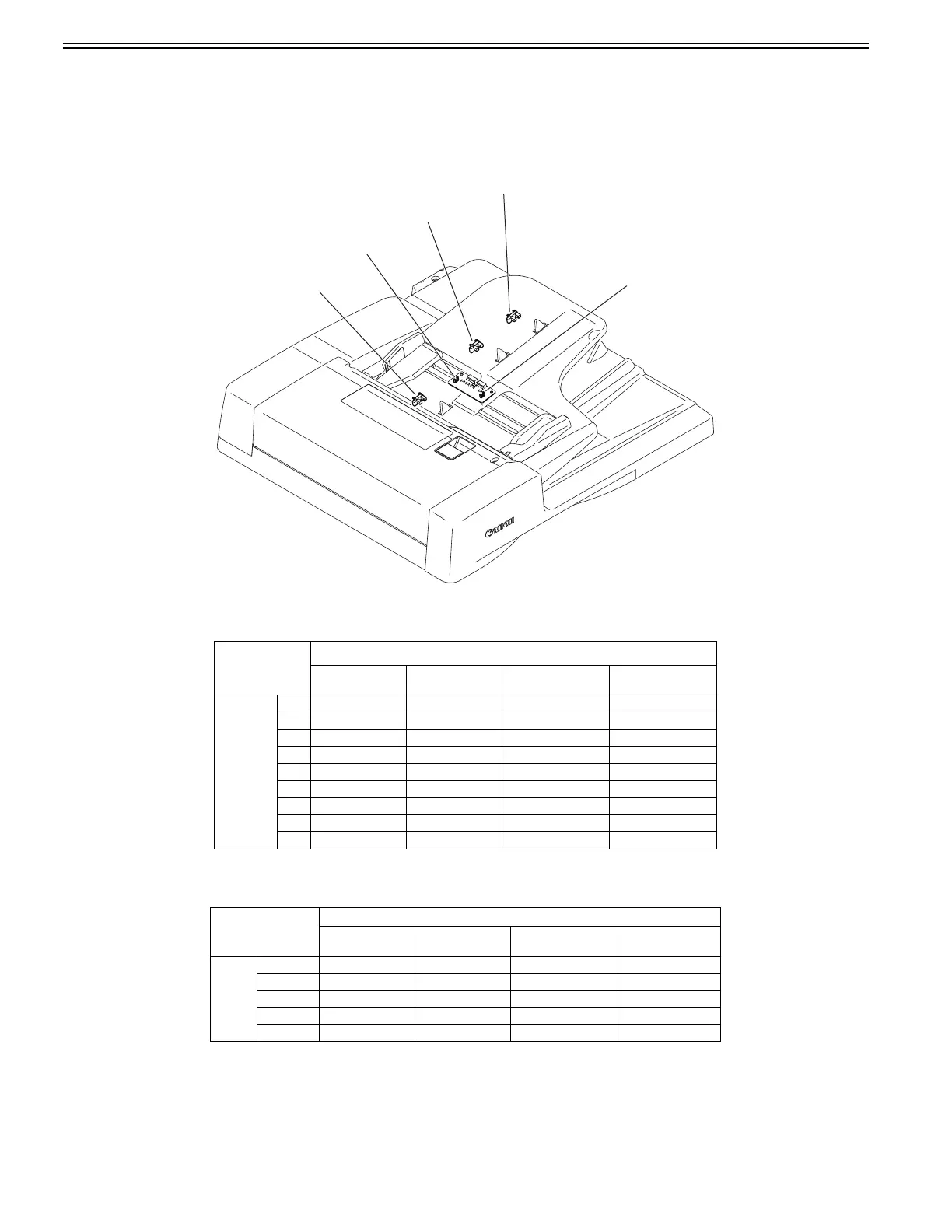
The document length sensor 1 (SR8) and document length sensor 2 (SR8) detect the longitudinal size of the document placed on the document tray, and the docu-
ment width sensor 1 (PS2) and the document width sensor 2 (PS1) detect the lateral size of the document.
When a document is placed on the document tray, detection levers of the two document length sensors move the light shielding plate to prevent light from passing
through the photo interrupter.
If the slide guide is adjusted to the document size, the two document width sensors mounted inside the document tray are shielded by the light shielding plate mount-
ed at the bottom of the slide guide.
Document sizes are determined by the combination of the ON/OFF states of document length sensors, the combination of ON/OFF states of document width sensor.
F-3-11
The following table shows the relationship among length detection sensor signals, document widths, and initial document sizes.
1. AB type
T-3-1
2. Inch type
T-3-2
Sensor name
Document width
sensor 1(PS2)
Document width
sensor 2(PS1)
Document length
sensor 1(SR9)
Document length
sensor 2(SR8)
Size
A3 ON ON ON ON
B4 OFF ON ON ON
A4R OFF OFF OFF ON
B5R ON OFF OFF ON
A4 ON ON OFF OFF
A5R ON OFF OFF OFF
B5 OFF ON OFF OFF
A5 OFF OFF OFF OFF
B6 ON OFF OFF OFF
Sensor name
Document width
sensor 1(PS2)
Document width
sensor 2(PS1)
Document length
sensor 1(SR9)
Document length
sensor 2(SR8)
Size
11 x 17 OFF ON ON ON
LGL OFF OFF ON ON
LTRR OFF OFF OFF ON
LTR OFF ON OFF OFF
STMT OFF OFF OFF OFF
SR7
SR9
SR8
PS1
PS2










 To Next Page