Chapter 4
4-1
4.1 Points to Note on Disassembly and
Reassembly
4.1.1 Points to Note When Turning Off the Main Power of
the Host Machine
0024-7008
4.2 External Covers
4.2.1 Front Cover
4.2.1.1 Removing the Front Cove
0024-7009
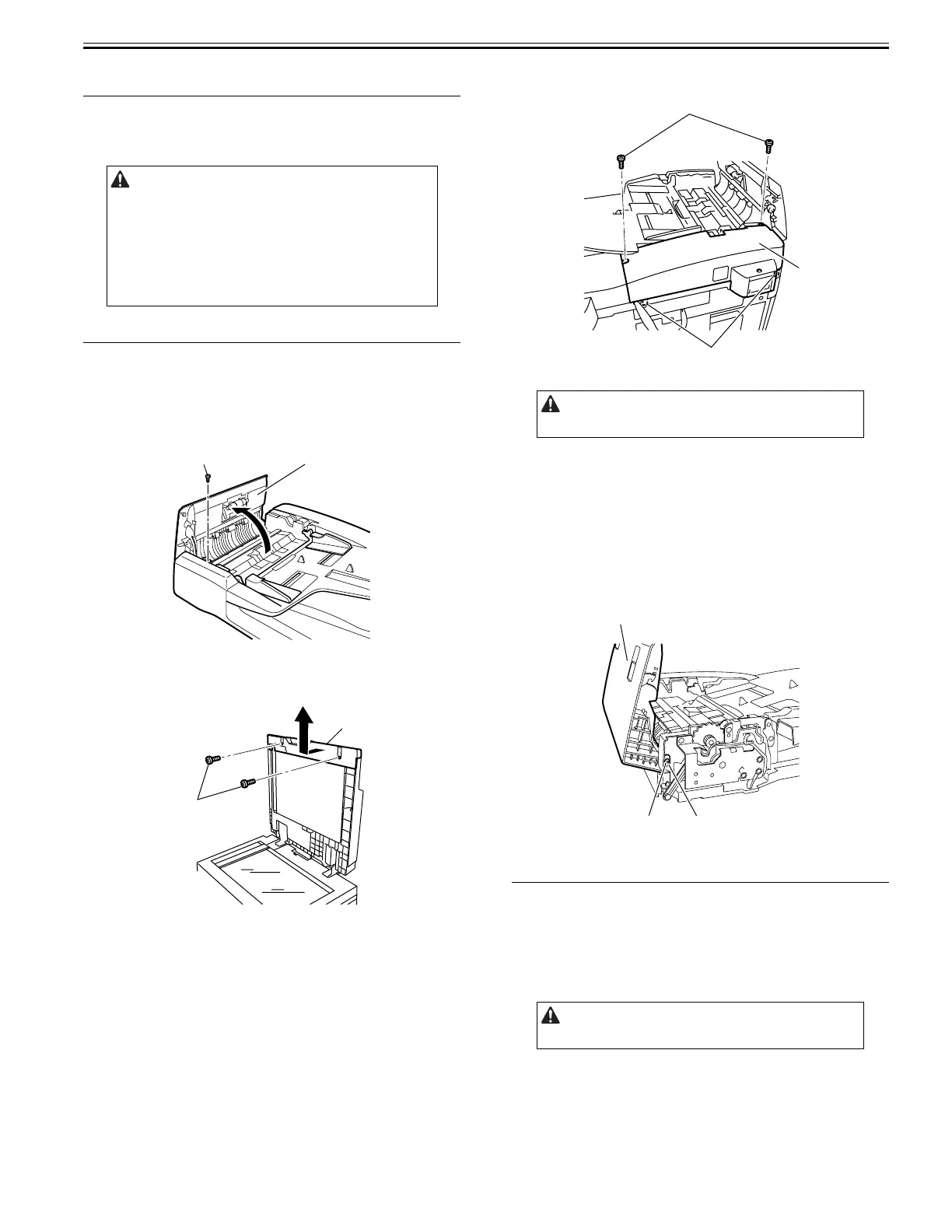
1) Open the feeder cover [1].
2) Remove the screw [2].
F-4-1
3) Open the ADF.
4) Detach the front cover [1].
- Screw [2], 2 pcs.
F-4-2
4.2.2 Rear Cover
4.2.2.1 Removing the Rear Cover
0024-7010
1) Open the feeder cover.
2) Move to the back of the host machine and detach the rear cover [2].
- Screw [1], 2 pcs.
F-4-3
4.2.3 Feeder Cover
4.2.3.1 Removing the Feeder Cover
0024-7011
1) Open the feeder cover.
2) Open the ADF.
3) Detach the front cover.
- Screw, 3 pcs.
4) Close the ADF.
5) Remove the feeder cover [1].
- Screw [2], 1 pc.
- Positioning pin [3], 1 pc.
F-4-4
4.3 Drive System
4.3.1 Pickup Motor
4.3.1.1 Removing the Pickup/Feed Motor
0024-7012
1) Open the feeder cover.
2) Move to the back of the host machine and detach the rear cover.
- Screw, 2 pcs.
Points to Note When Turning Off the Main Power of the Host
Machine
Be sure to pull out a power supply plug with the following process
before the work when exchanging of the part of this machine.
Be sure to turn off the main power in the following order to protect hard
disk of the host machine.
1) Press the power switch on control panel for 3 sec or more.
2) Follow the instruction on the shutdown sequence screen (the main power
switch will go off automatically).
3) Disconnect the power plug.
[2]
[1]
[2]
[1]
Remove the rear cover with the two claws[3] released.
Remove the rear cover with the two claws released.
[1]
[3]
[2]
[1]
[3]
[2]










 To Next Page