Chapter 4
4-17
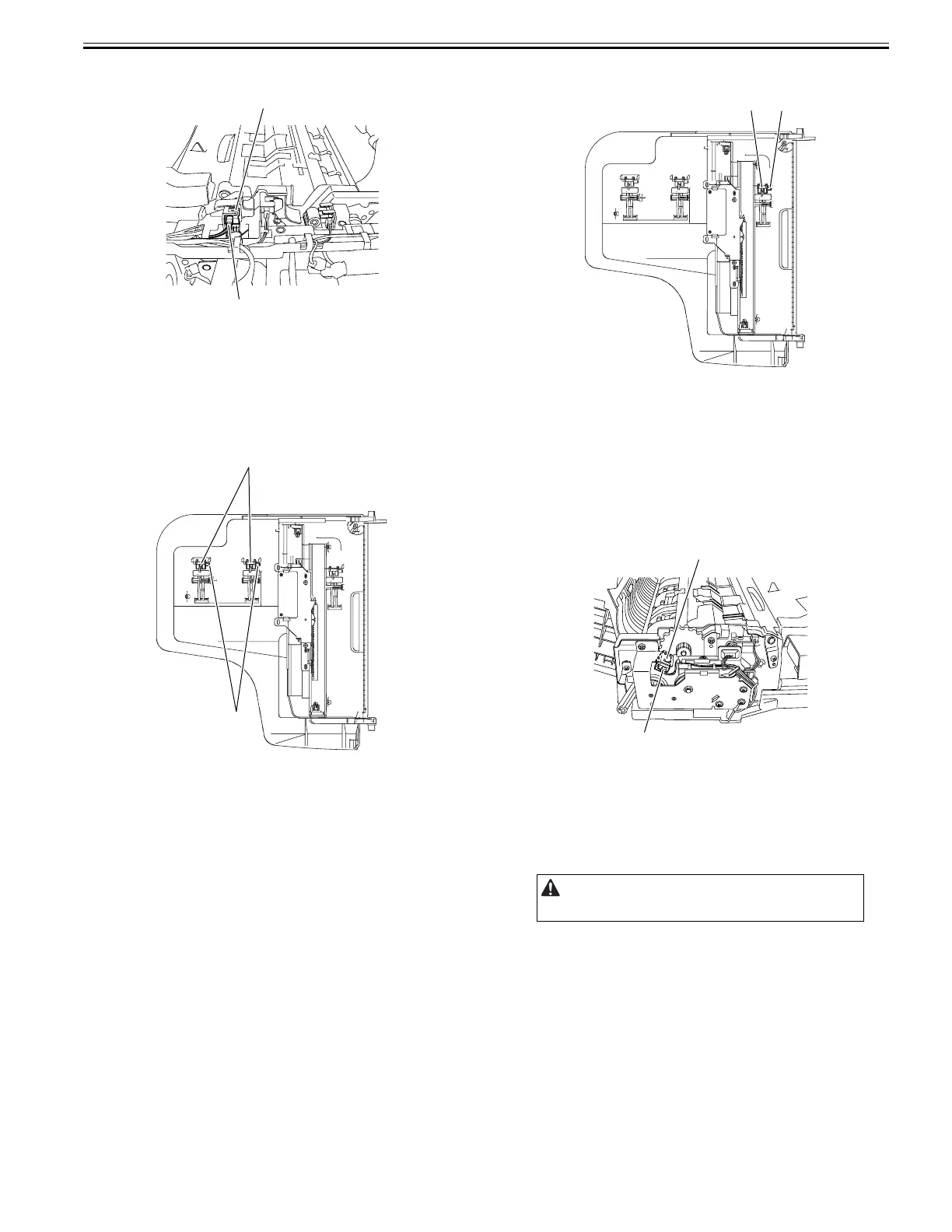
3) Remove the document set sensor [1].
- Connector [2], 1pc.
F-4-71
4.5.6 Document Length sensor
4.5.6.1 Removing the Document Length Sensor
0024-7036
1) Detach the cover on the reverse side of the document tray.
- Screw, 3 pcs.
2) Remove the document length sensor [1].
- Connector [2]
F-4-72
4.5.7 Last Document Detection Sensor
4.5.7.1 Removing the Last Document Detection Sensor
0024-7037
1) Detach the cover on the reverse side of the document tray.
- Screw, 3 pcs.
2) Remove the last document detection sensor [1].
- Connector [2]
F-4-73
4.5.8 Release Motor HP Sensor
4.5.8.1 Removing the Release Motor HP Sensor
0024-7039
1) Open the feeder cover.
2) Open the ADF.
3) Detach the front cover.
- Screw, 3 pcs.
4) Close the ADF.
5) Remove the release motor HP sensor [1].
- Connector [2]
F-4-74
4.5.9 Timing Sensor
4.5.9.1 Removing the Timing Sensor
0024-7040
1) Open the feeder cover.
2) Move to the back of the host machine and detach the rear cover.
- Screw, 2 pcs.
[1]
[2]
[1]
[2]
Remove the rear cover with the two claws released.
[1]
[2]
[2]
[1]










 To Next Page