Chapter 4
4-9
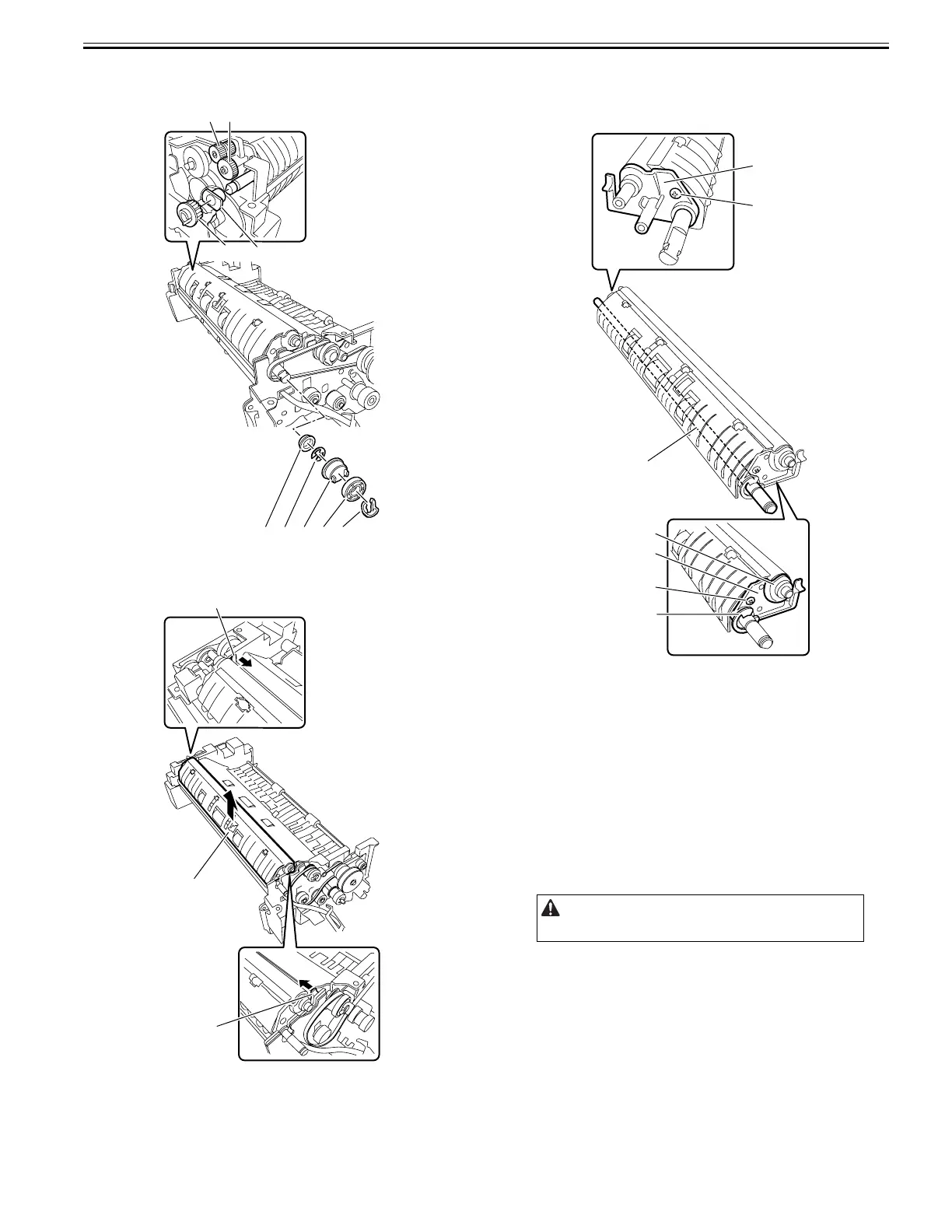
16) Remove the resin ring [1], pulley [2], gear [3], E-ring [4], and bearing
[5].
17) Remove the gear [6], gear [7], gear [8], and bearing [9].
F-4-37
18) While pushing the hook [1] in the direction of the arrow, remove the plat-
en roller unit [2] in the direction of the arrow.
F-4-38
19) Remove the read roller 1 [1].
- Pulley [2], 1 pc.
- E-ring [3], 1 pc.
- Screw [4], 2 pcs.
- Platen roller holder [5], 2 pcs.
F-4-39
4.4.8 Read Roller 2
4.4.8.1 Removing the Read Roller 2
0024-7025
1) Remove the ADF from the host machine.
- Screw, 2 pcs.
2) Open the feeder cover.
3) Detach the front cover.
- Screw, 3 pcs.
4) Remove the feeder cover.
- Screw, 1 pc.
- Positioning pin, 1 pc.
5) Remove the tray holder.
- Screw, 1 pc.
6) Move to the back of the host machine and detach the rear cover.
- Screw, 2 pcs.
[8]
[1]
[6]
[9]
[7]
[2][3][4][5]
[1]
[1]
[2]
Remove the rear cover with the two claws released.
[5]
[4]
[1]
[4]
[3]
[5]
[2]










 To Next Page