Chapter 4
4-4
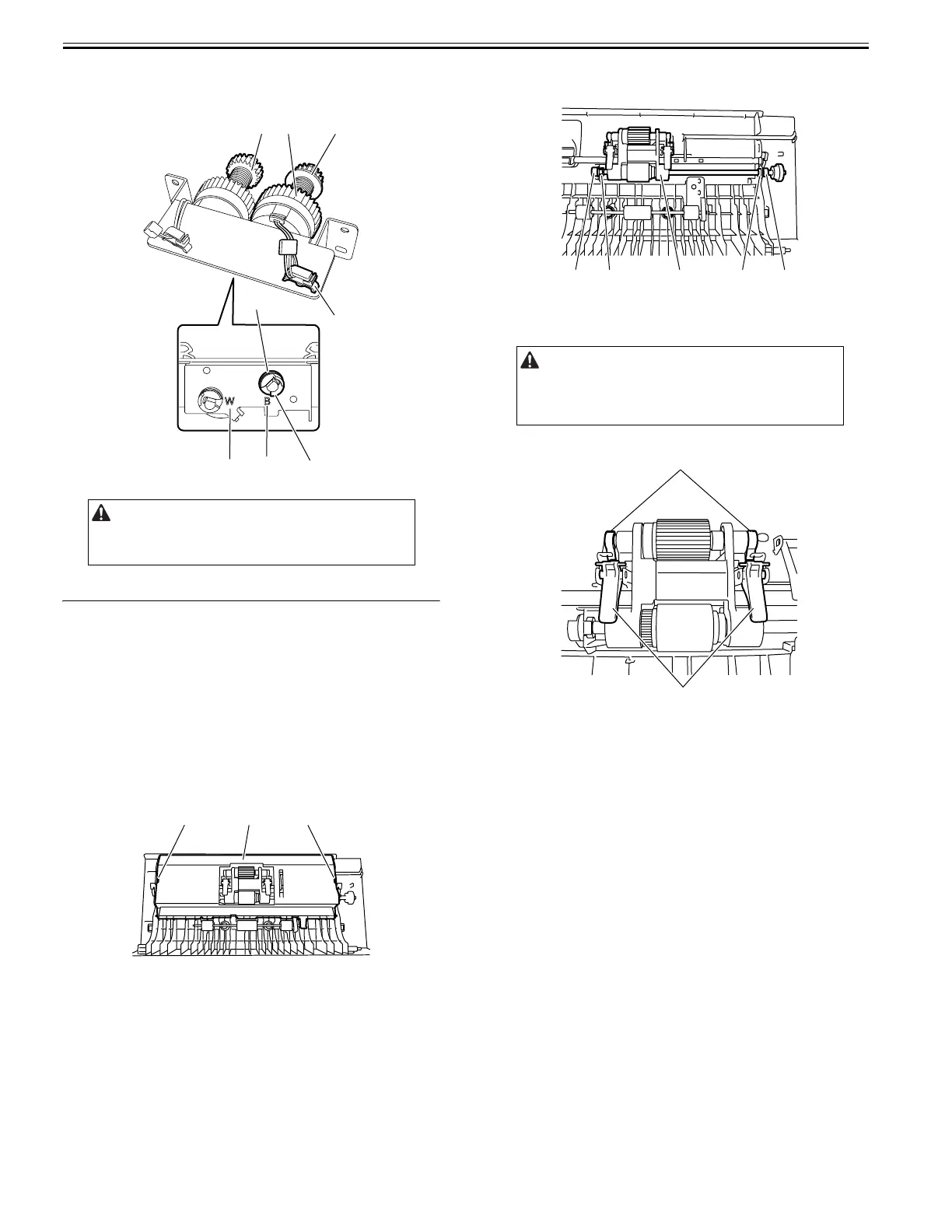
4) Remove the registration clutch [1].
- Harness clamp [2]
- Resin ring [3]
- Bearing [4]
F-4-15
4.4 Document Feeding System
4.4.1 Pickup Roller Unit
4.4.1.1 Removing the Pickup Roller Unit
0024-7017
1) Open the feeder cover.
2) Open the ADF.
3) Detach the front cover.
- Screw, 3 pcs.
4) Close the ADF.
5) Remove the feeder cover.
- Screw, 1 pc.
- Positioning pin
6) Remove the inner cover [1] from the feeder cover.
- Hook [2], 2 pcs.
F-4-16
7) Remove the pickup roller unit [1].
- Resin ring [2], 2 pcs.
- Bearing [3], 2 pcs.
F-4-17
4.4.1.2 Precaution about Pickup Roller Unit Installation
0024-7018
F-4-18
4.4.2 Pickup Roller/Separation Roller
4.4.2.1 Removing the Pickup Roller/Feed Roller
0024-7019
1) Open the feeder cover.
2) Open the ADF.
3) Detach the front cover.
- Screw, 3 pcs.
4) Close the ADF.
5) Remove the feeder cover.
- Screw, 1 pc.
- Positioning pin
6) Remove the inner cover from the feeder cover.
- Hook, 2 pcs.
7) Remove the pickup roller unit.
- Resin ring, 2 pcs.
- Bearing] , 2 pcs.
Install the registration clutch with the clutch gear [5] (black) aligned
with the mark "B" on the clutch support plate.
Install the pickup clutch with the gear [6] (white) aligned with the mark
"W" (white) on the clutch support plate.
[5]
[2]
[4]
[3]
[1][6]
WB
[2] [1] [2]
- Install the pickup roller unit with the stopper arm [1] positioned at the
front as shown.
- Install the pickup roller unit with the stopper [2] positioned at the rear as
shown.
[2] [3] [1] [3] [2]
[1]
[2]





 To Next Page