Chapter 2
2-5
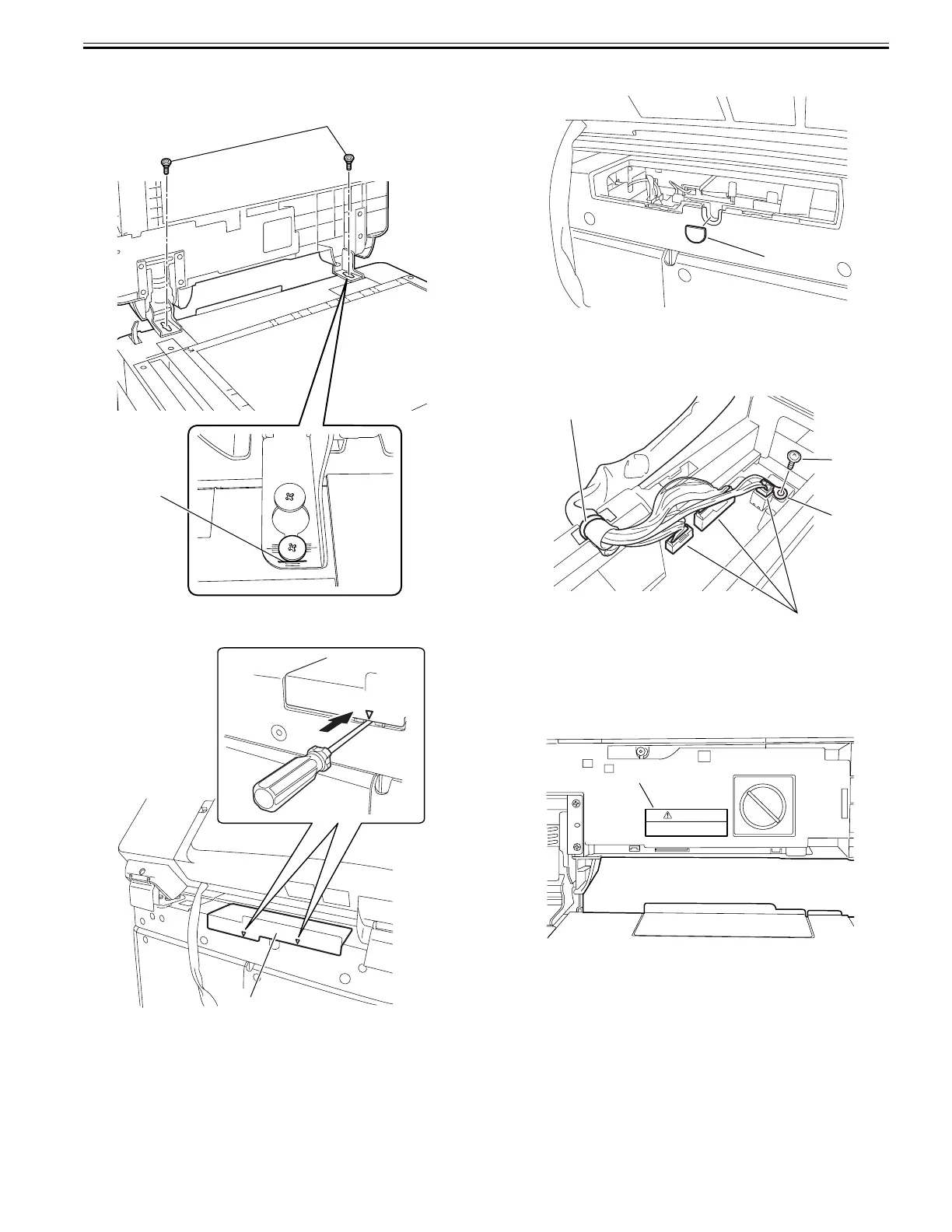
5) Secure the hinges with the supplied 2 stepped screws (M4X10) [1]. Secure
the right hinge with the screw aligning the edge of the screw with the
mark-off line (long) [2].
F-2-12
6) Insert the flat-bladed screwdriver to the triangle mark of the cover to re-
move the reader rear small cover [1].
F-2-13
7) Peel off the blind sheet [1] from the reader rear cover. (The blind sheet is
no longer necessary.)
F-2-14
8) Connect the three connectors [1] to the reader controller PCB, and then
secure the ground cable [2] using the supplied binding screw (M3X6) [3].
9) Install the DADF harness so that the cable tie [4] fits in the groove of the
reader rear cover.
F-2-15
10) Attach the reader rear small cover detached in step 6). (One screw)
2.2.4 Affixing Labels
0024-4923
1) Open the DADF.
2) Attach the supplied finger pinch caution label 2 [1] of the appropriate lan-
guage, if necessary.
F-2-16
[1]
[2]
[1]
[1]
[4]
[1]
[2]
[3]
CAUTION
To avoid injury, do not place your hands
or fingers in this space.
[1]







 To Next Page