Chapter 2
2-3
2.2 Installation Procedure
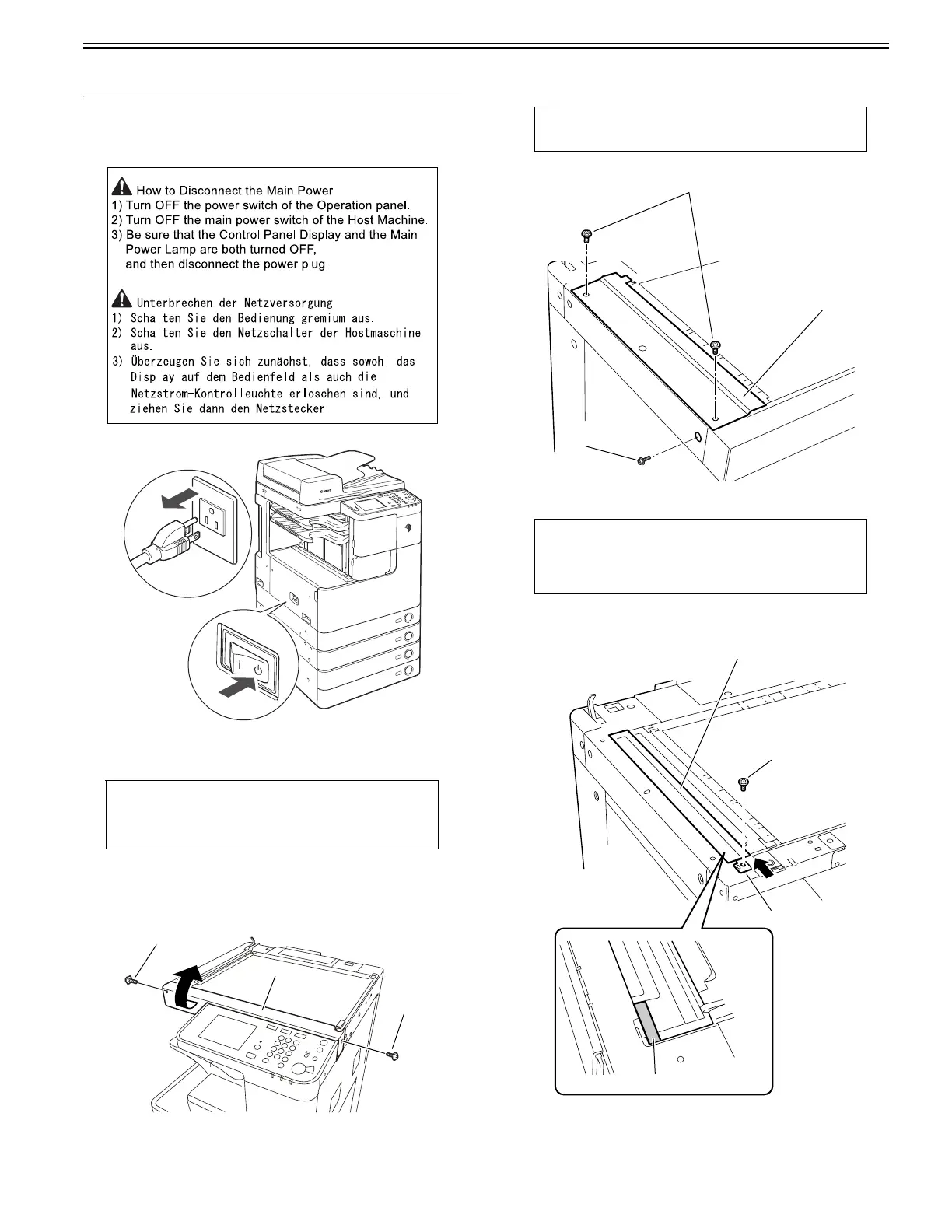
2.2.1 Points to Note When Turning OFF the power of Host
Machine
0024-3812
F-2-2
F-2-3
2.2.2 Installing the Stream Reading Glass
0024-4921
1) When the host machine is equipped with the copyboard cover, detach the
copyboard cover.
2) Remove the 2 screws [1] to detach the reader front cover [2].
F-2-4
3) Remove the screw [1] retaining the front side of the reader left cover. Re-
move the 2 flat-head screws [2] to detach the reader upper left cover [3].
(The removed reader upper left cover is no longer necessary.)
F-2-5
4) Mount the supplied stream reading glass [1].
5) Mount the supplied glass posotioning plate [3] with the supplied flat-head
screw [4] pressing it against the stream reading glass.
F-2-6
CAUTION:
Installation precautions are as follows.
- Be careful not to allow foreign objects to enter the reader unit.
- Do not stain the back side of the stream reading glass.
[1]
[1]
[2]
MEMO:
The removed flat-head screws will be used later.
CAUTION:
Mount the stream reading glass so that the sheet material affixed to the back
side of the glass comes in the left side (so that the sheet material comes in
contact with the reader frame).
[2]
[3]
[1]
[1]
[3]
[2]
[4]





 To Next Page