Chapter 4
4-16
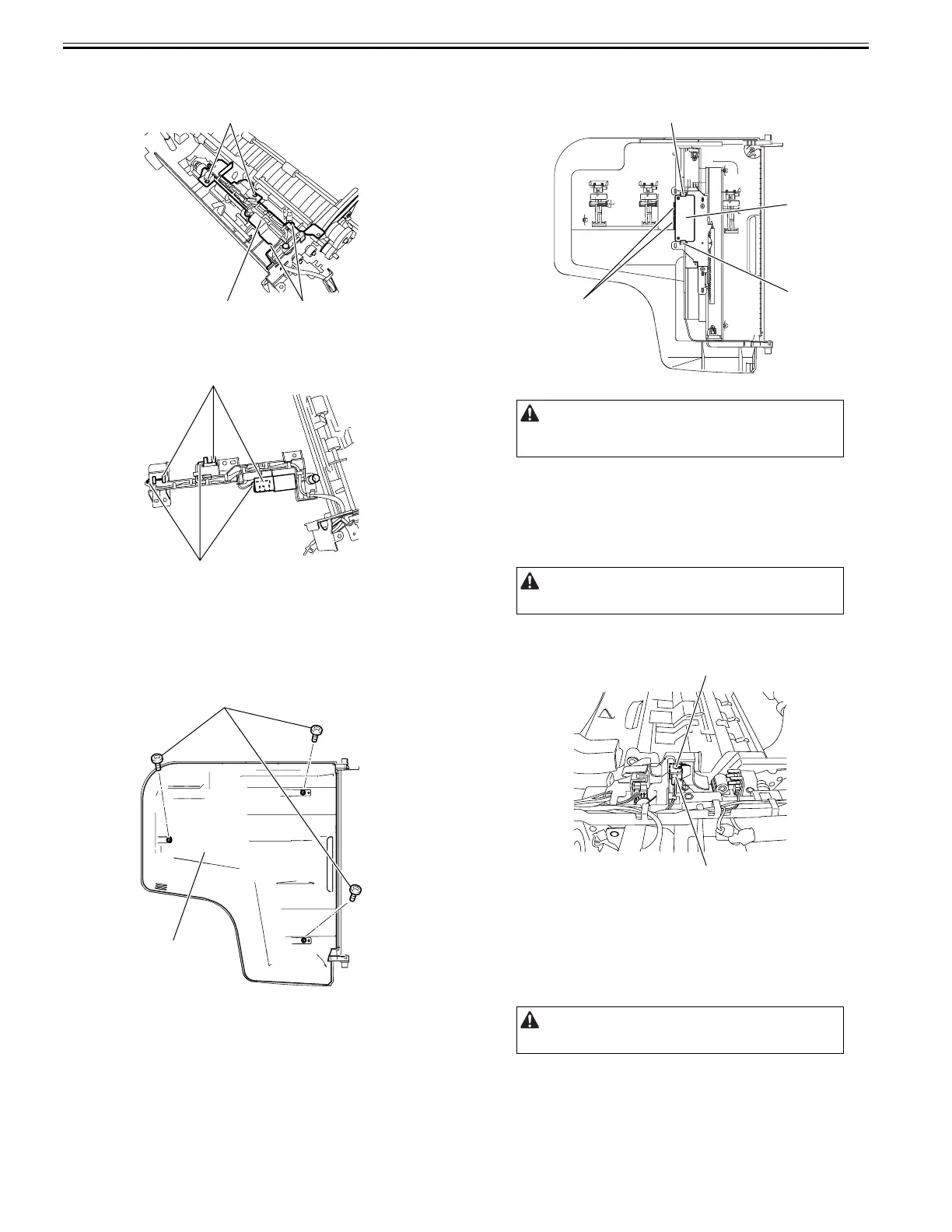
21) Remove the sensor mount [1].
- Screw [2], 2 pcs.
- Hook [3], 2 pcs.
F-4-66
22) Remove the sensor [1].
- Connector [2]
F-4-67
4.5.3 Document Width Volume
4.5.3.1 Removing the Relay PCB
0024-7033
1) Detach the cover [2] on the reverse side of the document tray.
- Screw [1], 3 pcs.
F-4-68
2) Remove the Relay PCB [1].
- Fook [2], 2 pcs.
- Connector [3], 2 pcs.
F-4-69
4.5.4 Cover Open/Closed Sensor
4.5.4.1 Removing the Cover Open/Closed Sensor
0024-7034
1) Open the feeder cover.
2) Move to the back of the host machine and detach the rear cover.
- Screw, 2 pcs.
3) Remove the cover open/closed sensor [1].
- Connector [2]
F-4-70
4.5.5 Document Set Sensor
4.5.5.1 Removing the Document Set Sensor
0024-7035
1) Open the feeder cover.
2) Move to the back of the host machine and detach the rear cover.
- Screw, 2 pcs.
[2]
[3]
[1]
[1]
[2]
[1]
[2]
Install the document width volume with its lower gear groove [4]
fitting on the projection [5] on the document tray side. Be sure to install it
with the arrow on the gear aligned with the arrow [6] on the tray cover.
Remove the rear cover with the two claws released.
Remove the rear cover with the two claws released.
[1]
[3]
[2]
[2]
[1]
[2]





 To Next Page