Image Playback
You
can select any captured image to view.
You
can view a single
image, the shooting information,
an
index display, or a magnified view.
I
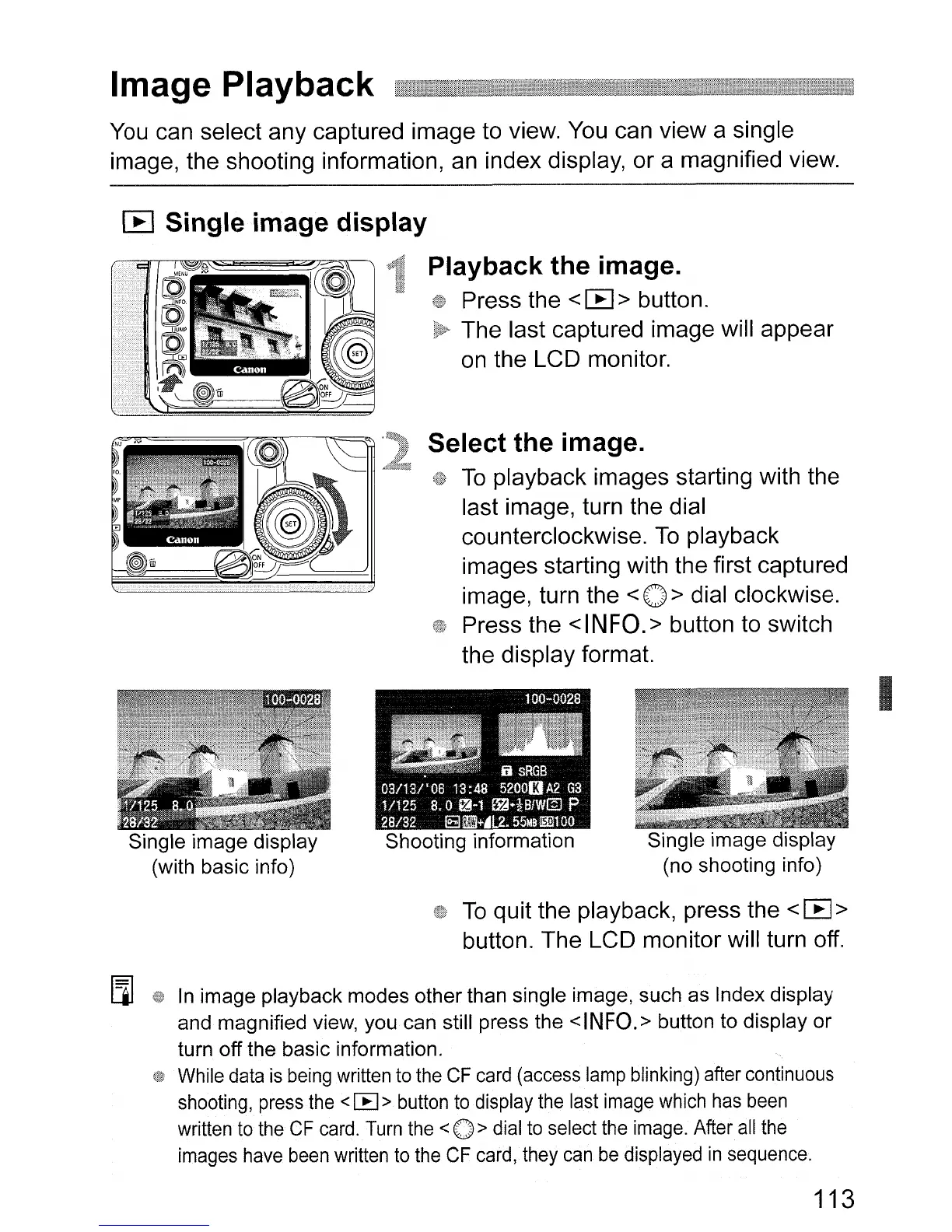
Single image display
(no shooting info)
Select the image.
To
playback images starting with the
last image, turn the dial
counterclockwise.
To
playback
images starting with the first captured
image, turn the
< 0 > dial clockwise.
Press the
<INFO.>
button to switch
the display format.
Single image display
(with basic info)
[E]
Single image display
Playback the image.
Press the <
I:E
> button.
The last captured image will appear
on
the LCD monitor.
To
quit the playback, press the <
I:E
>
button. The LCD monitor will turn off.
[]]
In
image playback modes other than single image, such as Index display
and magnified view, you can still press the
<INFO.>
button to display or
turn off the basic information.
While
data
is
being
written
to
the
CF
card
(access
lamp
blinking)
after
continuous
shooting,
press
the
< [EI>
button
to
display
the
last
image
which
has
been
written
to
the
CF
card.
Turn
the
<
0>
dial
to
select
the
image.
After
all
the
images
have
been
written
to
the
CF
card,
they
can
be
displayed
in
sequence.
113




 To Next Page