WB
Setting the White Balance *
Normally, the <
~
> setting will set the optimum white balance
automatically. If natural-looking colors cannot
be
obtained with <
~
>,
you
can
set the white balance manually to suit the respective light source.
In
the Basic Zone modes,
<~>
will
be
set automatically.
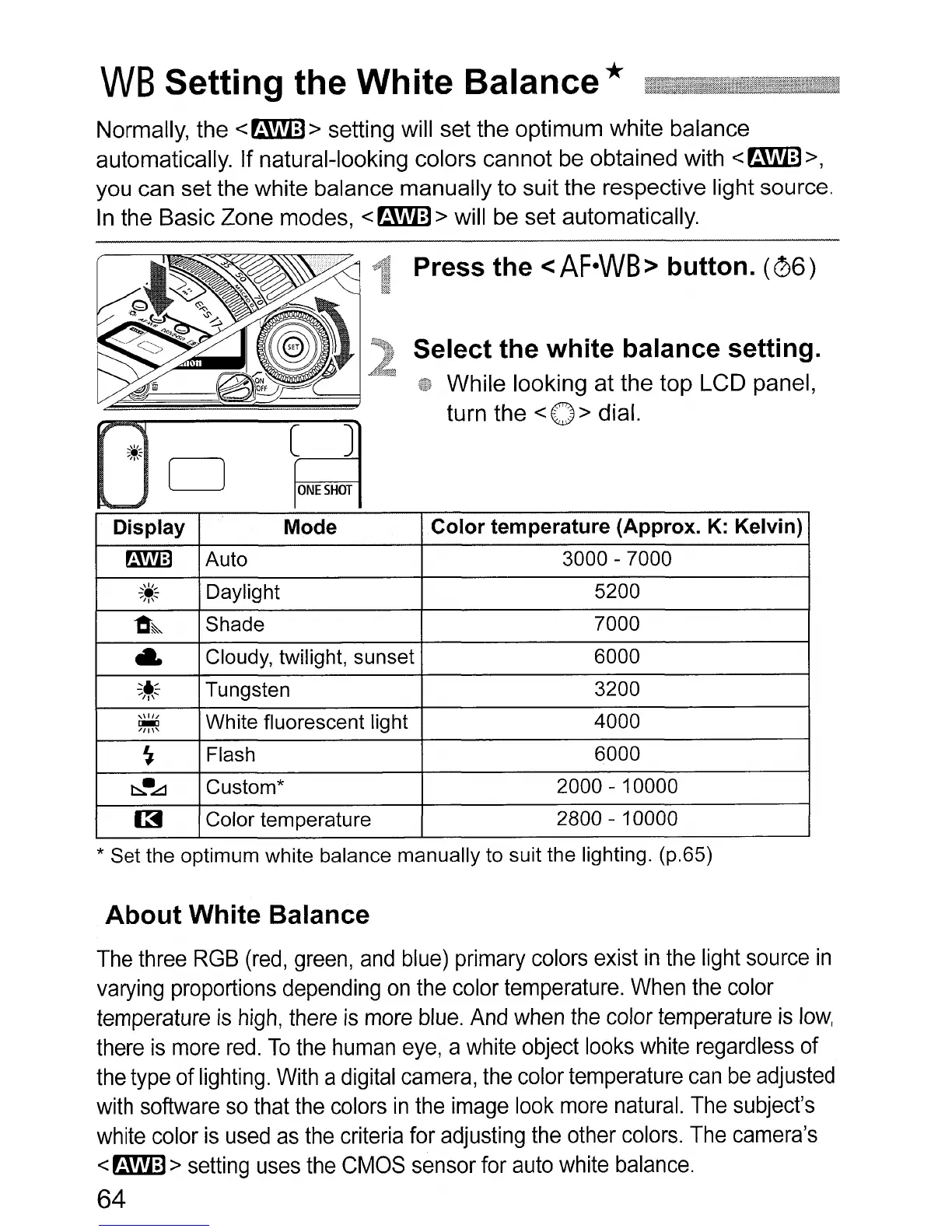
Press
the
<AF·WB>
button.
(06)
Select the
white
balance setting.
While looking at the top LCD panel,
turn the
<0 > dial
[3
[ J
0
~
Display
Mode
Color
temperature (Approx. K: Kelvin)
~
Auto 3000 - 7000
~~~
Daylight 5200
~~
Shade 7000
..
Cloudy, twilight, sunset 6000
~~~
Tungsten 3200
,\1//
White fluorescent light 4000
~
~
Flash
6000
t::::..
•
.o:::::l
Custom* 2000 - 10000
~
Color temperature
2800 - 10000
* Set the optimum white balance manually to suit the lighting. (p.65)
About
White Balance
The
three
RGB
(red,
green,
and
blue)
primary
colors
exist
in
the
light
source
in
varying
proportions
depending
on
the
color
temperature.
When
the
color
temperature
is
high,
there
is
more
blue.
And
when
the
color
temperature
is
low,
there
is
more
red.
To
the
human
eye,
a
white
object
looks
white
regardless
of
the
type
of
lighting.
With
a
digital
camera,
the
color
temperature
can
be
adjusted
with
software
so
that
the
colors
in
the
image
look
more
natural.
The
subject's
white
color
is
used
as
the
criteria
for
adjusting
the
other
colors.
The
camera's
<
~
>
setting
uses
the
CMOS
sensor
for
auto
white
balance.
64












 To Next Page