Installing and Removing the CF Card
The captured image will be recorded onto the CF card (optional).
Although the thickness
is
different, a Type I or Type
II
CF card can
be
inserted into the camera. The camera is also compatible with Microdrive
and CF cards with 2 GB or higher capacity.
Installing
the
Card
CF card
eject button
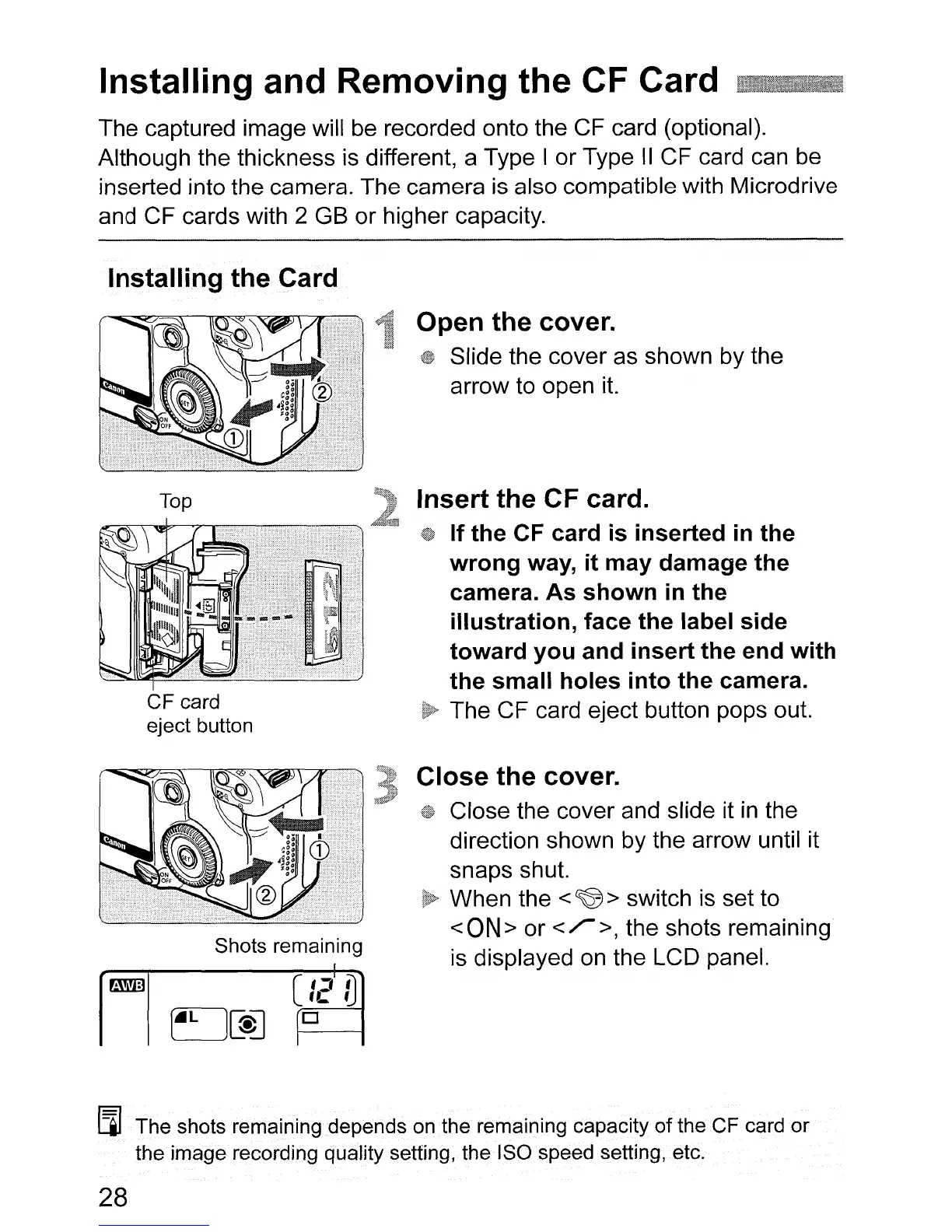
Open
the
cover.
Slide the cover as shown by the
arrow to open
it.
Insert
the CF card.
If
the
CF
card
is
inserted
in the
wrong
way,
it
may
damage
the
camera.
As
shown
in
the
illustration,
face
the
label
side
toward
you
and
insert
the
end
with
the
small
holes
into
the
camera.
The CF card eject button pops out.
Shots remaining
C
'J
i)
U:
fJ
D
Close the cover.
Close the cover and slide it
in
the
direction shown by the arrow until it
snaps shut.
When the
<
~
> switch
is
set to
<
ON
> or < r >, the shots remaining
is displayed
on
the LCD panel.
[i] .The shots remaining depends on
the
remaining capacity
of
the
CF
card or
the
image
recording quality setting, the ISO speed setting, etc.
28












 To Next Page