~Q:-
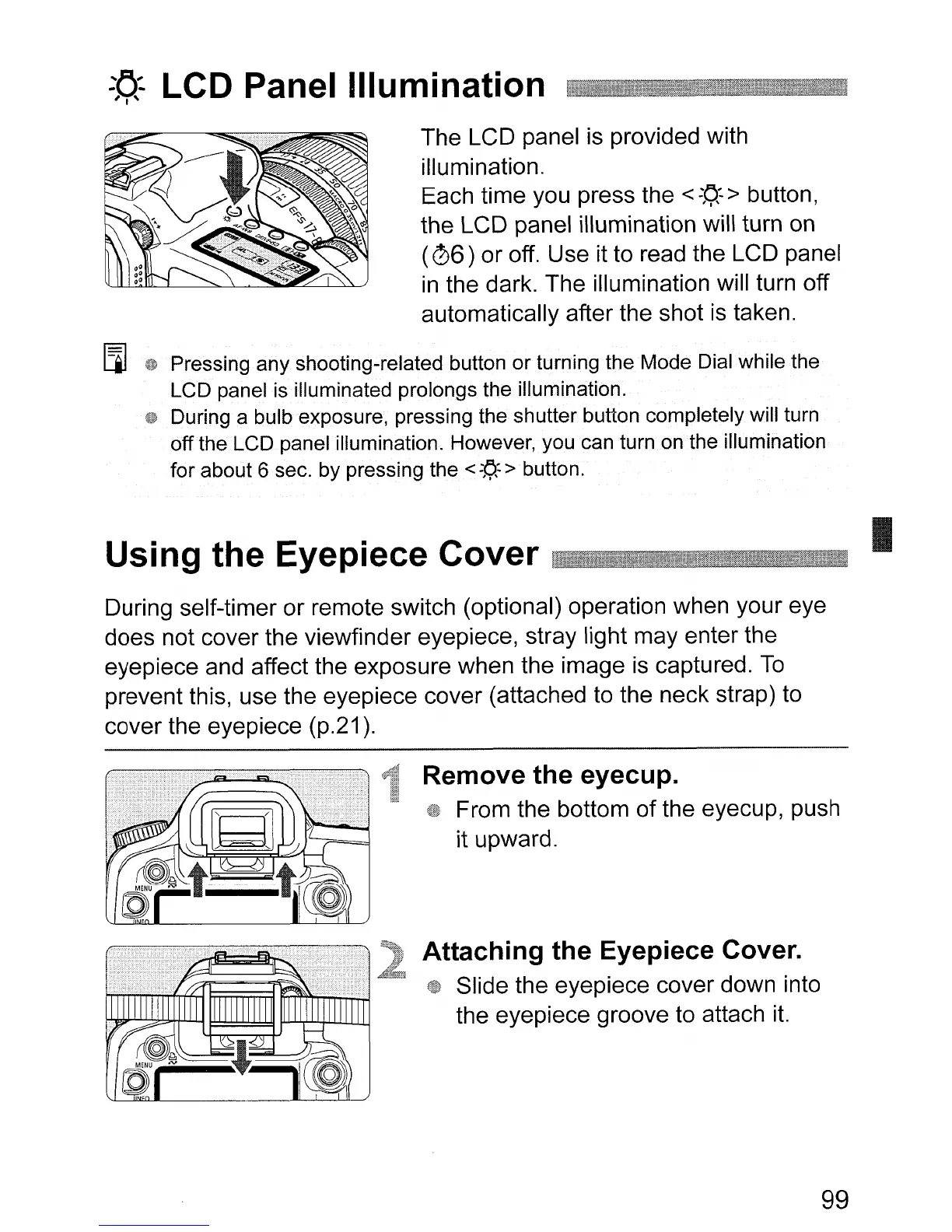
LCD Panel Illumination
The LCD panel
is
provided with
illumination.
Each time you press the
<
::t;r·
> button,
the LCD panel illumination will turn on
(
06)
or off. Use it to read the LCD panel
in
the dark. The illumination will turn off
automatically after the shot
is
taken.
[l]
40
Pressing any shooting-related button or turning the Mode Dial while
the
LCD panel
is
illuminated prolongs the illumination.
During a bulb exposure, pressing the shutter button completely will turn
off
the
LCD panel illumination. However,you can turn on the illumination
for about 6 sec. by pressing the
<
fl.:
> button.
Using the Eyepiece Cover , .
During self-timer or remote switch (optional) operation when your eye
does not cover the viewfinder eyepiece, stray light may enter the
eyepiece and affect the exposure when the image
is
captured.
To
prevent this, use the eyepiece cover (attached to the neck strap) to
cover the eyepiece (p.21).
I
Remove the eyecup.
From the bottom of the eyecup, push
it upward.
Attaching the Eyepiece Cover.
Slide the eyepiece cover down into
the eyepiece groove to attach
it.
99












 To Next Page