Setting the Image-recording Quality
The.
L/'"
L/.
M/'"
MI.
51'" 5 modes record the image
in
the
widely-used JPEG.
In
the
ImWj
mode, the captured image will require
post-processing with the software provided. The
ImWj
+.
L/+'" L/
+.
M/+'"
M/+.
5/+'"
5 (RAW+ JPEG) modes simultaneously
record the image
in
both RAW and JPEG images to the CF card with a
single shot. Note that
in
the Basic Zone modes, RAW or RAW+JPEG
cannot be set.
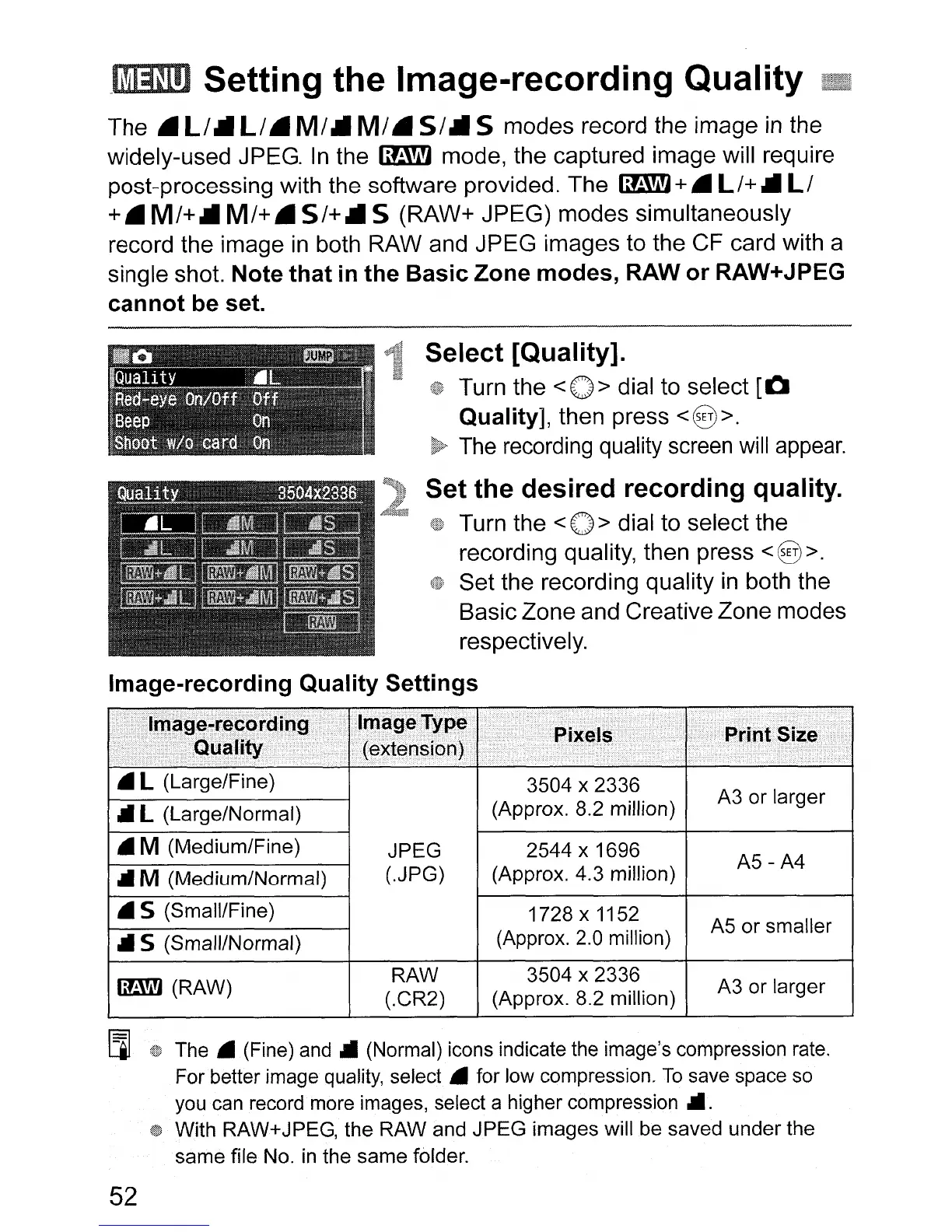
Select [Quality].
Turn the
<0>
dial to select
[0
Quality], then press < § >.
The
recording quality
screen
will
appear.
Set the desired recording quality.
Turn the < 0 > dial to select the
recording quality, then press
<§
>.
Set the recording quality
in
both the
Basic Zone and Creative Zone modes
respectively.
Image-recording Quality Settings
..............................
)
............
.•.•••••.....
<)
• L (Large/Fine)
3504 x 2336
A3 or larger
.II
L (Large/Normal)
(Approx. 8.2 million)
• M (Medium/Fine)
JPEG 2544 x 1696
A5-A4
.II
M (Medium/Normal)
(.JPG) (Approx. 4.3 million)
.5
(Small/Fine)
1728 x 1152
A5 or smaller
.II
5 (Small/Normal)
(Approx.
2.0
million)
~(RAW)
RAW 3504 x 2336
A3 or larger
(.CR2)
(Approx. 8.2 million)
[l]
The.
(Fine)
and"
(Normal) icons indicate
the
image's compression
rate.
For better image quality,
select.
for low compression.
To
save space
so
you
can
record more images, select a higher
compression".
With RAW+JPEG, the RAW and JPEG images will
be
saved under the
same file No.
in
the same folder.
52












 To Next Page