~
Setting the Image-recording Quality
iWp
.
IT
.....
CTfillimmmmWS
"
JWIIRIiU.JlMI!i
Image
File
Size
and
CF
Card
Capacity
According
to
Image-Recording
Quality
.L 3.6
.ilL 1.8
.M
2.2
.11M
1.1
.liS 0.6
1imm+.IIL
1imm+.IIM
1imm+.IIS
Iimm
8.7
133
267
225
442
392
761
39
45
44
49
48
51
55
I
€1
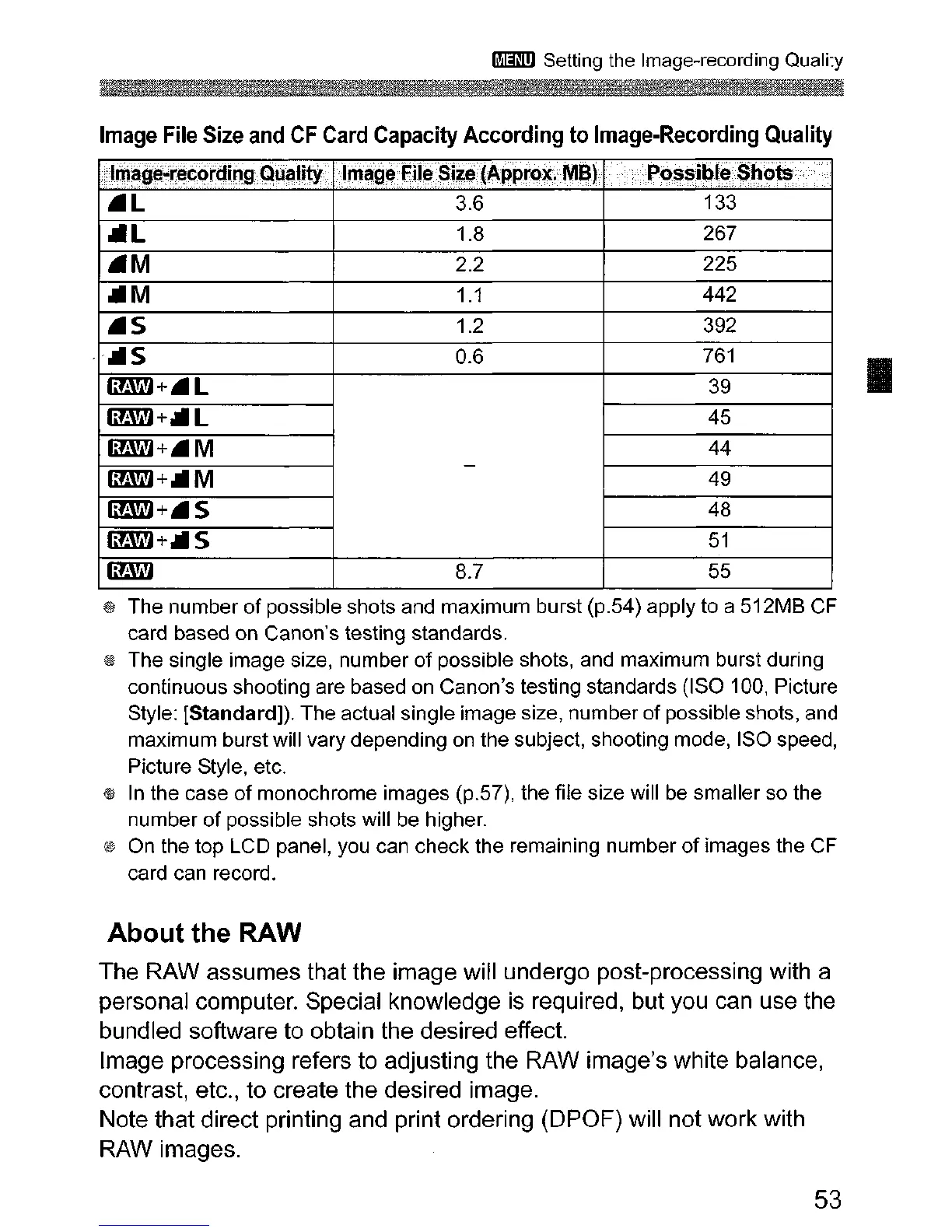
The number
of
possible shots and maximum burst (p.54) apply to a 512MB
CF
card based on Canon's testing standards.
@ The single image size, number
of
possible shots, and maximum burst during
continuous shooting are based on Canon's testing standards (ISO 100, Picture
Style: [Standard)).
The
actual single image size, number
of
possible shots, and
maximum burst will vary depending on the subject, shooting mode, ISO speed,
Picture Style, etc.
1&
In the case
of
monochrome images (p.57), the file size will be smaller so the
number
of
possible shots will be higher.
® On the top LCD panel, you can check the remaining number
of
images the
CF
card can record.
About the RAW
The RAW assumes that the image will undergo post-processing with a
personal computer. Special knowledge
is
required, but you can use the
bundled software to obtain the desired effect.
Image processing refers to adjusting the RAW image's white balance,
contrast, etc., to create the desired image.
Note that direct printing and print ordering (DPOF) will not work with
RAW images.
53












 To Next Page