[~J
Selecting the Metering Mode*
Four metering modes are provided: Evaluative, partial, spot, and
center-weighted average metering.
In
the Basic Zone modes,
evaluative metering will
be
set automatically.
I
Press the
<[~}~>
button.
(06)
Select the metering mode.
While looking at the LCD panel, turn
the
<B>
dial.
[$J:
Evaluative metering
[oJ:
Partial metering
[eJ:
Spot metering
[J:
Center-weighted average
metering
[$J
Evaluative metering
This
is
the camera's standard metering mode suited for most
subjects even under backlit conditions. After detecting the
main subject's position, brightness, background, front
and
back lighting, etc., the camera sets the proper exposure.
[oJ
Partial metering
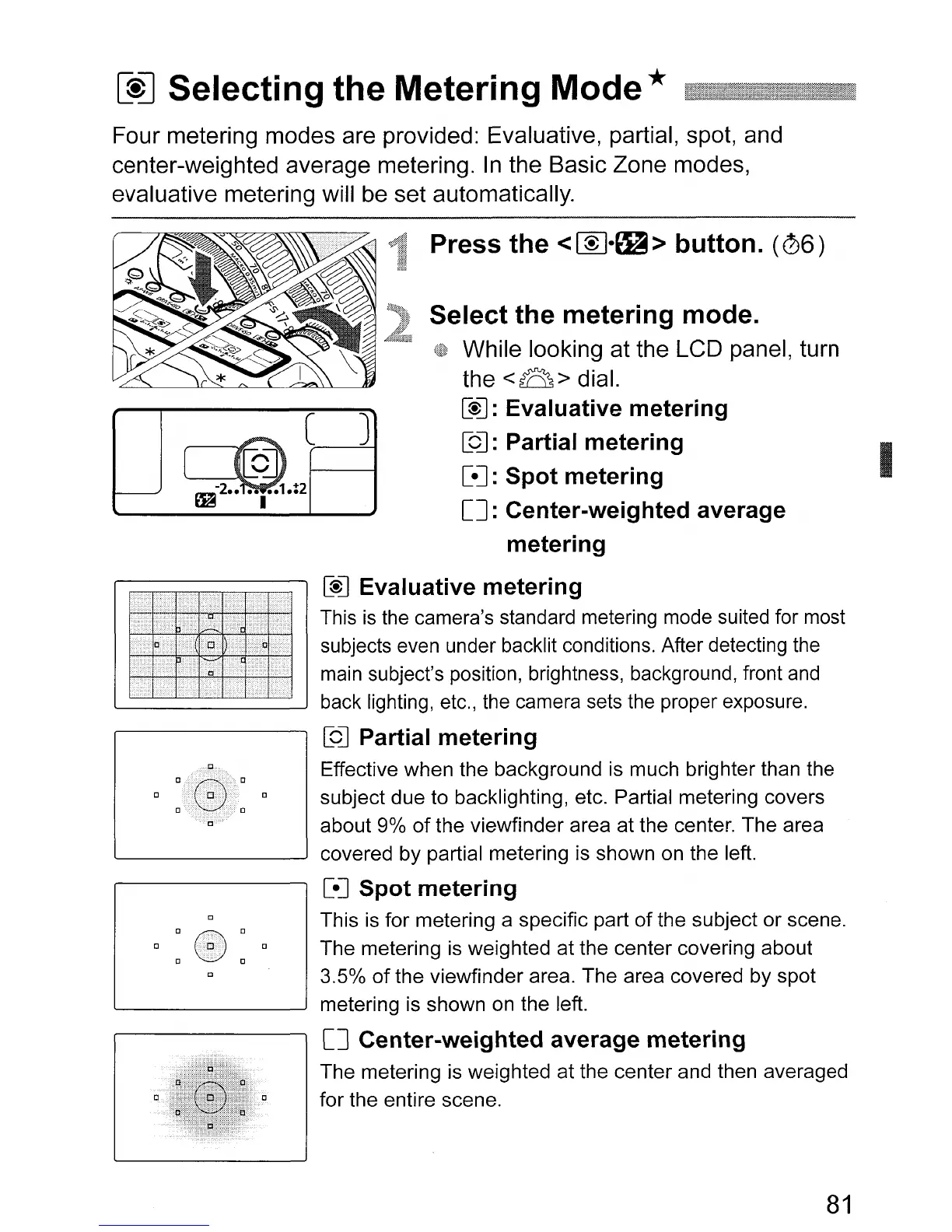
Effective when the background is much brighter than the
subject due to backlighting, etc. Partial metering covers
about 9%
of
the viewfinder area at the center. The area
'------------'
covered by partial metering is shown on the left.
[eJ Spot metering
This
is
for metering a specific part
of
the subject or scene.
The metering
is
weighted at the center covering about
3.5%
of
the viewfinder area. The area covered by spot
metering is shown
on
the left.
[J
Center-weighted average metering
The metering is weighted at the center and then averaged
for the entire scene.
81












 To Next Page