Menu Operations
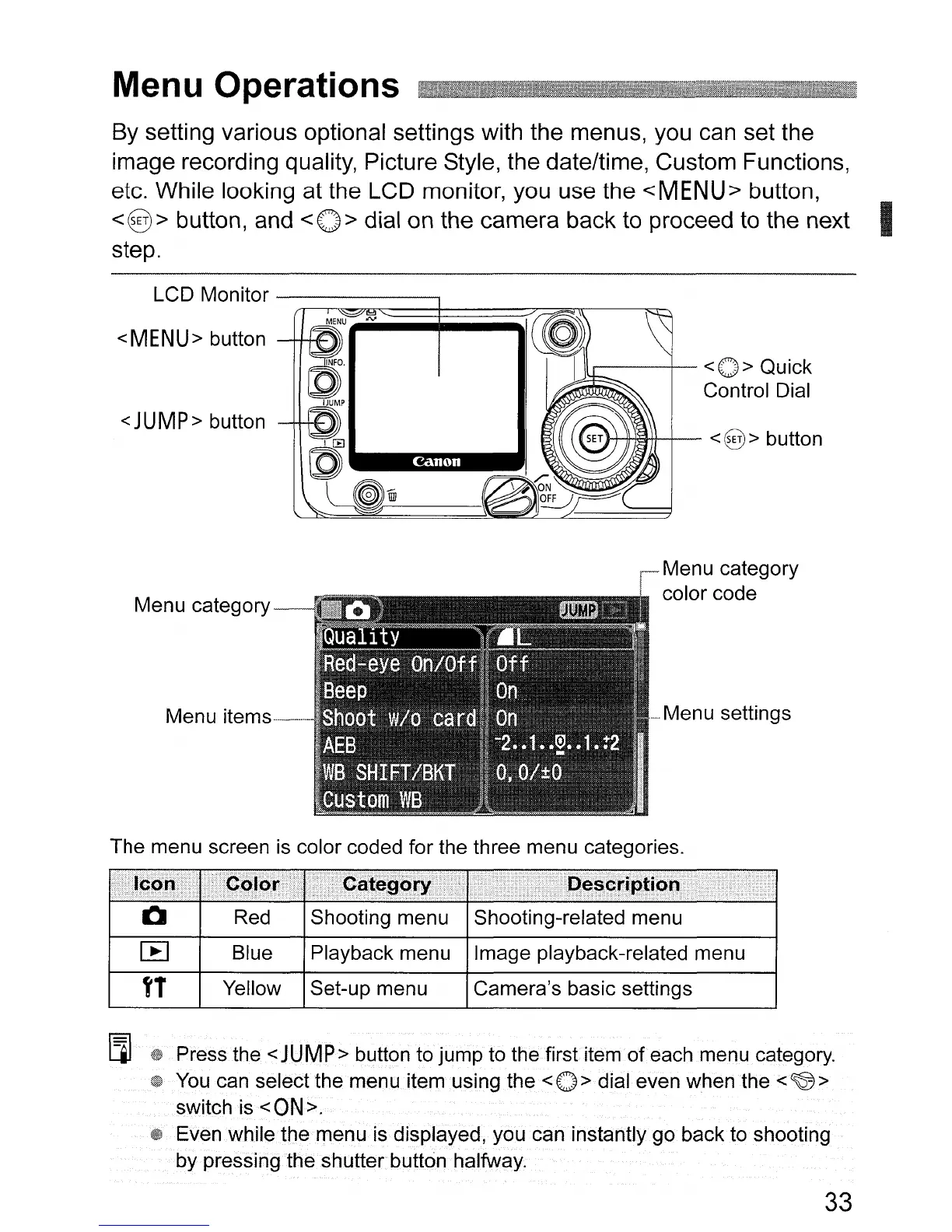
By setting various optional settings with the menus, you can set the
image recording quality, Picture Style, the date/time, Custom Functions,
etc. While looking at the LCD monitor, you use the
<MENU>
button,
<8>
button, and
<0>
dial on the camera back to proceed to the next I
step.
LCD Monitor
---------,
<MENU> button
<JUMP> button
Menu category
Menu
items-----
1Ir----+__
<0>
Quick
Control Dial
<@>
button
Menu category
color code
--
Menu settings
The menu screen
is
color coded for the three menu categories.
I"§¥l
LjJ
tD
Press the <JUMP> button to jump to
thefirstitem
of
each menu category.
w
You
can select the menu
itemusingthe<O>
dial even when
the
<~>
switch·
is
<ON>.
t»
Even while
the
menu
is
displayed, you can instantly go back to shooting
by pressing the·shutterbutton .halfway.
33












 To Next Page