o
Using
Full
Auto
All you
do
is point the camera and press the
shutter
button
for
quick and
easy
shooting. With nine
AF
points to focus the subject, anyone can
easily take nice pictures.
Set
the
Mode
Dial
to
<0>.
Automatically, the
AF
mode
will be set
to
<AI
FOCUS>,
the drive
mode
will
be
set
to <0 >, and the metering
mode
will be set to
<[@J>.
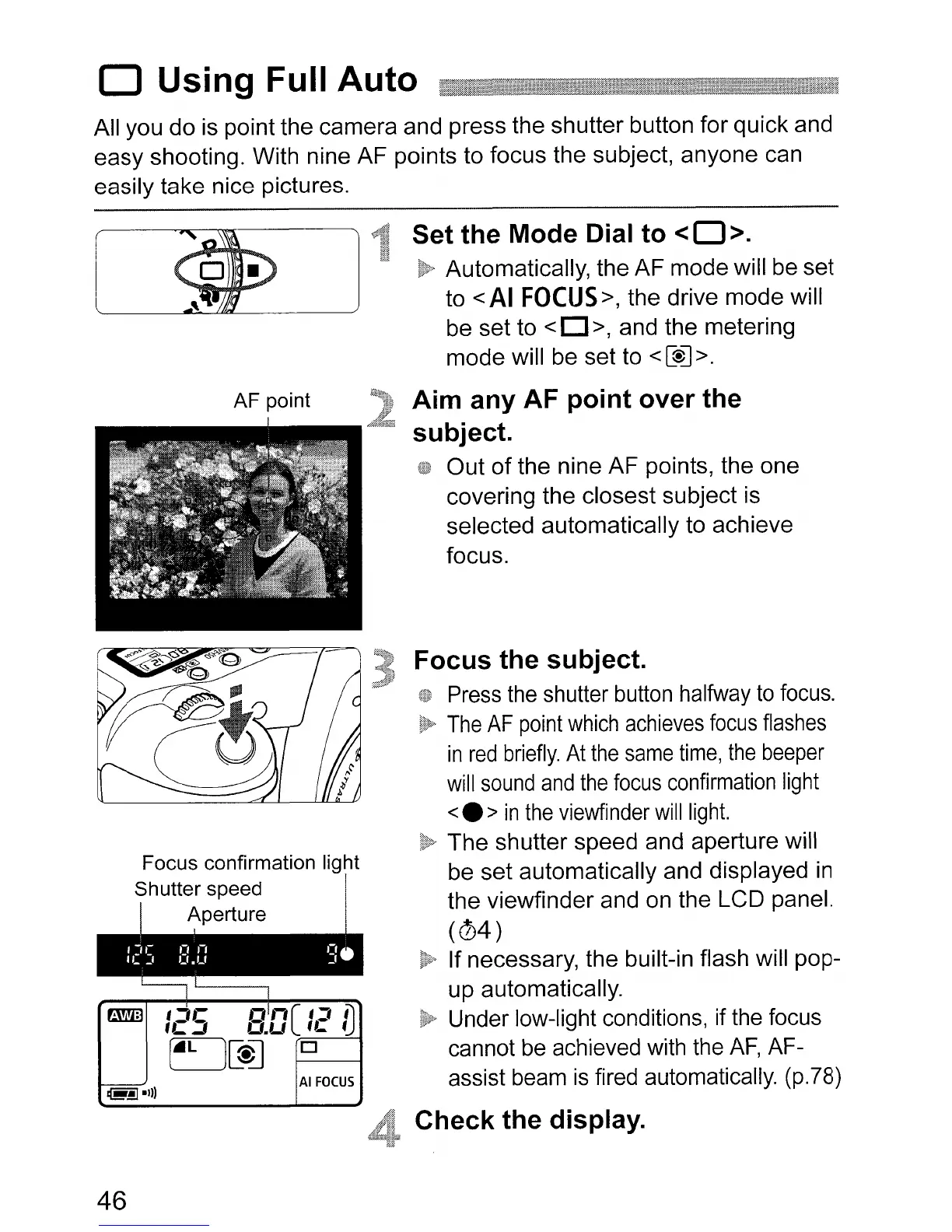
Aim
any
AF
point
over
the
subject.
Out
of
the nine
AF
points, the one
covering the closest subject is
selected automatically to achieve
focus.
Focus
the
subject.
Press the shutter button halfway
to
focus.
The
AF
point
which
achieves
focus
flashes
in
red
briefly.
At
the
same
time,
the
beeper
will
sound
and
the
focus
confirmation
light
<.
>
in
the
viewfinder
will
light.
The
shutter speed and aperture will
be
set
automatically and displayed in
the viewfinder and on the LCD panel.
(04)
If necessary, the built-in flash will pop-
up automatically.
Under low-light conditions, if the focus
cannot be achieved with the
AF,
AF-
assist beam
is
fired automatically. (p.78)
Check
the
display.
46












 To Next Page