AF
Selecting the AF Mode*
The AF mode
is
the autofocusing operation method. Three AF modes
are provided. One-Shot AF
is
suited for still subjects, while
AI
Servo AF
is
for moving subjects. And
AI
Focus AF switches from One-Shot AF to
AI
Servo AF automatically if the still subject starts moving.
In
the Basic
Zone modes, the optimum AF mode
is
set automatically.
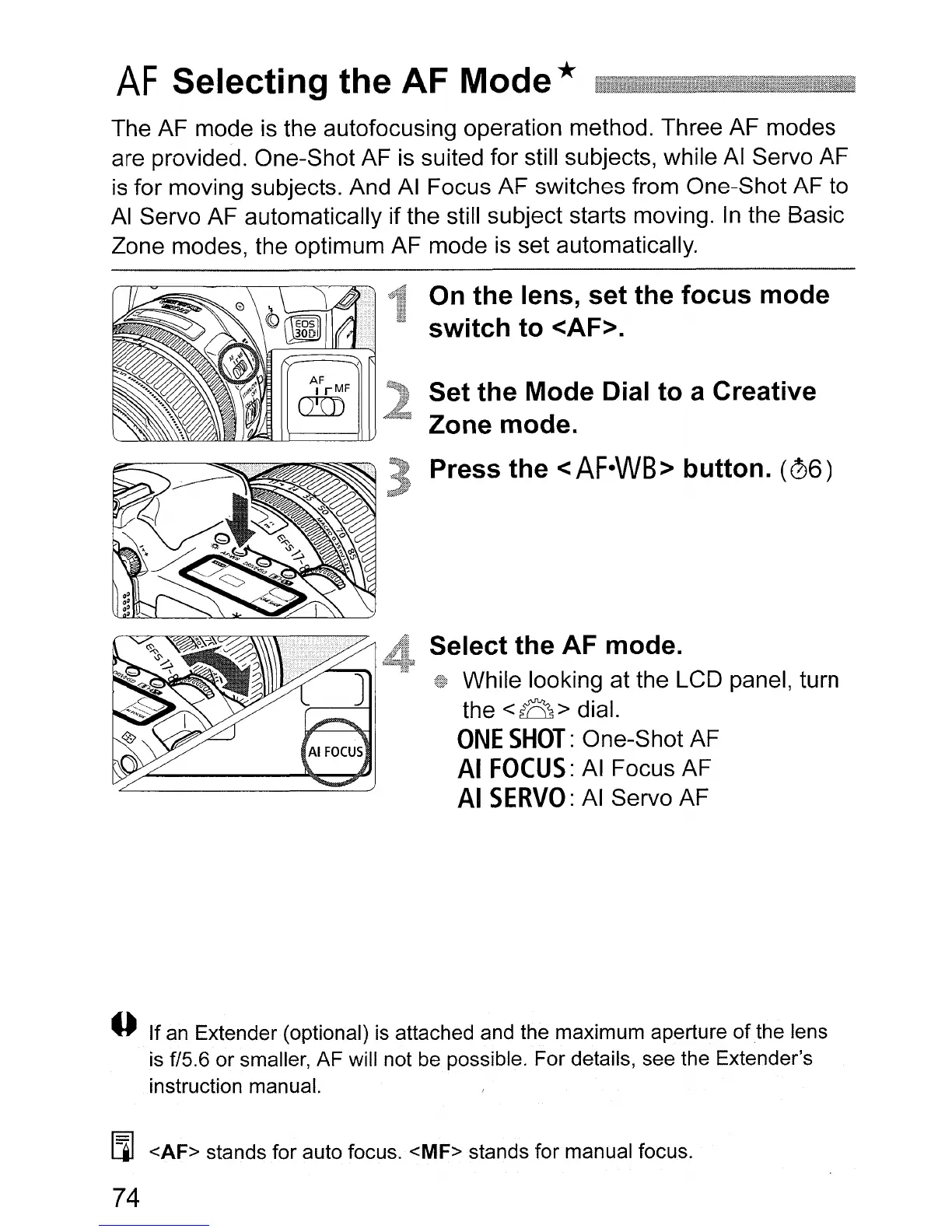
On
the lens, set the focus mode
switch to <AF>.
Set the Mode Dial to a Creative
Zone mode.
Press the
<AF·WB>
button.
(06)
Select the AF mode.
While looking at the LCD panel, turn
the
<8>
dial.
ONE
SHOT:
One-Shot AF
AI
FOCUS:
AI
Focus AF
AI
SERVO:
AI
Servo AF
o If an Extender (optional) is attached and the maximum aperture
of
the
lens
is
f/5.6 or smaller, AF will not be possible. For details, see the Extender's
instruction manual.
[i] <AF> stands for auto focus. <MF> stands for manual focus.
74












 To Next Page