Customizing the Picture Style *
You
can customize the Picture Style by changing the individual
parameters like
[Sharpness] and [Contrast].
To
customize
[Monochrome], see page
59.
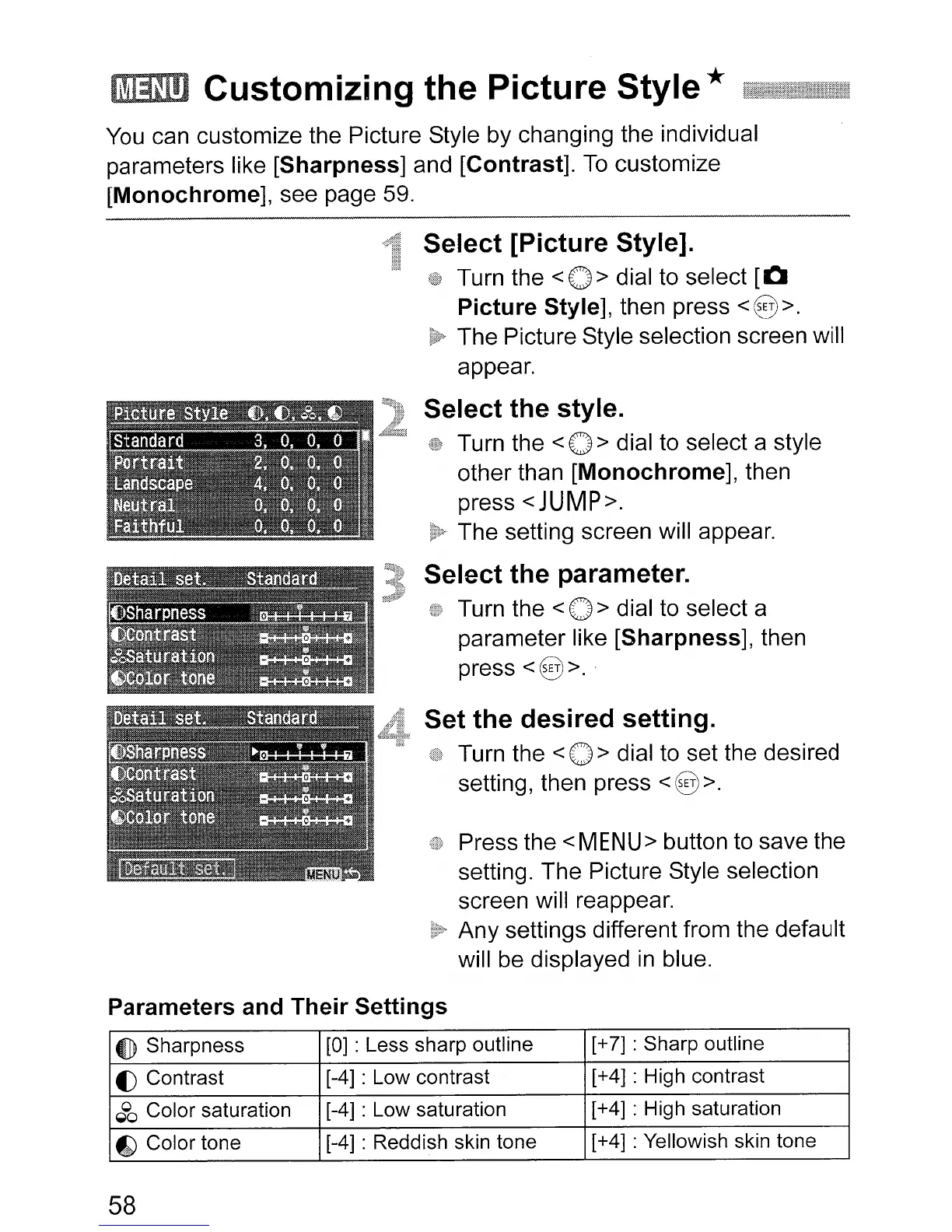
Select [Picture Style].
Turn the <0 > dial to select
[0
Picture Style], then press
<8>.
The Picture Style selection screen will
appear.
Select the style.
Turn the < 0 > dial to select a style
other than
[Monochrome], then
press
<JUMP>.
The setting screen will appear.
Select the parameter.
Turn the < 0 > dial to select a
parameter like
[Sharpness], then
press
<8>.
Set the desired setting.
Turn the <0 > dial to set the desired
setting, then press
<8
>.
Press the
<MENU>
button to save the
setting. The Picture Style selection
screen will reappear.
Any settings different from the default
will
be
displayed
in
blue.
Parameters and Their Settings
4])
Sharpness
[0]
: Less sharp outline
[+
7]
: Sharp outline
f)
Contrast [-4] : Low contrast [+4] : High contrast
~oo
Color saturation
[-4] : Low saturation [+4] : High saturation
fk)
Color tone [-4] : Reddish skin tone [+4] : Yellowish skin tone
58












 To Next Page