Setting the Date and Time
Set the date and time
as
shown below.
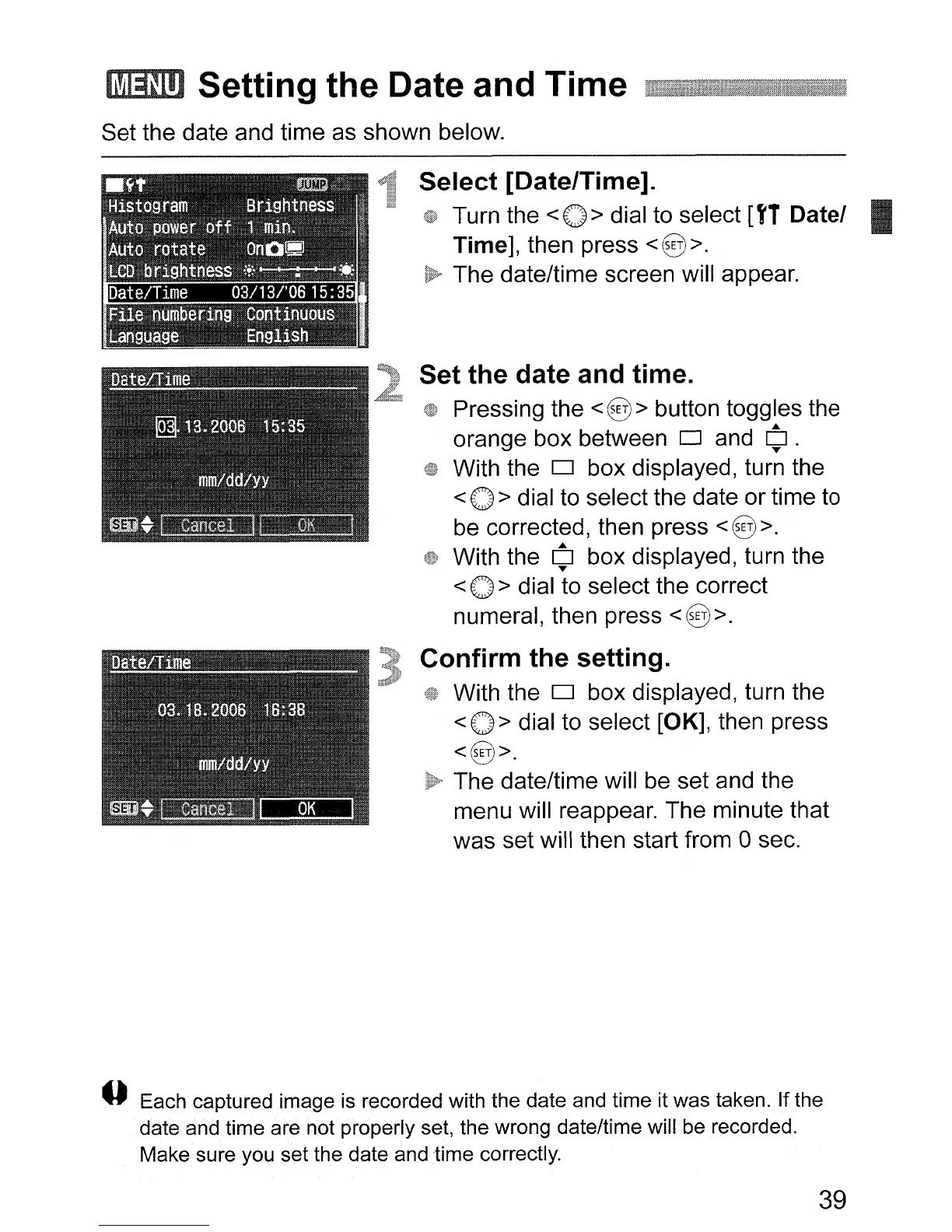
Select [Date/Time].
Turn the < 0 > dial to select
[fT
Datel
Time], then press
<§>.
The date/time screen will appear.
Set the date and time.
Pressing the <@> button toggles the
orange box between
0 and
¢.
With the 0 box displayed, turn the
< 0 > dial to select the date or time to
be corrected, then press
<§>.
With the ¢ box displayed, turn the
< 0 > dial to select the correct
numeral, then press
<§>.
Confirm the setting.
With the 0 box displayed, turn the
< 0 > dial to select [OK], then press
<§>.
The date/time will be set and the
menu will reappear. The minute that
was set will then start from 0 sec.
o Each captured image
is
recorded with the date and time it was taken. If the
date and time are not properly set, the wrong date/time will be recorded.
Make sure you set the date and time correctly.
39












 To Next Page