~
Self-timer Operation
Use the self-timer when you want
to
be
in
the picture.
You
can use self-
timer
in
any Basic Zone mode or Creative Zone mode.
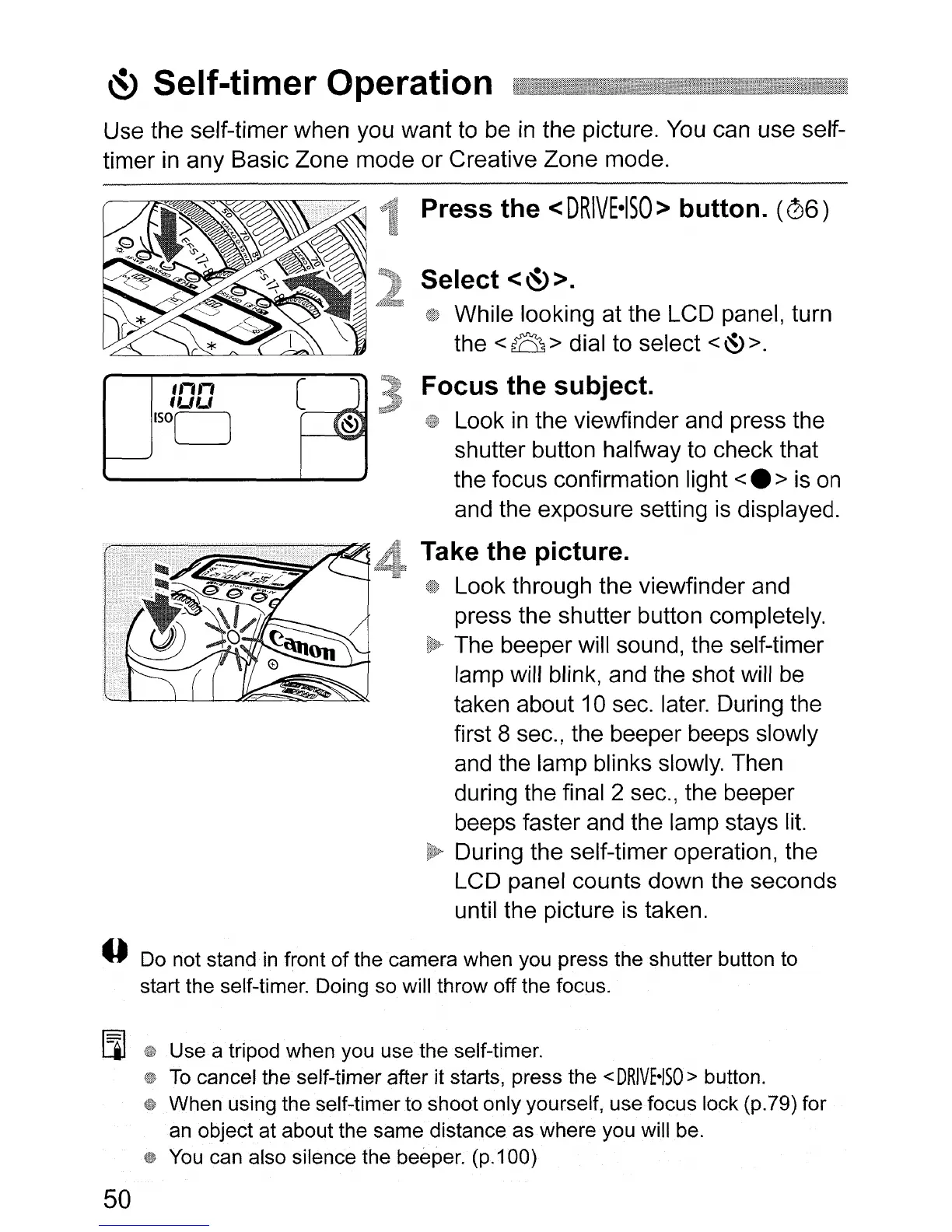
Press the <
DRIVE-ISO>
button.
(06)
Select
<~>.
While looking at the LCD panel, turn
the
<B>
dial to select
<&>.
Focus the subject.
Look
in
the viewfinder and press the
shutter button halfway
to
check that
the focus confirmation light
<.
>
is
on
and the exposure setting
is
displayed.
Take the picture.
Look through the viewfinder and
press the shutter button completely.
The beeper will sound, the self-timer
lamp will blink, and the shot will
be
taken about 10 sec. later. During the
first 8 sec., the beeper beeps slowly
and the lamp blinks slowly. Then
during the final 2 sec., the beeper
beeps faster and the lamp stays
lit.
During the self-timer operation, the
LCD panel counts down the seconds
until the picture
is
taken.
o Do not stand
in
front
of
the camera when you press the shutter button to
start the self-timer. Doing so will throw off the focus.
[J]
Use a tripod when you use the self-timer.
To
cancel the self-timer after it starts, press the
<DRIVE-ISO>
button.
When using the self-timer to shoot only yourself, use focus lock (p.79) for
an object at about the same distance as where you will be.
You
can also silence the beeper.
(p.i00)
50












 To Next Page