Setting Exposure Compensation *
Exposure
compensation
is
used
to
alter
the
standard
exposure
setting
set
by
the
camera.
You
can
make
the
image
look
lighter
(increased
exposure)
or
darker
(decreased
exposure).
You
can
set
the
exposure
compensation
up
to
±2
stops
in
1/3-stop
increments.
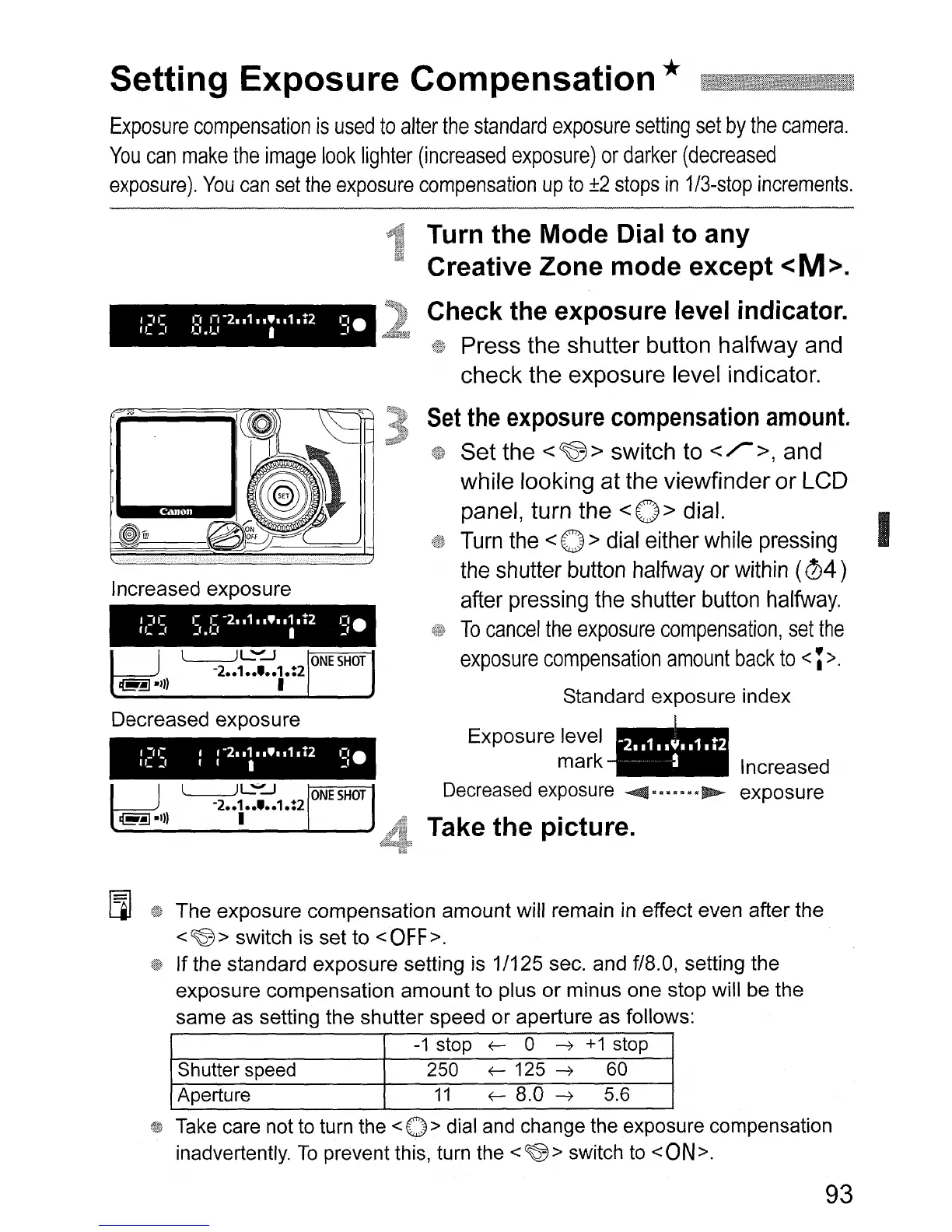
Increased
exposure
~
L-JL~-J
L:l
-2
..
1
..
'
..
1.:2
~.I})
I
Decreased
exposure
Turn the Mode Dial to any
Creative Zone mode except
<M>.
Check the exposure level indicator.
Press the shutter button halfway and
check the exposure level indicator.
Set
the
exposure
compensation
amount.
Set the
<~>
switch to
</>,
and
while looking at the viewfinder or LCD
panel, turn the
<0 > dial.
Turn
the
<
0>
dial
either
while
pressing
I
the
shutter
button
halfway
or
within
(04
)
after
pressing
the
shutter
button
halfway.
To
cancel
the
exposure
compensation,
set
the
exposure
compensation
amount
back
to
<;
>.
Standard
exposure
index
Exposure
level
-'--
mark
__
Increased
Decreased exposure
~
~
exposure
Take the picture.
[iI
The
exposure
compensation
amount
will remain in effect
even
after
the
<~>
switch is set
to
<OFF>.
If
the
standard
exposure
setting is 1/125 sec.
and
f/8.0, setting
the
exposure
compensation
amount
to
plus
or
minus
one
stop
will
be
the
same
as
setting
the
shutter
speed
or
aperture
as
follows:
-1
stop
f-
0 --7
+1
stop
Shutter speed 250
f-
125 --7
60
Aperture
11
f-
8.0 --7 5.6
Take care not to turn the
<0 > dial and change the exposure compensation
inadvertently.
To
prevent this, turn the
<~>
switch to
<ON>.
93












 To Next Page