348
Protecting images
Protecting All Images in a Folder or on a Card
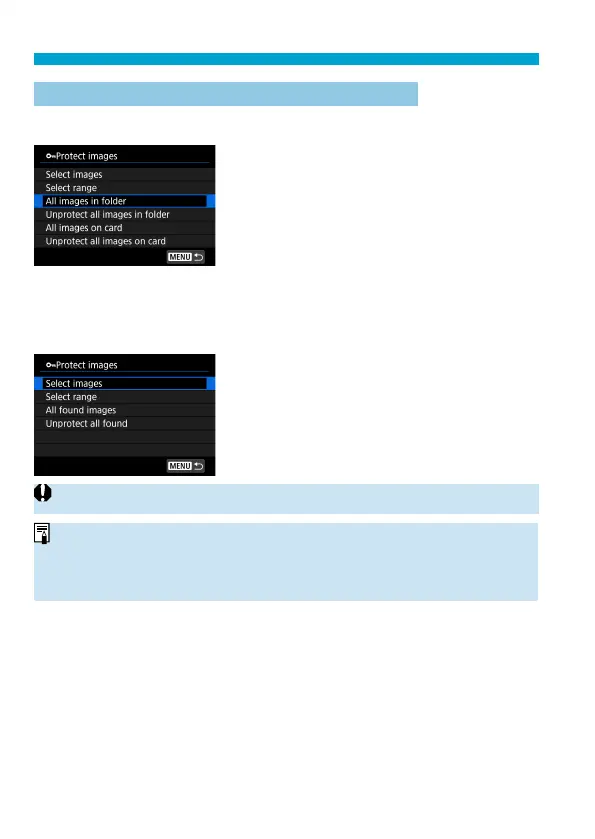
You can protect all the images in a folder or on a card at once.
When you select [All images in folder]
or [All images on card] in [
3
: Protect
images], all the images in the folder or on
the card will be protected.
To cancel the selection, select [Unprotect
all images in folder] or [Unprotect all
images on card].
If the search conditions are set with [
3
: Set image search conditions]
(
=
385), the display will change to [All found images] and [Unprotect all
found].
If you select [All found images], all the
images fi ltered by the search conditions will
be protected.
If you select [Unprotect all found], the
protection of all the fi ltered images will be
canceled.
o
If you format the card (
=
511), the protected images will also be erased.
o
Once an image is protected, it cannot be erased by the camera’s erase
function. To erase a protected image, you must fi rst cancel the protection.
o
If you erase all the images (
=
353), only the protected images will remain.
This is convenient when you want to erase all unnecessary images at once.



 To Next Page