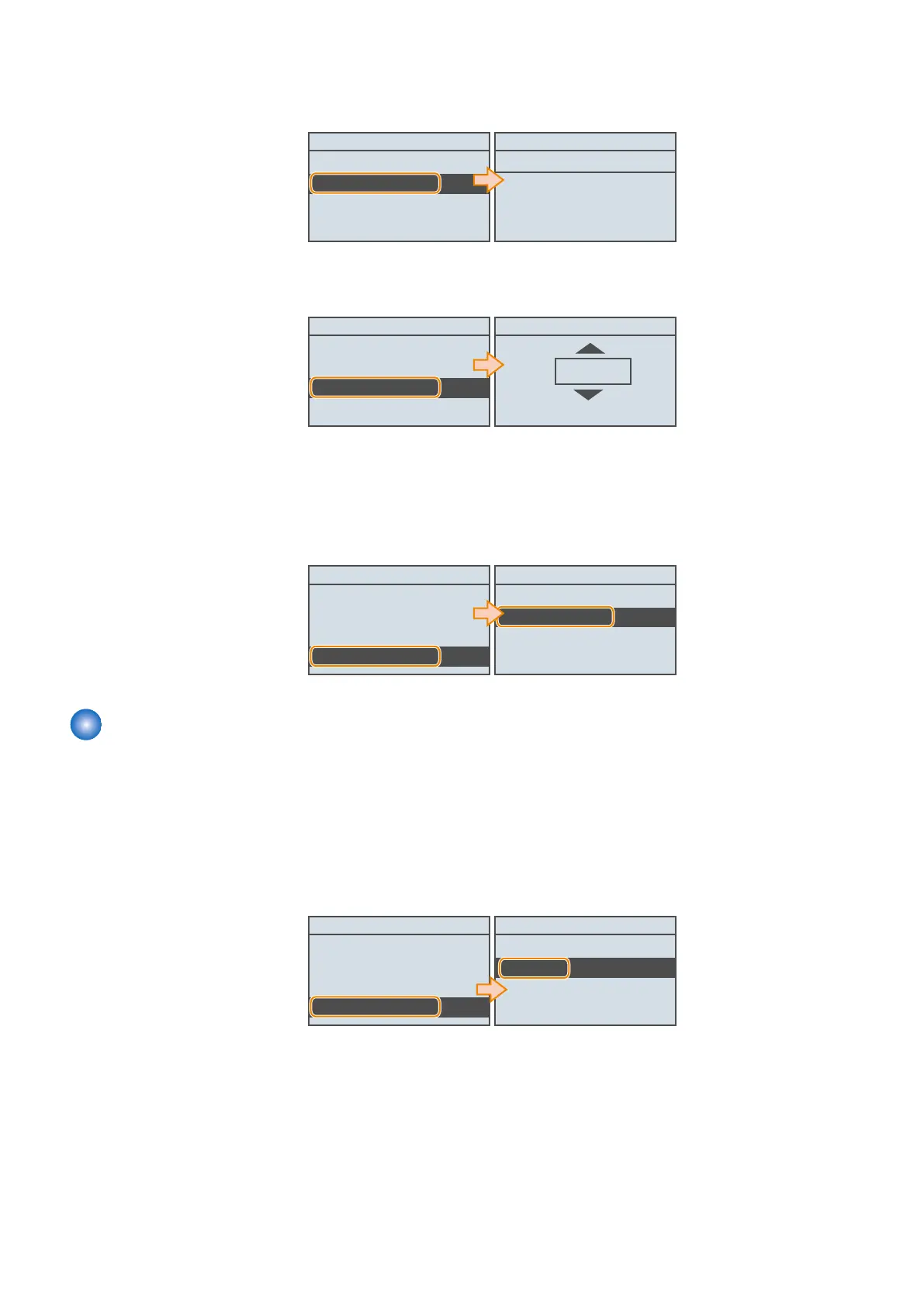
1. Open the following service mode, and confirm that the URL for accessing UGW is set correctly. If the correct URL
is not set, set it.
• SERVICE MODE > NETWORK GR.> E-RDS > RGW-ADDRESS
E-RDS
E-RDS SWITCH
RGW-ADDRESS
RGW-PORT
COM-TEST
RGW-ADDRESS
https://b01.ugwdevice.net/u
fix : OK key
Entry Mode: a
2. Open the following service mode, and confirm the port number used when communicating with the UGW server. If
the correct number is not set, set it.
• SERVICE MODE > NETWORK GR.> E-RDS > RGW-PORT
E-RDS
E-RDS SWITCH
RGW-ADDRESS
RGW-PORT
COM-TEST
RGW-PORT
443
(1~65535)
3. Open the following service mode, and set whether to reduce transmission costs for E-RDS data when the power is
turned ON.
• SERVICE MODE > NETWORK GR.> E-RDS > REDUCE SEND NETHOD
4. Execute the following service mode to perform a communication test with the UGW server.
• SERVICE MODE > NETWORK GR.> E-RDS > COM-TEST
E-RDS
E-RDS SWITCH
RGW-ADDRESS
EGW-PORT
COM-TEST
Execute?
No
Yes
Maintenance
■ Initializing E-RDS settings
It is possible to clear the FLASH data of E-RDS and change the E-RDS setting back to the default value.
● Initialization procedure
1. Press [OK] to execute the following service mode to initialize the E-RDS settings.
• NETWORK GR. > E-RDS > CLEAR
E-RDS
RGW-PORT
COM-TEST
COM-LOG
CLEAR
Execute?
No
Yes
● Setting values and data to be initialized
The following E-RDS settings, internal data, and Alarm filtering information are initialized.
• SERVICE MODE > NETWORK GR. > E-RDS > E-RDS SWITCH
• SERVICE MODE > NETWORK GR. > E-RDS > RGW-PORT
• SERVICE MODE > NETWORK GR. > E-RDS > RGW-ADR
• SERVICE MODE > NETWORK GR. > E-RDS > COM-LOG
3. Technical Explanation (System)
98











 To Next Page