Error Codes Not Included in the Error Code List and Remedy for Them
Scenes Where an Error Occurs
When an error code not included in the error code list is displayed, one of the errors shown in the following scenes may have
occurred.
Scenes Where an Error Occurs
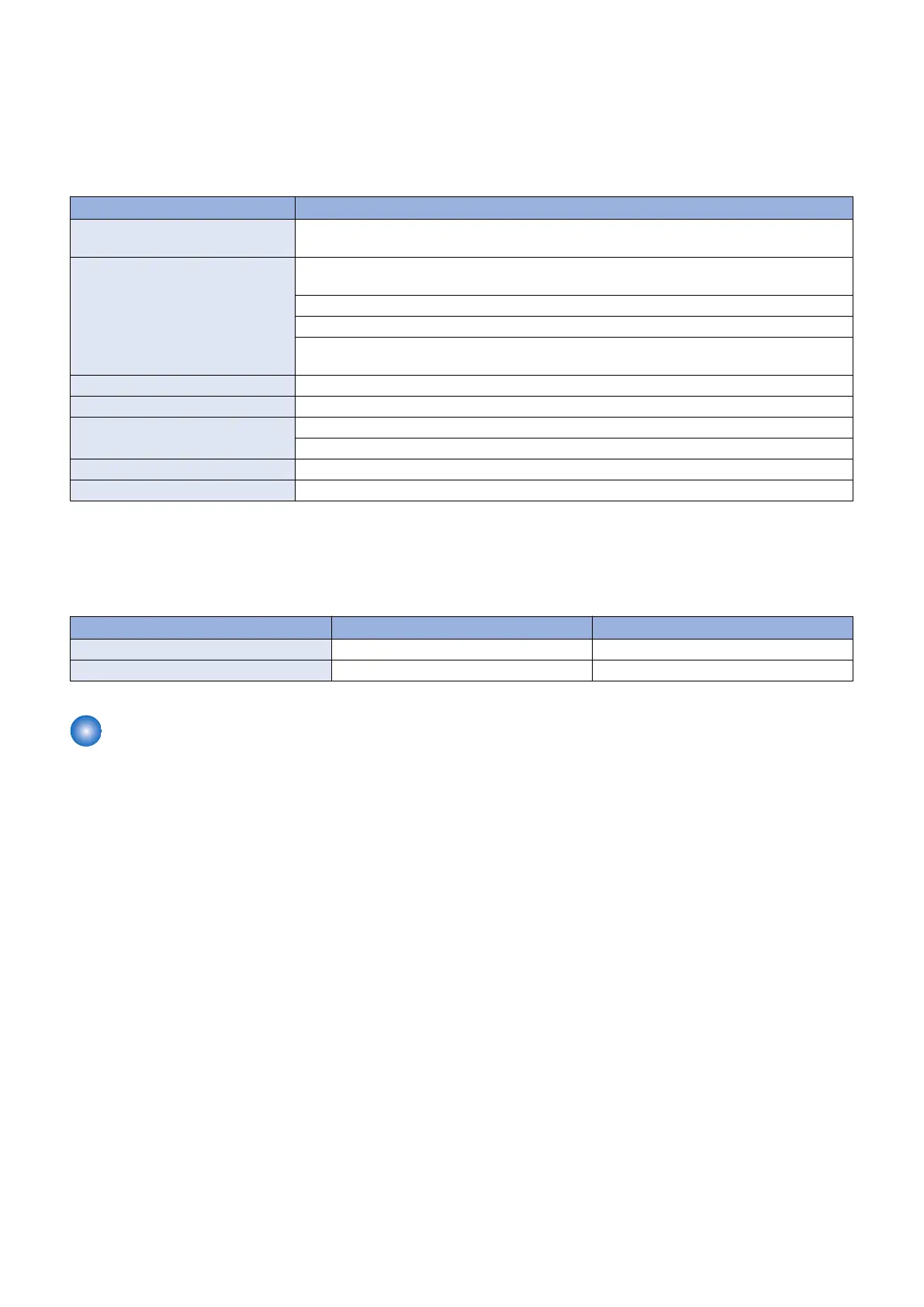
Scenes Where an Error Occurs Content
Communication test, etc. (main
screen)
Log could not be written due to maximum value (capacity/the number of files) being exceeded.
Version information notification (main
screen)
Retrieval of device version information ended in failure because the firmware version of the
device was not registered in CDS.
Connection to the delivery server failed at the time of notification of version information.
The network cable was disconnected during notification of version information.
Notification of version information ended in failure because the device was restarted during no-
tification of version information.
UGW linkage (main screen) UGW linkage was turned ON while eRDS was OFF.
On-site (error dialog) An internal error occurred when obtaining the applicable firmware information.
Immediate download (error dialog) An internal error occurred at the time of request of firmware delivery information.
Free space in the storage destination disk ran out during download. (DiskFull)
Manual/auto update (error dialog) An internal error occurred at start of update.
Deletion of downloaded firmware An internal error occurred at the time of cancellation notification.
Remedy
Check that the log files shown below do not exceed the maximum values.
When this problem recurs, obtain the log, and contact the support department of the sales company.
Logs and maximum capacity / number
Log name Maximum capacity Maximum number of files
Update log 128KB/ file 4
System log 512KB/ file 4
Version Upgrade Using a USB Flash Drive
Connect a USB flash drive where the firmware is stored to this machine, and update the firmware in service mode.
■ Prerequisite
In order to perform version upgrade of the machine using a USB flash drive, the following conditions must be met.
There should be no other jobs being executed.
Firmware cannot be upgraded while there is a job being executed. If there is a job being executed, wait for completion of the
job and then perform the work.
3. Technical Explanation (System)
78










 To Next Page