Ver 58 of MEAP Specifications supports this service.
The collected logs can be downloaded or deleted in user mode.
The settings such as the log level to be saved cannot be made from SMS.
These settings depend on the MEAP application. For detailed information, refer to the manual for the application.
● Advantages Obtained When Using the Services
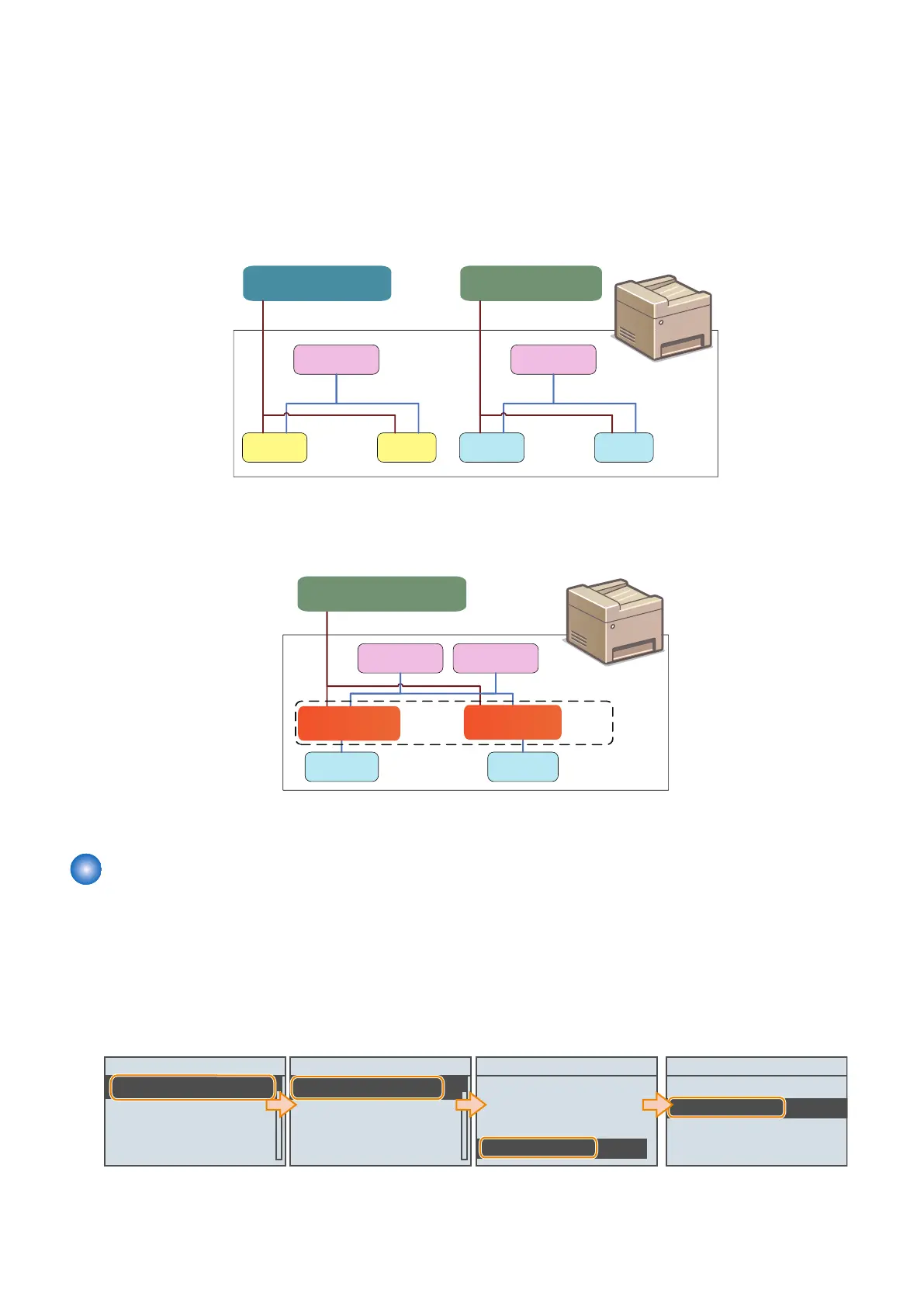
By using MEAP Application Setting Information Management and MEAP Application Log Service, as long as the MEAP application
supports these services, you can collectively perform data management tasks.
Devices and MEAP applications which do not support new functions
App1
Dedicated management tool
Config data
(App1 format)
App1
Device
Log data
Setting and reference
App2
Dedicated management tool
Config data
App2
Log data
(App1 format)
(App2 format) (App2 format)
Setting and reference
Setting and reference
Setting and reference
As for devices and MEAP applications that do not support the service, the setting information
and log data are managed on an application-by-application basis.
Devices and MEAP applications which support new functions
App1 App2
Setting and reference
Configuration
Config data
(common format)
Device
Log data
Platform
General-purpose management tool
Configuration
management service
(common format)
Log
management service
As for devices and MEAP applications that support the service, information can be collectively managed.
Setting Procedure
■ Preparation
The following settings are required on the machine to provide a MEAP device with support via a network such as SMS.
Network Settings (HTTP)
Select [Setup] > [Network] > [TCP/IP Settings] > [HTTP] from the setup menu to activate the network. ([ON] is specified at
the time of shipment.) For details on the work procedure, refer to e-Manual [ Top page ] > [ Setting Menu List ] > [ Setup
Menu ] > [ Network ].
HTTP
OFF
ON
TCP/IP Settings
BMLinkS
IPP Print
WSD
HTTP
Setup
Network
Layout
Print Quality
Interface
Network
TCP/IP Settings
Mopria
Google Cloud Print
SNMP Settings
3. Technical Explanation (System)
106














 To Next Page