■ Updater Function Maintenance
● Checking Logs
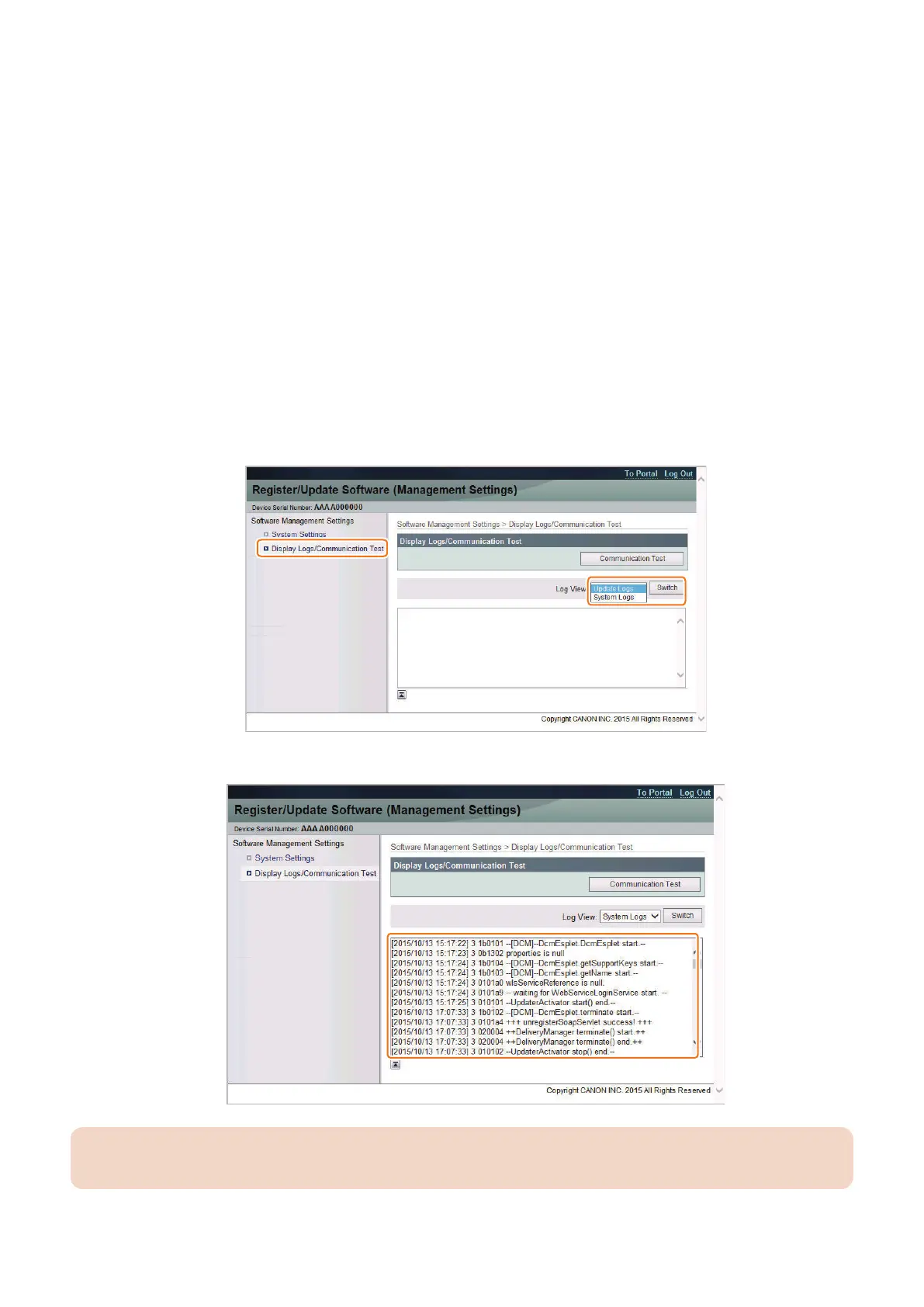
If an error occurs when upgrading the firmware using the Updater, a log can be checked on the [Register/Update Software] screen
of the Remote UI.
There are two types of logs; update logs and system logs.
Update log
A log regarding installation of system options/MEAP applications and firmware updates.
System log
The system log of this machine. Records all operations.
The procedure for checking a log is described below.
1. Access the following URL from the browser on a PC connected to the same network as this machine, and log in to
the management screen.
• https://<device address>:8443/svm/
Confirm the password to the Support Dept. of the sales company.
2. Select [Display Logs/Communication Test], select [Update Logs] or [System Logs] in the Log View, and click
[Switch].
3. Check the log displayed in the log display area.
CAUTION:
To escalate the content of the log, copy the full text of the log and paste it in a text editor such as Notepad, then save it.
3. Technical Explanation (System)
60










 To Next Page