EasyManua.ls Logo

Canon MV430 - Page 101

Canon MV430
152 pages
Print Icon
To Next Page IconTo Next Page
To Previous Page IconTo Previous Page
Loading...
H
Notes:
To
use
the
self-timer
(CD65),
press
the
O
button
before
step
3,
and
then
press
the
PHOTO
button
fully
down.
The
wireless
controller’s
PHOTO
button
has
no
half-way
setting.
Press
the
button
fully
and
the
camcorder
immediately
takes
the
image.
When
the
POWER
switch
is
set
to
CAMERA
and
the
TAPE/CARD
switch
is
moved
from
TAPE
to
CARD,
the
camcorder
modifies
the
image
for
appropriate
recording
onto
a
memory
card.
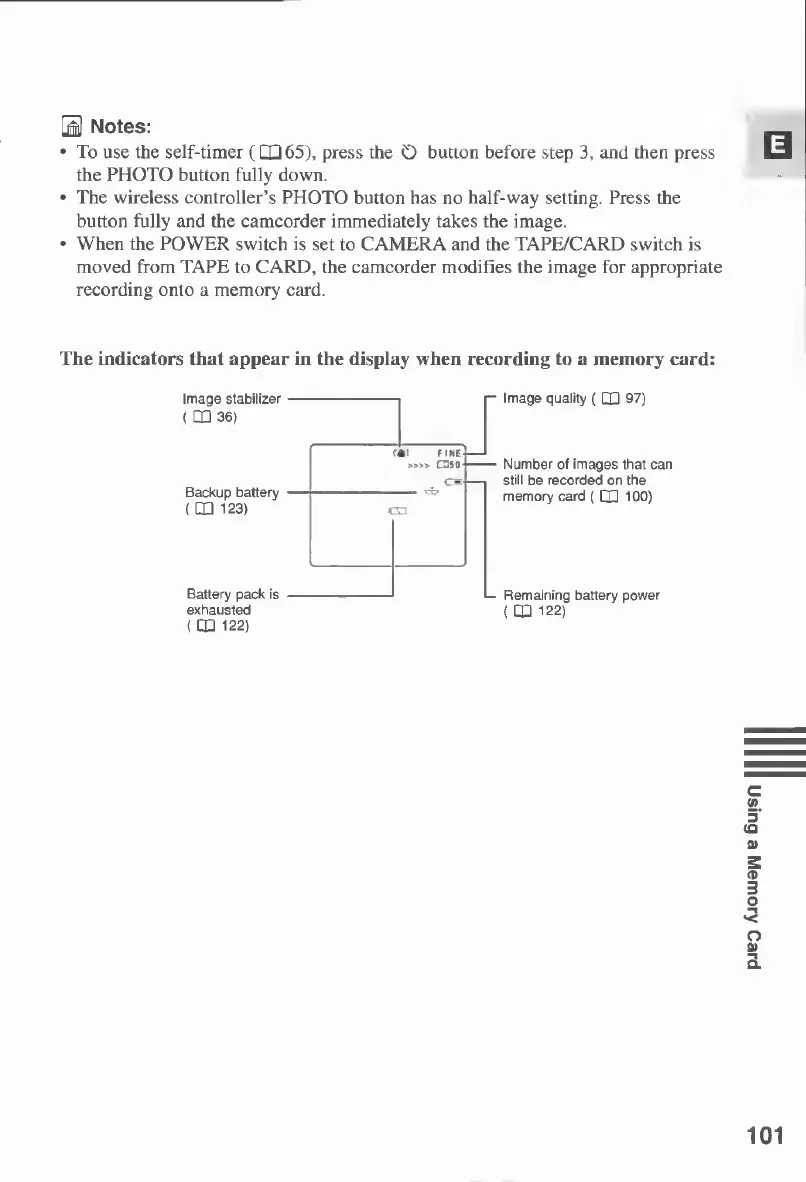
The
indicators
that
appear
in
the
display
when
recording
to
a
memory
card:
Image
stabilizer
(
CO
36)
r~
Image
quality
(
CQ
97)
Backup
battery
(
CQ
123)
Number
of
images
that
can
still
be
recorded
on
the
memory
card
(
CD
100
)
Battery
pack
is
exhausted
(
CQ
122)
L-
Remaining
battery
power
(
CQ
122)
101
Using
a
Memory
Card

Table of Contents

Other manuals for Canon MV430

Related product manuals