EasyManua.ls Logo

Canon MV430 - Zooming

Canon MV430
152 pages
Print Icon
To Next Page IconTo Next Page
To Previous Page IconTo Previous Page
Loading...
Zooming
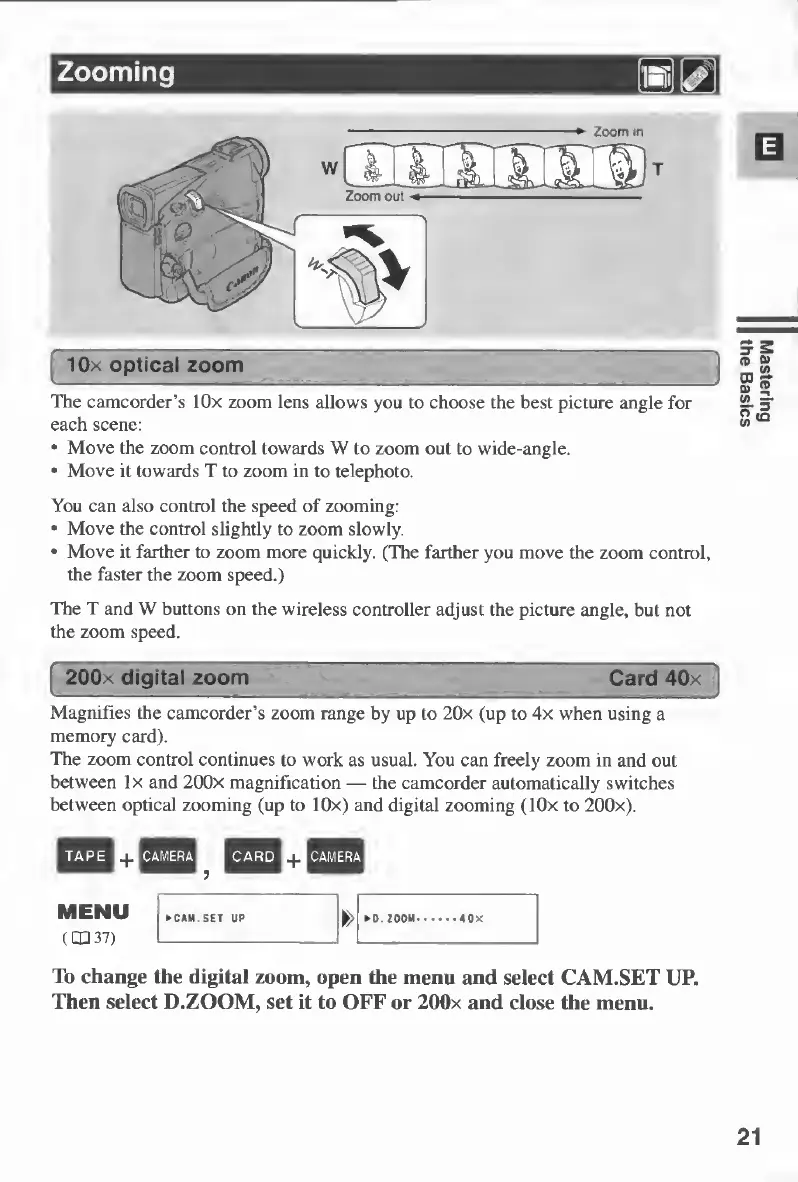
The
camcorder’s
lOx
zoom
lens
allows
you
to
choose
the
best
picture
angle
for
each
scene:
•
Move
the
zoom
control
towards
W
to
zoom
out
to
wide-angle.
•
Move
it
towards
T
to
zoom
in
to
telephoto.
You
can
also
control
the
speed
of
zooming:
•
Move
the
control
slightly
to
zoom
slowly.
•
Move
it
farther
to
zoom
more
quickly.
(The
farther
you
move
the
zoom
control,
the
faster
the
zoom
speed.)
The
T
and
W
buttons
on
the
wireless
controller
adjust
the
picture
angle,
but
not
the
zoom
speed.
!
200x
digital
zoom
Card
40x
Magnifies
the
camcorder’s
zoom
range
by
up
to
20x
(up
to
4x
when
using
a
memory
card).
The
zoom
control
continues
to
work
as
usual.
You
can
freely
zoom
in
and
out
between
lx
and
200x
magnification
—
the
camcorder
automatically
switches
between
optical
zooming
(up
to
lOx)
and
digital
zooming
(lOx
to
200x).
To
change
the
digital
zoom,
open
the
menu
and
select
CAM.SET
UP.
Then
select
D.ZOOM,
set
it
to
OFF
or
200x
and
close
the
menu.
21
Mastering
the
Basics

Table of Contents