EasyManua.ls Logo

Canon MV430 - Powering Your Camcorder.10

Canon MV430
152 pages
Print Icon
To Next Page IconTo Next Page
To Previous Page IconTo Previous Page
Loading...
Mastering
the
Basics
Powering
Your
Camcorder
Before
operating
your
camcorder,
you
will
need
to
use
the
power
adapter
to:
Provide
power
from
a
mains
outlet
or
Charge
a
battery
pack
H
Notes:
•
The
power
adapter
converts
current
from
a
household
power
socket
(100-240
V
AC,
50/60
Hz)
to
the
DC
current
used
by
your
camcorder.
♦
If
the
adapter
is
used
next
to
a
TV,
it
may
cause
bars
to
appear
on
the
TV
—
move
the
adapter
away
from
the
TV
or
the
aerial
cable.
Connecting
the
camcorder
to
a
mains
outlet
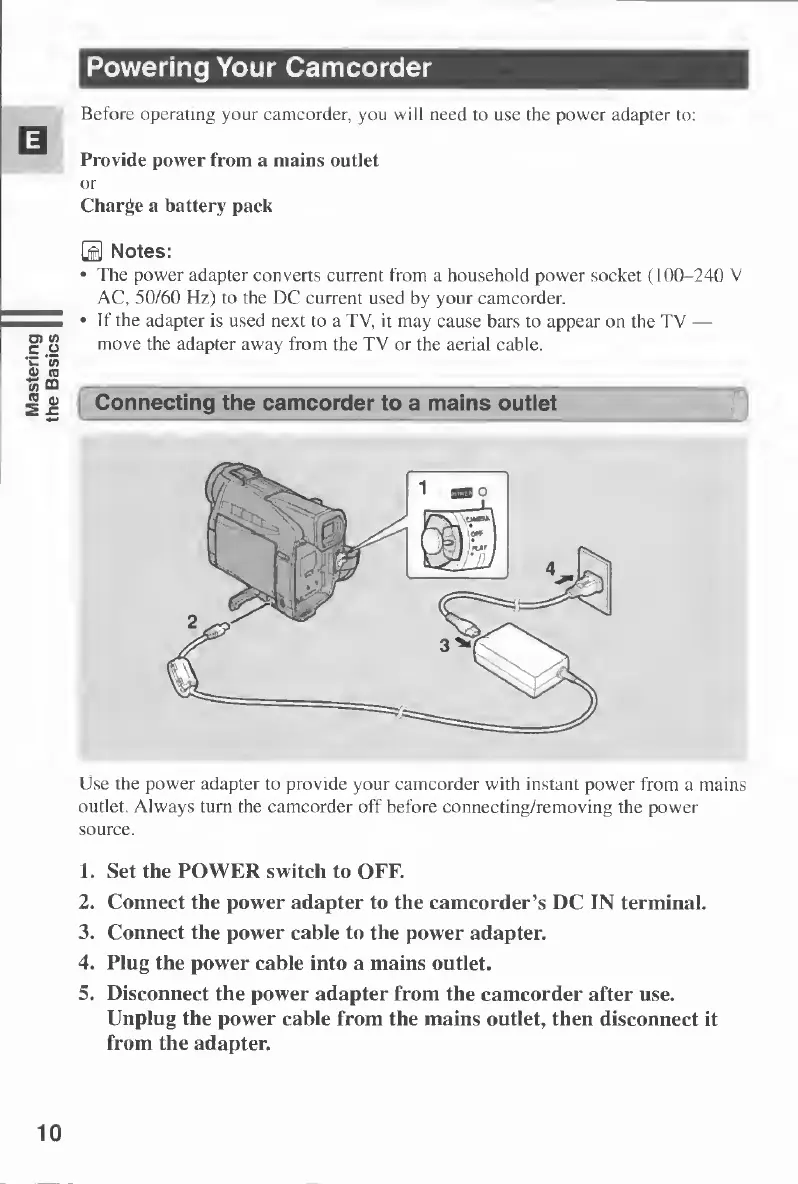
Use
the
power
adapter
to
provide
your
camcorder
with
instant
power
from
a
mains
outlet.
Always
turn
the
camcorder
off
before
connecting/removing
the
power
source.
1.
Set
the
POWER
switch
to
OFF.
2.
Connect
the
power
adapter
to
the
camcorder’s
DC
IN
terminal.
3.
Connect
the
power
cable
to
the
power
adapter.
4.
Plug
the
power
cable
into
a
mains
outlet.
5.
Disconnect
the
power
adapter
from
the
camcorder
after
use.
Unplug
the
power
cable
from
the
mains
outlet,
then
disconnect
it
from
the
adapter.
10

Table of Contents

Other manuals for Canon MV430

Related product manuals