EasyManua.ls Logo

Canon MV430 - Preventing Accidental Erasure (Protect)

Canon MV430
152 pages
Print Icon
To Next Page IconTo Next Page
To Previous Page IconTo Previous Page
Loading...
Using
a
Memory
Card
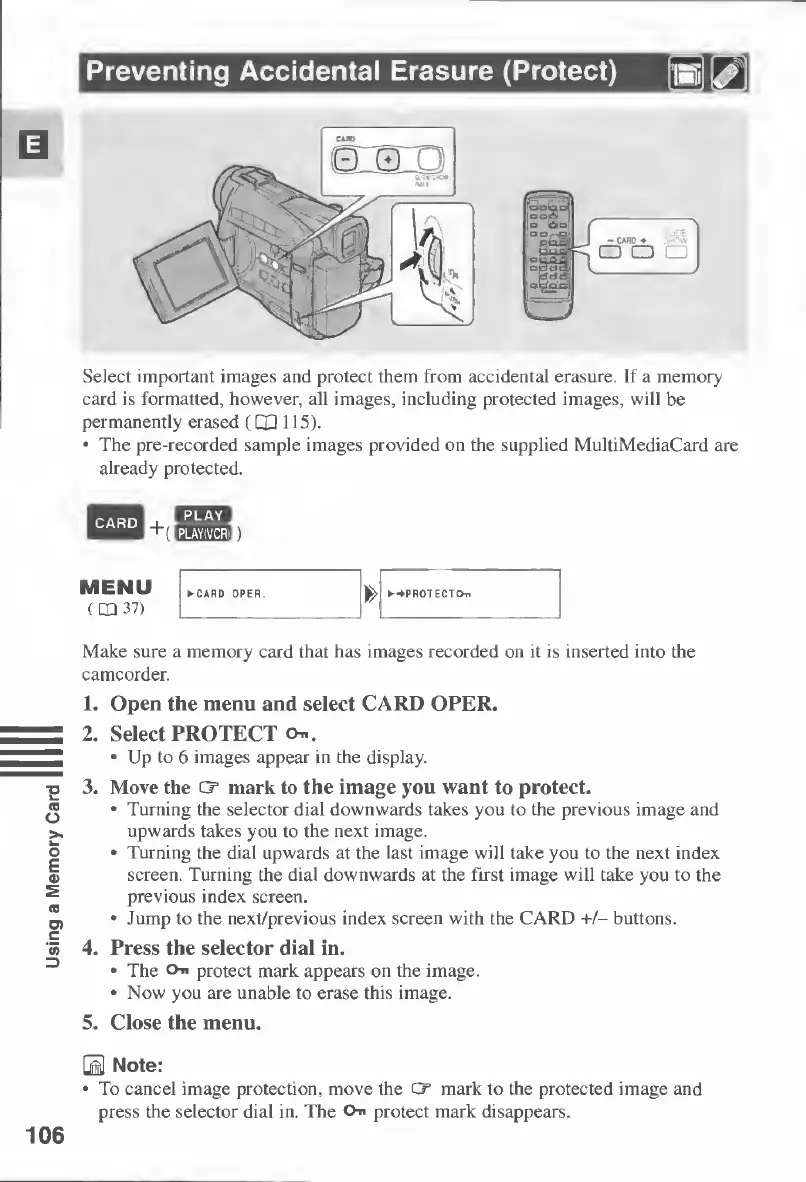
Preventing
Accidental
Erasure
(Protect)
Select
important
images
and
protect
them
from
accidental
erasure.
If
a
memory
card
is
formatted,
however,
all
images,
including
protected
images,
will
be
permanently
erased
(CXI
115).
•
The
pre-recorded
sample
images
provided
on
the
supplied
MultiMediaCard
are
already
protected.
Make
sure
a
memory
card
that
has
images
recorded
on
it
is
inserted
into
the
camcorder.
1.
Open
the
menu
and
select
CARD
OPER.
2.
Select
PROTECT
On.
•
Up
to
6
images
appear
in
the
display.
3.
Move
the
CT
mark
to
the
image
you
want
to
protect.
•
Turning
the
selector
dial
downwards
takes
you
to
the
previous
image
and
upwards
takes
you
to
the
next
image.
•
Turning
the
dial
upwards
at
the
last
image
will
take
you
to
the
next
index
screen.
Turning
the
dial
downwards
at
the
first
image
will
take
you
to
the
previous
index
screen.
•
Jump
to
the
next/previous
index
screen
with
the
CARD
+/-
buttons.
4.
Press
the
selector
dial
in.
•
The
On
protect
mark
appears
on
the
image.
•
Now
you
are
unable
to
erase
this
image.
5.
Close
the
menu.
0
Note:
•
To
cancel
image
protection,
move
the
Cr
mark
to
the
protected
image
and
press
the
selector
dial
in.
The
On
protect
mark
disappears.
106

Table of Contents