EasyManua.ls Logo

Canon MV430 - Combining Images and Recording

Canon MV430
152 pages
Print Icon
To Next Page IconTo Next Page
To Previous Page IconTo Previous Page
Loading...
Combining
Images
and
Recording
Them
to
a
Cassette
(Card
Mix)
Liven
up
your
productions
by
superimposing
one
image
on
top
of
the
other.
Combine
2
still
images
or
a
still
image
and
a
moving
image.
Choose
a
still
image
from
the
memory
card,
either
one
of
the
pre-recorded
sample
images
([XI117)
or
one
you
have
recorded
yourself,
then
combine
it
with
the
currently
recording
image,
moving
or
still.
Select
from
3
types
of
Card
Mix
effects:
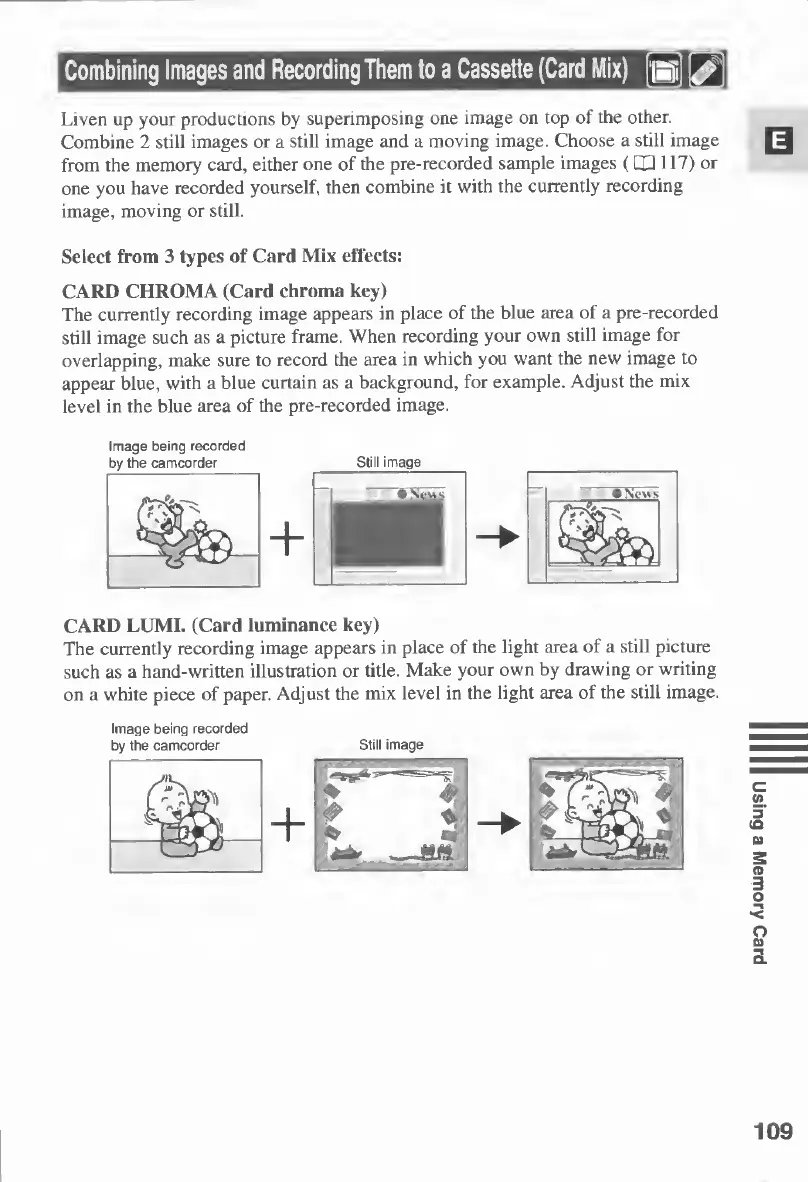
CARD
CHROMA
(Card
chroma
key)
The
currently
recording
image
appears
in
place
of
the
blue
area
of
a
pre-recorded
still
image
such
as
a
picture
frame.
When
recording
your
own
still
image
for
overlapping,
make
sure
to
record
the
area
in
which
you
want
the
new
image
to
appear
blue,
with
a
blue
curtain
as
a
background,
for
example.
Adjust
the
mix
level
in
the
blue
area
of
the
pre-recorded
image.
Image
being
recorded
by
the
camcorder
Still
image
+
CARD
LUMI.
(Card
luminance
key)
The
currently
recording
image
appears
in
place
of
the
light
area
of
a
still
picture
such
as
a
hand-written
illustration
or
title.
Make
your
own
by
drawing
or
writing
on
a
white
piece
of
paper.
Adjust
the
mix
level
in
the
light
area
of
the
still
image.
Image
being
recorded
by
the
camcorder
Still
image
+
1
%
6
n
|M|
.
r
iMMlBKd
_X__J
109
Using
a
Memory
Card

Table of Contents

Other manuals for Canon MV430

Related product manuals