EasyManua.ls Logo

Canon MV430 - Page 110

Canon MV430
152 pages
Print Icon
To Next Page IconTo Next Page
To Previous Page IconTo Previous Page
Loading...
Using
a
Memory
Card
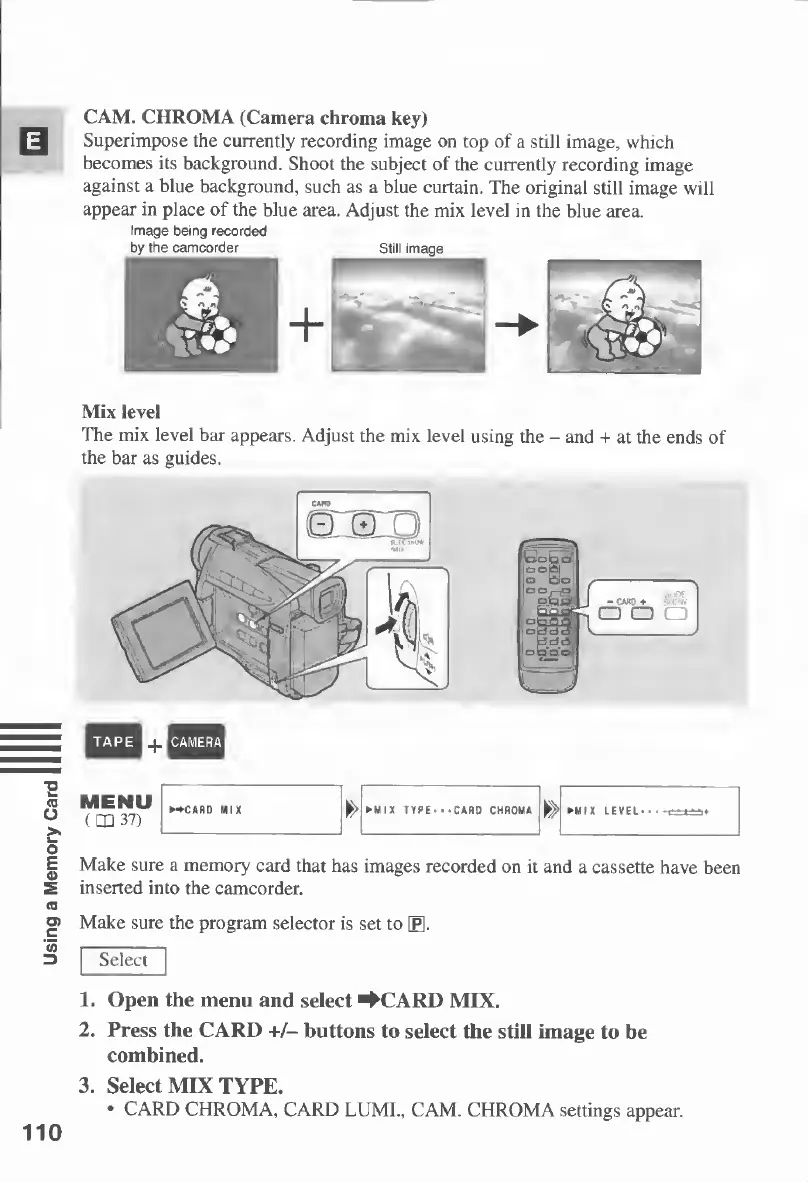
CAM.
CHROMA
(Camera
chroma
key)
Superimpose
the
currently
recording
image
on
top
of
a
still
image,
which
becomes
its
background.
Shoot
the
subject
of
the
currently
recording
image
against
a
blue
background,
such
as
a
blue
curtain.
The
original
still
image
will
appear
in
place
of
the
blue
area.
Adjust
the
mix
level
in
the
blue
area.
Image
being
recorded
by
the
camcorder
Still
image
Mix
level
The
mix
level
bar
appears.
Adjust
the
mix
level
using
the
-
and
+
at
the
ends
of
the
bar
as
guides.
Make
sure
a
memory
card
that
has
images
recorded
on
it
and
a
cassette
have
been
inserted
into
the
camcorder.
Make
sure
the
program
selector
is
set
to
\P\.
Select
1.
Open
the
menu
and
select
^CARD
MIX.
2.
Press
the
CARD
+/-
buttons
to
select
the
still
image
to
be
combined.
3.
Select
MIX
TYPE.
CARD
CHROMA,
CARD
LUMI.,
CAM.
CHROMA
settings
appear.
110

Table of Contents

Other manuals for Canon MV430

Related product manuals