EasyManua.ls Logo

Canon MV430 - Using the Various Recording Programs

Canon MV430
152 pages
Print Icon
To Next Page IconTo Next Page
To Previous Page IconTo Previous Page
Loading...
Using
the
Full
Range
of
Features
Using
the
Various
Recording
Programs
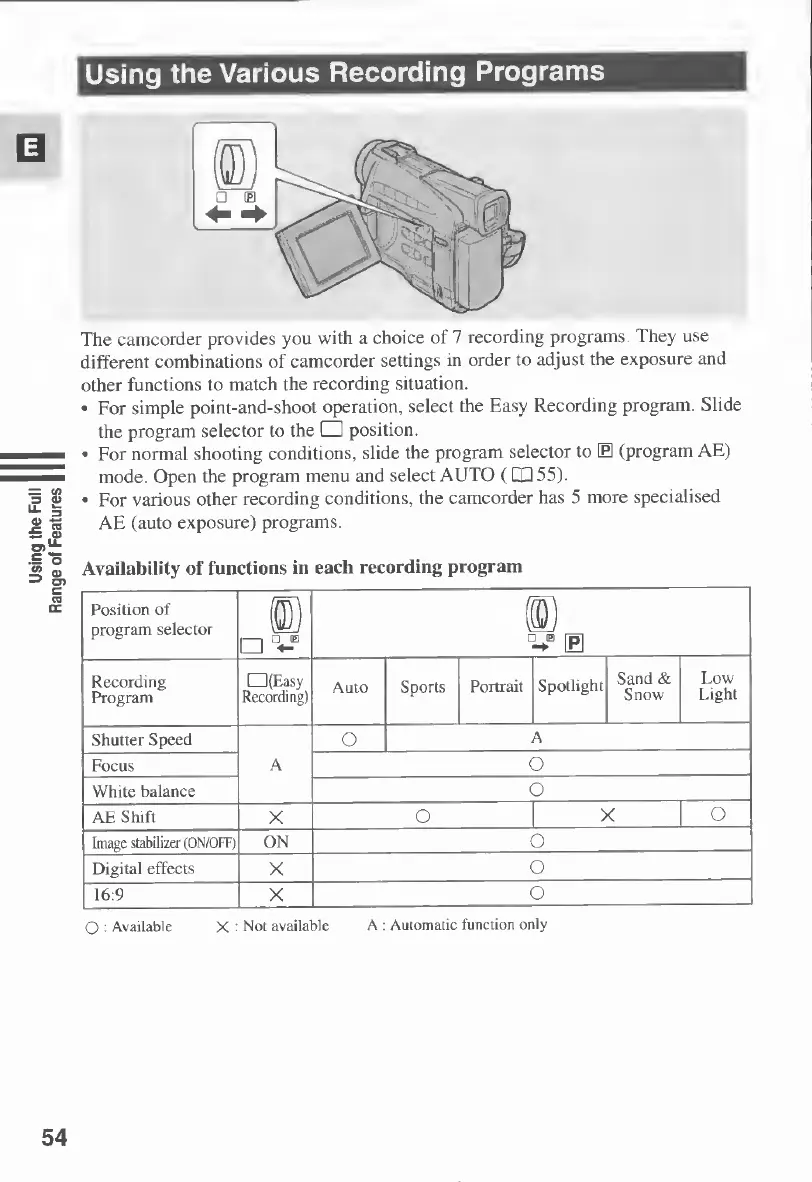
The
camcorder
provides
you
with
a
choice
of
7
recording
programs.
They
use
different
combinations
of
camcorder
settings
in
order
to
adjust
the
exposure
and
other
functions
to
match
the
recording
situation.
For
simple
point-and-shoot
operation,
select
the
Easy
Recording
program.
Slide
the
program
selector
to
the
position.
For
normal
shooting
conditions,
slide
the
program
selector
to
B
(program
AE)
mode.
Open
the
program
menu
and
select
AUTO
(CQ
55).
For
various
other
recording
conditions,
the
camcorder
has
5
more
specialised
AE
(auto
exposure)
programs.
Availability
of
functions
in
each
recording
program
Position
of
program
selector
t:
D
-
E
D
nm
|p]
Recording
Program
(Easy
Recording)
Auto
Sports
Portrait
Spotlight
Sand
&
Snow
Low
Light
Shutter
Speed
A
O
A
Focus
o
White
balance
o
AE
Shift
X
o
X
O
Image
stabilizer
(ON/OFF)
ON
o
Digital
effects
X
o
16:9
X
o
O
:
Available
X
:
Not
available
A
:
Automatic
function
only
54

Table of Contents

Other manuals for Canon MV430

Related product manuals