EasyManua.ls Logo

Canon MV430 - Recording from a VCR, TV or Analog

Canon MV430
152 pages
Print Icon
To Next Page IconTo Next Page
To Previous Page IconTo Previous Page
Loading...
Recording
from
a
VCR,
TV
or
Analog
Camcorder-
Analog
Line-in
(MV430i
only)
You
can
record
a
video
played
on
your
VCR
or
analog
camcorder
(for
digital
camcorders,
see
p.
79)
or
a
TV
program
onto
a
tape
in
the
MV430i,
if
the
TV
or
other
device
has
audio/video
outputs.
If
an
anomalous
signal
is
sent
from
the
TV
or
VCR,
the
images
recorded
on
the
tape
may
also
be
anomalous
(although
it
may
not
appear
so
on
the
TV
image),
not
recorded
at
all,
or
COPYRIGHT
PROTECTED
DUBBING
RESTRICTED
may
appear
in
the
display.
You
are
unable
to
dub
tapes
recorded
with
the
copyright
protective
signal.
For
higher
picture
quality,
we
recommend
using
the
S-150
S-video
cable
when
doing
analog
line-in
recording.
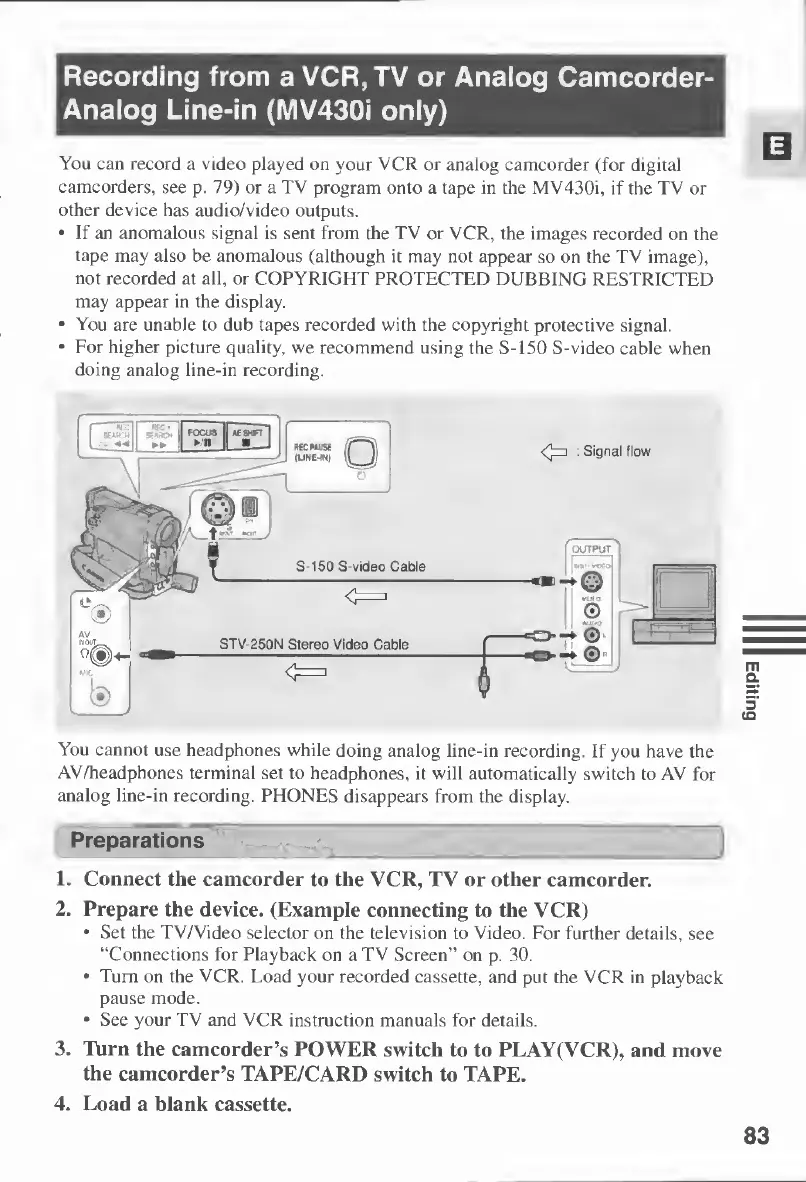
STV-250N
Stereo
Video
Cable
B6CMU5E
(
r“V
(LINC-INl
\l_
JJ
S-150
S-video
Cable
:
Signal
flow
You
cannot
use
headphones
while
doing
analog
line-in
recording.
If
you
have
the
AV/headphones
terminal
set
to
headphones,
it
will
automatically
switch
to
AV
for
analog
line-in
recording.
PHONES
disappears
from
the
display.
Preparations
V
__
u
1.
Connect
the
camcorder
to
the
VCR,
TV
or
other
camcorder.
2.
Prepare
the
device.
(Example
connecting
to
the
VCR)
Set
the
TV/Video
selector
on
the
television
to
Video.
For
further
details,
see
“Connections
for
Playback
on
a
TV
Screen”
on
p.
30.
Turn
on
the
VCR.
Load
your
recorded
cassette,
and
put
the
VCR
in
playback
pause
mode.
See
your
TV
and
VCR
instruction
manuals
for
details.
3.
Turn
the
camcorder’s
POWER
switch
to
to
PLAY(VCR),
and
move
the
camcorder’s
TAPE/CARD
switch
to
TAPE.
4.
Load
a
blank
cassette.
83
Editing

Table of Contents

Other manuals for Canon MV430

Related product manuals